Education
Abstract
Configuration options in the System Properties Application
Content
There are additional System Settings added to Maximo version 7.5.x
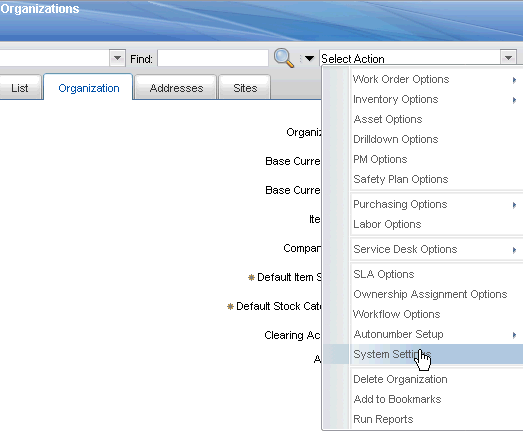
In the Organizations Application, under the "Select Action" menu, select the "System Settings" option:
Scroll to the bottom of the dialog box where there are additional options for Work Order Tasks, Doclinks to Work Order on save, Job Plan revision and Item tax exempt options as displayed in the screen shot below:

1. Work Order Tasks
Database column: MAXVARINPUT.KEEPTASKSTATUSHIST
Record Status History for Null Work Type Work Order Tasks
2. Copy Doclinks to Work Order on Save
Database column: MAXVARINPUT.COPYLINKTOWO
When set to true, system will copy the related doclinks which has the copylinktowo flag set to work order.
3. Revision Control for Job Plans
Database column: MAXVARINPUT.JPREVCONTROL
When unchecked Revision Control for Job Plans option will not be available from the select action menu in Job Plans applications.
4. Apply Tax-exempt Status to Item at Organization Level and at Vendor Level
Database column: MAXVARINPUT.ITEMTAXROLLDOWN
The tax-exempt option indicates whether the item, the tool, or the service is taxable or not.
Original Publication Date
11 November 2012
Was this topic helpful?
Document Information
Modified date:
17 June 2018
UID
swg27024489