Product Documentation
Abstract
System board diagrams for the IBM System x3200.
Content
 | System-board optional-device connectors |
| System-board internal connectors |
| System-board external connectors |
| System-board LEDs |
| System-board jumpers |
| Related information (HMM) |
The following illustration shows the system-board connectors for user-installable optional devices:
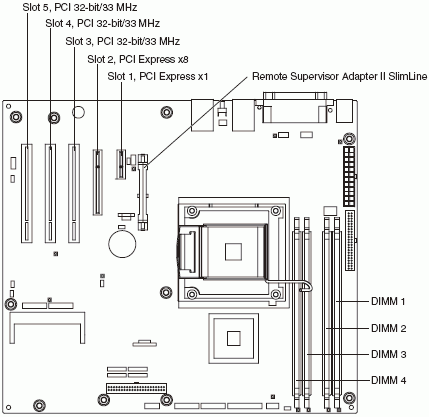
 | Back to top |
The following illustration shows the internal connectors on the system board:

| Back to top |
The following illustration shows the external input/output (I/O) connectors on the system board:

| Back to top |
The following illustration shows the light-emitting diodes (LEDs) on the system board:

| Back to top |
The following illustration shows the jumpers on the system board:

Note: Any jumper blocks on the system board that are not shown in the illustration are reserved. The following table describes the function of each jumper block:
| Jumper | Settings |
|---|---|
| Mini-BMC force update (JP1) | Pins 1 and 2: Normal (default) |
| Clear CMOS (JP2) | Pins 1 and 2: Keep CMOS data (default) Pins 2 and 3: Clear the CMOS data, which clears the power-on password Note: Changing the position of this jumper does not affect the administrator password check if an administrator password is set. If the administrator password is set and forgotten, remove and then reinstall the battery. |
| Boot block (JP6) | Pins 1 and 2: Normal (default) Pins 2 and 3: Recover boot block (see "Recovering from a BIOS update failure" in the HMM) |
| Force power-on (JP8) | Pins 1 and 2: Use the power-control button to start the server (default) |
| Back to top |
 | Problem Determination and Service Guide - IBM System x3200 |
Document Location
Worldwide
Was this topic helpful?
Document Information
Modified date:
24 January 2019
UID
ibm1MIGR-5069931