How To
Summary
Support to submit macOS apps for approval
Steps
MaaS360 extends app approval workflow support to macOS apps. With this support, administrators can submit iTunes and enterprise apps for app approval before promoting those apps to App Catalog. Previously, the App Approval workflow was limited to Android, Windows, and iOS apps.
The iTunes apps can be submitted for approval through App Approval workflows. For more information about, App Approval workflow, see MaaS360 App Approval and Publication.
Submitting enterprise apps for app approval
MaaS360 Packager tool is used for submitting enterprise apps to MaaS360 Portal. With this release, the enterprise apps can be submitted for approval through MaaS360 Packager before promoting them to production App Catalog.
Administrators can download the latest version of MaaS360 Packager via MaaS360 Portal > Apps > Catalog > Add > macOS > Enterprise App for macOS.
Administrators can also setup App Approval Process as Mandatory (applies to all apps) or Optional (applies to specific apps on demand).
To submit an enterprise app for app approval,
- Launch the MaaS360 Packager and then click Add New Package.
- Select an enterprise app and then click Finish.
Result: The Summary screen is displayed with an option to submit the app for approval. - Click Submit for Approval.
Result: The app is submitted for approval. MaaS360 administrators can view the submitted for approval through Apps > Apps for Approval on the MaaS360 portal.
Note: If app approval template for macOS enterprise app is unavailable, the submission will be failed.
When adding an enterprise app, if app approval process has been set up as Mandatory, administrators would only be able to submit the app for approval by clicking on Submit for Approval button.

When adding an enterprise app, if app approval process has been set up as Optional, administrators could either submit the app for approval by clicking on Submit for Approval button or directly upload the app to production catalog using Upload to Catalog button.

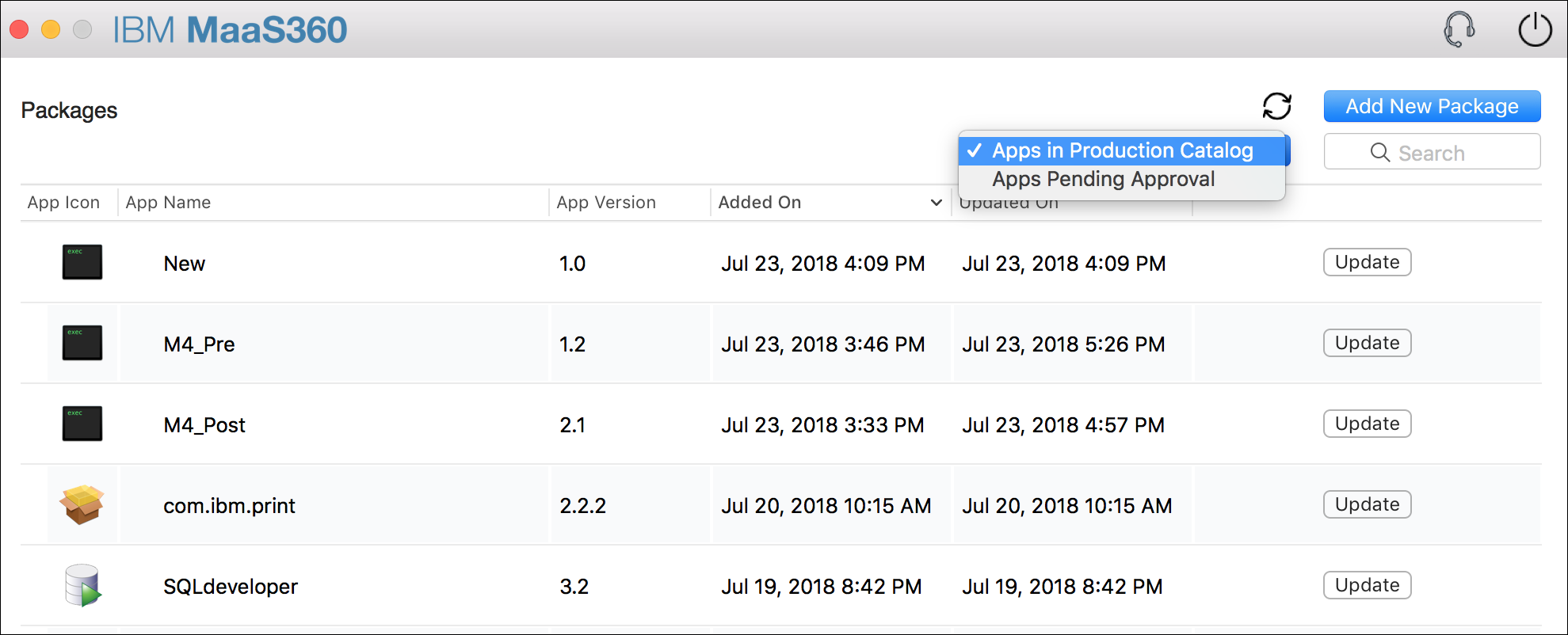
Administrators can use the new filter to toggle between the apps uploaded to the production app catalog versus apps submitted for approval.
Was this topic helpful?
Document Information
Modified date:
29 November 2018
UID
ibm10739065