Troubleshooting
Problem
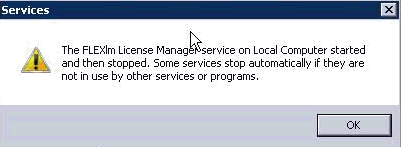
Attempts to start the FLEXlm license manager service from Services results in an error indicating that the FLEXlm license manager service on the local computer started and then stopped.
Symptom
The complete error message is:
The FLEXlm License Manager service on Local Computer started and then stopped. Some services stop automatically if they are not in use by other services or programs.
image
Cause
The path to the lmgrd.exe and / or the path to the debug log file is mentioned incorrectly in the license tools application.
Resolving The Problem
Procedure:
- Open license tools (LMTOOLS)
- Select the Config services tab
- Verify and correct the following:
- Path to the lmgrd.exe
- Path to the debug log file
- Close the license tools (LMTOOLS) application and restart the FLEXlm license manager service.
[{"Line of Business":{"code":"LOB45","label":"Automation"},"Business Unit":{"code":"BU053","label":"Cloud & Data Platform"},"Product":{"code":"SSTMW6","label":"Rational License Key Server"},"ARM Category":[{"code":"a8m0z0000001i5rAAA","label":"Rational licensing->License Key Server->Configuration"}],"ARM Case Number":"","Platform":[{"code":"PF025","label":"Platform Independent"}],"Version":"8.1.1;8.1.2;8.1.3;8.1.4;8.1.5;8.1.6"}]
Was this topic helpful?
Document Information
Modified date:
24 March 2021
UID
swg21670978