Question & Answer
Question
How can a date range be configured to limit output from a scheduled Cognos or BIRT report?
Answer
The report date range property must be set to limit the report output, the default is ALL.
In the following example, setting a date range for the Client Schedule Status report will be shown.
Click on 'More' as shown in the image below:

Click on 'Set properties':

Select the 'Report' tab, then click on 'Set...'.
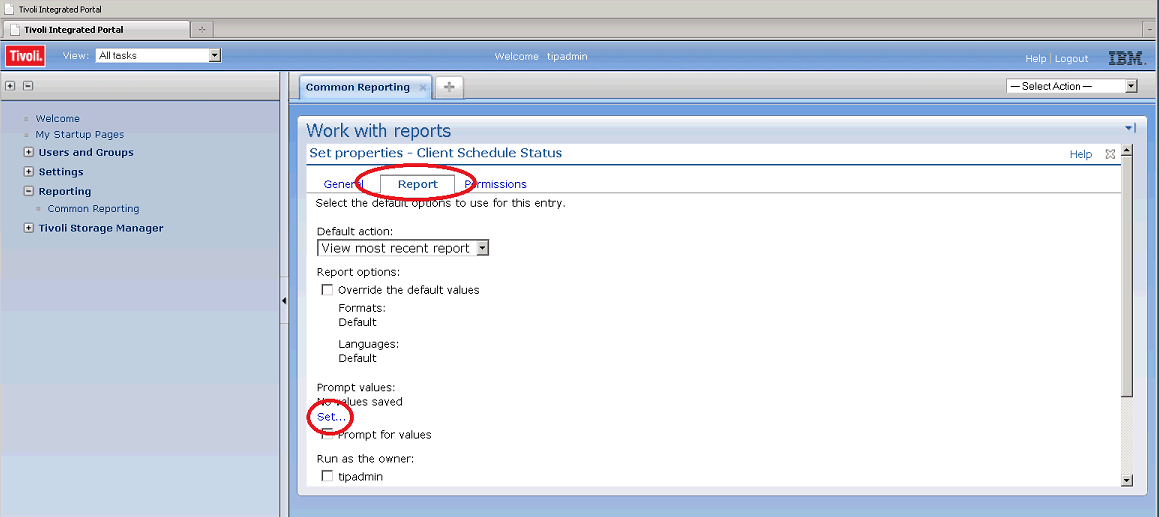
Select the desired date range for the report. Note that the default for this report is 'All', this will return all data, no date filter will be applied.

Click on 'Finish' at the bottom of the page, then click on 'OK' to complete saving the setting. The report may now be run, the new date filter will be applied to the output.
Was this topic helpful?
Document Information
Modified date:
17 June 2018
UID
swg21958905