Troubleshooting
Problem
Description and use of the ServeRAID controller error codes/messages.
Resolving The Problem
ServeRAID controller error codes/messages
The error codes/messages are displayed on the screen in a line of text immediately after the controller BIOS version.
If POST detects changes in the controller configuration or detects an controller hardware problem, messages appear on the screen. Refer to "ServeRAID POST error procedures" in the Hardware Maintenance Manual (HMM) and correct the problem.
If there is no POST Error or Configuration Error message, the BIOS screen resembles the sample shown below.
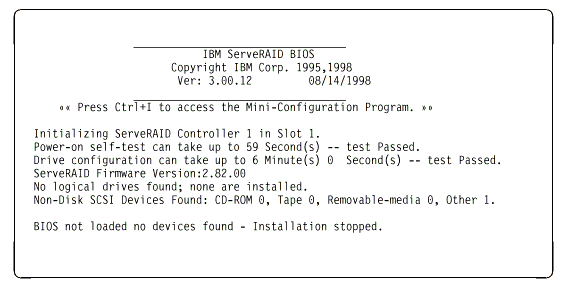
If there is a POST error message, the BIOS screen resembles the sample shown below. Refer to "ServeRAID POST error codes" and correct the problem.
The characters XXXX indicate the POST (ISPR) error.

The BIOS screen below shows Configuration Status and/or Error information. Refer to "ServeRAID Startup Messages".

| NOTE: Do not replace a system board containing an imbedded ServeRAID controller for ServeRAID problems unless replacing the controller is listed in the Symptom-to-FRU Index. |
ServeRAID POST error codes
The ISPR (Interrupt Status Port Register), BCS (Basic Configuration Status), and ECS (Extended Configuration Status) codes identify the controller state.
| NOTE: Do not replace a system board containing an imbedded ServeRAID controller unless such a replacement is indicated in the recommended "Actions" in an error code list that appears in "Symptom-to-FRU index". |
ServeRAID POST error procedures
The ISPR Error Procedures list errors, symptoms, and the possible causes. The most probable cause is listed first. Use these procedures to help you solve ServeRAID problems when servicing the computer.
| NOTE: Where the ISPR Error Procedures refer to a SCSI backplane, see the Hardware Maintenance Manual for the system you are servicing. |
EF10 (Default ISPR)
- No ISPR Error Present.
1 XXX (Microcode Checksum Error)
- Replace the ServeRAID controller.
2 XXX thru 5 XXX (Code DRAM Error)
- Install two download jumpers parallel to the PCI slots. For jumper locations, see "System board jumpers".
- Flash the controller with the latest IBM ServeRAID BIOS/Firmware from the IBM Website.
- Remove the jumpers.
- If the error persists, replace ServeRAID controller.
6 XXX (Cache DRAM Error)
- Reseat Cache Memory SIMM
- Install two download jumpers parallel to the PCI slots. For jumper locations, see "System board jumpers".
- Flash the controller with the latest IBM ServeRAID BIOS/Firmware from the IBM Website.
- Remove the jumpers.
- If the error persists, replace ServeRAID controller.
7 XXX thru 8 XXX (Host/Local PCI Bus Interface Error)
- Install two download jumpers parallel to the PCI slots. For jumper locations, see "System board jumpers".
- Flash the controller with the latest IBM ServeRAID BIOS/Firmware from the IBM Website.
- Remove the jumpers.
- If the error persists, replace ServeRAID controller.
9 XXX thru B XXX (SCSI bus error caused either by defective drives, termination, etc.)
- Isolate between SCSI subsystem and controller by disconnecting all SCSI cables from suspect card, and reboot.
CAUTION: Do not press F5. Doing so changes the customer's configuration.
If an ISPR error is still present, perform the following actions until the error is no longer present:
a. Reseat the controller
b. Replace the controller
| NOTE:
|
- If ISPR error is EF10 after disconnecting cables:
- Identify which channel is causing the error by the second digit of the original ISPR code:
- ISPR = B1xx = Channel 1
- ISPR = B2xx = Channel 2
- ISPR = B3xx = Channel 1 and 2
- ISPR = B4xx = Channel 3
- ISPR = B5xx = Channel 1 and 3
- ISPR = B6xx = Channel 2 and 3
- ISPR = B7xx = Channel 1, 2 and 3
- ISPR = BFxx = Channel not identified
- Confirm that the channel(s) identified from the error in step 2a is (are) the cause of the error by verifying that the error presents itself only when the offending channel is reconnected.
- Check termination of identified channel.
| NOTE: Refer to the HMM (Hardware Maintenance Manual) specific to the system comprising the SCSI channel for termination details. |
- Check for proper backplane jumper configuration.
| NOTE: Refer to the HMM (Hardware Maintenance Manual) specific to the system comprising the SCSI channel for jumper details. |
- Check for proper cabling configuration in systems that use DASD status cables. Reconnect all cables removed in step 1 above.
- Disconnect one drive at a time attached to the channel identified in step 2a, then reboot to determine which drive is causing the error.
- Replace SCSI cable.
- Replace SCSI backplane.
EF10 (Default ISPR)
- No ISPR error present.
- Controller is probably functioning properly. Do not replace system board unless you have run the controller's diagnostics and you get an error message. If you do not get an error message, assume it is functioning properly.
- Refer to "ServeRAID Startup Messages". Note the resulting BCS and or ECS Error codes, and see the FRU actions respective to those codes. (EF10 is a default code for ISPR indicating that there is no ISPR error present.)
EFFE (Firmware code corrupted or download jumpers are in place.)
- Verify download jumpers are in their default locations. See "System board jumpers" for jumper locations.
- If download jumpers are not in place and error still persists, then flash the controller firmware with the jumpers in place; then remove the jumpers.
- If error persists after step 2, replace the controller or the system board with integrated controller.
FFFF or other code not listed
- Isolate between SCSI subsystem and controller by disconnecting all SCSI cables attached to the suspect controller and reboot. If ISPR code is EF10 after disconnecting cables, follow the steps below until the error is eliminated:
- Identify which channel is causing the error by reconnecting cables one at a time and rebooting until the error returns.
- Check termination of identified channel in step 1a.
| NOTE: Refer to the HMM (Hardware Maintenance Manual) specific to the system comprising the SCSI channel for termination details. |
- Disconnect one drive at a time attached to channel identified in step 1a and reboot each time to determine which drive is causing the problem.
- Replace SCSI Cable attached to channel identified in step 1a.
- Replace Backplane attached to channel identified in step 1a.
2. If original ISPR code is still present after disconnecting all SCSI cables and rebooting, perform the following actions until the error is no longer present:
- Reseat the controller
- Replace the controller
Document Location
Worldwide
Was this topic helpful?
Document Information
Modified date:
23 January 2019
UID
ibm1MCGN-45ZP6D