Question & Answer
Question
How can you remove a user palette in IBM i2 Analyst's Notebook Premium (ANBP), and then create a new standard template that does not have that removed palette?
Cause
The palette is not needed or is confusing to the users to have it listed.
Answer
- Right-click on the chart and select "Edit Chart Properties...".

- Go to Definitions, Entity Types and select the palette to remove and look for entity types that are only related to that palette (the entities that uniquely came from that schema) and delete them. In this example, the palette of interest is Repository: LAR.

- Do the same for the Link Types.

- Now you're ready to delete the palette by right clicking in free space in Add Chart Items and select "Edit User Palettes...".
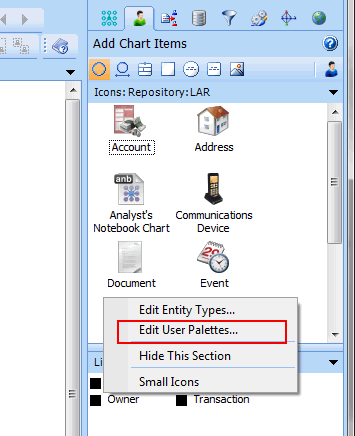
- Select and delete the palette.

- Now you can save the changed template.


- The file C:\Users\<username>\AppData\Roaming\Microsoft\Windows\Templates\en-US\Standard.ant should now be overwritten and now when a new chart is created this will be the template used.
A recommendation when creating templates is to first disconnect any database products the ANBP session is connected to (IAP, iBase, etc...) and create a new chart. The new chart from which you'll build the template from will then contain no database proxy (the thing that is embedded in the chart that defines a connection to a given database/datasource) and palettes that a database/datasource plug-in will automatically add to a chart when connected.
[{"Product":{"code":"SSXVMQ","label":"i2 Analyst's Notebook Premium"},"Business Unit":{"code":"BU059","label":"IBM Software w\/o TPS"},"Component":"Not Applicable","Platform":[{"code":"PF033","label":"Windows"}],"Version":"8.9.7;8.9.5;8.9.3;8.9.1;8.9","Edition":"","Line of Business":{"code":"LOB24","label":"Security Software"}}]
Was this topic helpful?
Document Information
Modified date:
16 June 2018
UID
swg21691196