Troubleshooting
Problem
Symptom
- Installed Apps do not display as a tab in the banner.
- Apps display as a tab, but the contents list an error, such as Bad Gateway, 404 error, or missing visualizations and data.
- The Hub app shield is not being displayed in the banner of the user interface.

Example 1: Hub app shield is missing and the User Behavior Analytics app displays a gateway error.
Resolving The Problem
There are multiple methods to resolve most issues with Apps not starting or in an error state. The QRadar® Hub app is always the first and preferred method to work with apps. If the QRadar® Hub app shield is not visible in the QRadar® User Interface, then administrators can use of one of the alternate methods to resolve the issue. For QRadar 7.4 versions, administrators can use the qappmanager utility or the API. QRadar 7.4 versions have enhanced features such as multitenant instances and better error correction capabilities. QRadar® V7.3, administrators need to use the API to restart the apps.
Tip: In some instances the app can display a status of RUNNING, but it is not working as expected or does not display properly in the user interface. To confirm an app is operational the administrator can stop the app, then start it, which forces the app to load.
Start an application in the error state with the QRadar Hub app
To resolve the issue by using the QRadar Hub app.
- Log in the QRadar Console as admin user.
- Click the QRadar Hub app shield.

- Click Applications.
- Click Manage.

- Under Installed Extensions, locate the App with the issue.
Note: The red bar indicates an application is in an error state or stopped.
- In the Options column, click the ellipsis (...) to expand the menu.
- Click Start All Instances.
The app instance starts and the bar changes from red to blue if successful.

How to start an app with the qappmanager utility (advanced)
The qappmanager utility is installed on QRadar V7.4 Console appliances after an auto update is run for the first time. The utility has all the functionality of the recon utility and the API to manage apps. It also has more functionality to manage apps. The scope of this article is to address how to use the utility to start or stop apps that might not be appearing in the UI or are in an error state. In some cases apps are not showing in the UI and not in an error state, but restating the app can resolve the issue.
Notes:
- This application is intended primarily for QRadar Support representatives and is considered a support tool.
- In order to perform these steps you need to have an authentication token with admin rights.
- You don't need to have the token, but this token needs to exist. On step 4, the tool displays the existing tokens and requests to select one with admin rights.
- For more information on how to create the authentication token, check Creating an authorized service token for QRadar Operations.
To use the qappmanager:
- Use SSH to log in to the Console as root user.
- Type the command:
/opt/qradar/support/qappmanager
Note: The Assistant app will be used as an example.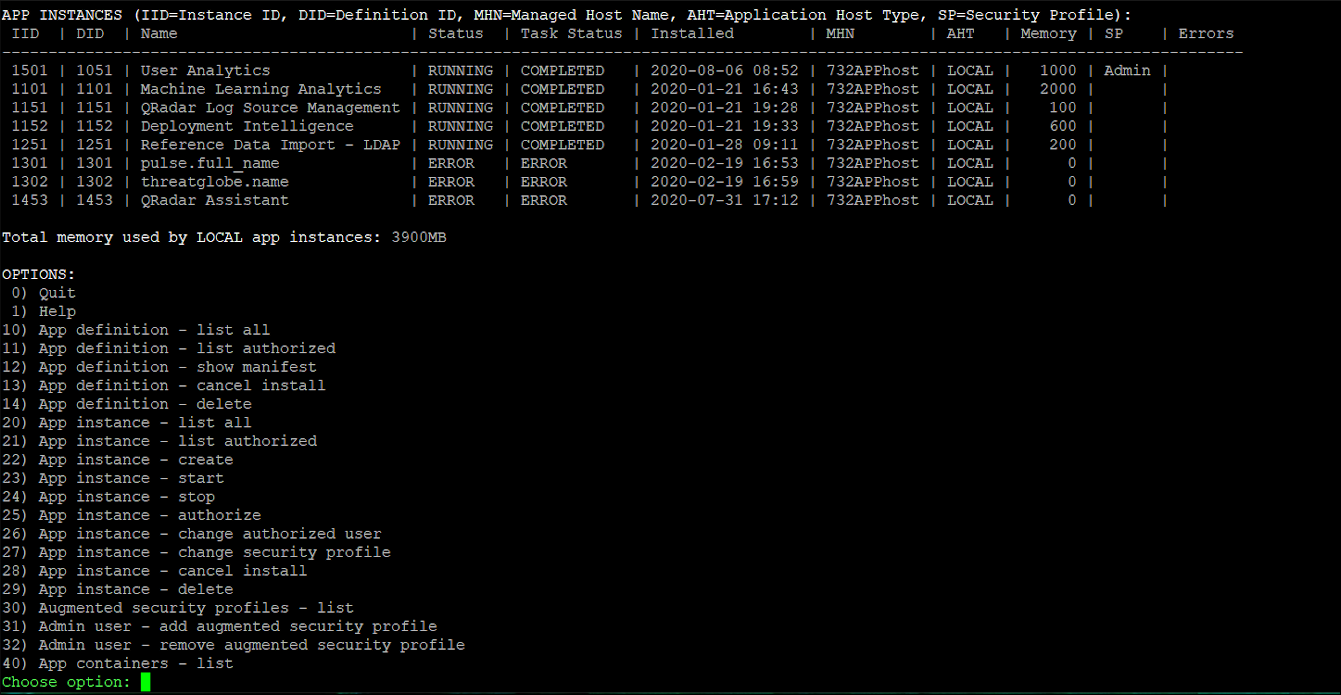
- From the Options list, select App instance - start (23).

- Type the number associated with the Authorized Service for your app.
Note: This must be an Admin security profile.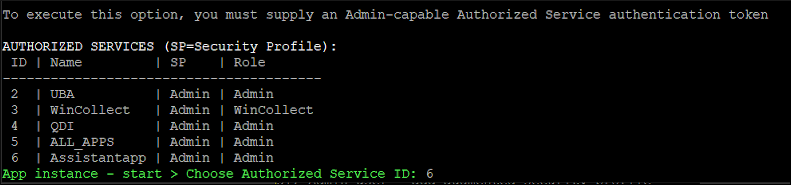
- Type the application ID for the app you want to start. The QRadar Assistant app 1453 is used in the example.
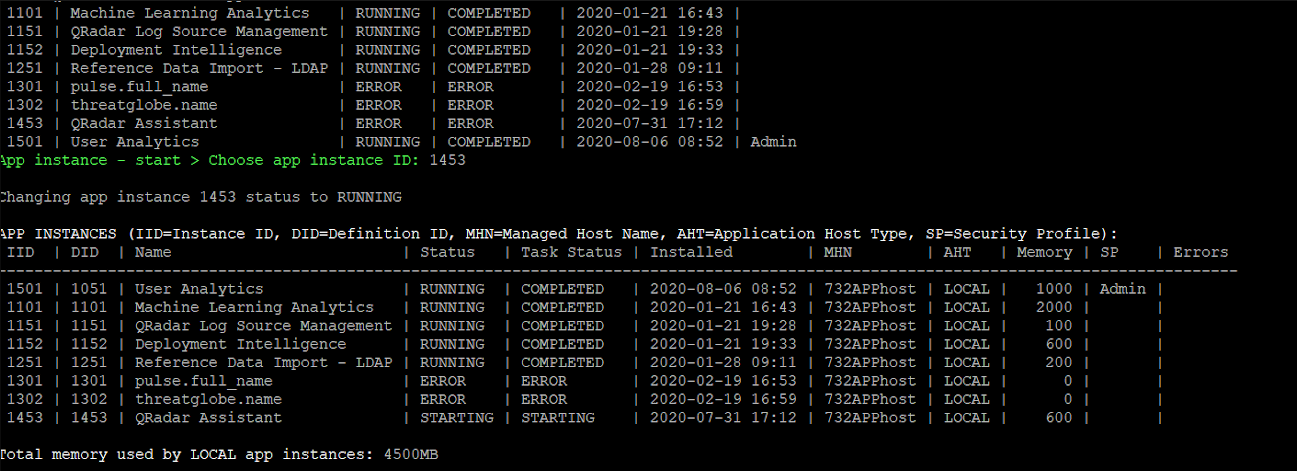
- The application should display a status of RUNNING.

- From Choose option, enter 0 to exit the qappmanager utility.
After the QRadar Assistant app starts, administrators can start other application instances from the user interface.
Using the API to start or stop and application
The qappmanager is not available in QRadar 7.3.x versions so administrators need to use the Developers interactive API to locate the App-ID and start the app.
To resolve the issue by using the recon utility and API.
- Log in to the Console as admin user.
- Click the navigation menu (☰) > Interactive API for Developers
- Expand gui_app_framework.
- Click Applications.
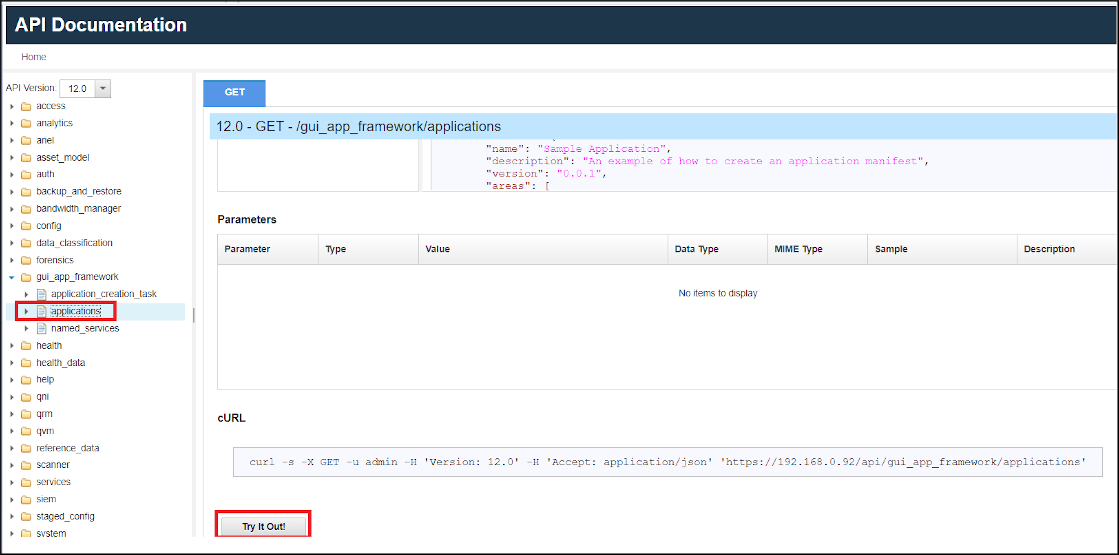
- Click Try It Out
- Search in the Response Body for the application that is not working. Record the Application ID and its status.
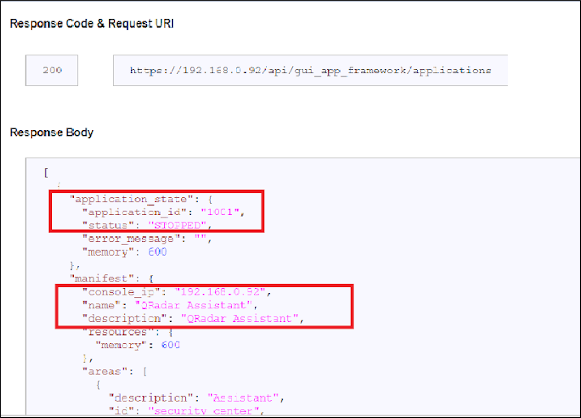
- Expand applications.
- Click application_id.
- Click POST.
- In the Parameter application_id, enter the App-ID from step #6

- In the Parameter status, enter RUNNING.
- Click Try it Out!
Results
The Response Body displays a message similar to:
{
  "installed_on": 1579643001405,
  "application_state": {
    "memory": 2000,
    "application_id": "1101",
    "status": "STARTING"
  },
  "manifest": {
    "description": "Machine Learning Analytics",
    "console_ip": "192.168.0.80",
    "uuid": "3f42e91e-bab9-4e7f-a943-64067a728f70",
    "app_id": 1101,
    "multitenancy_safe": "true",
    "resources": {
      "memory": 2000
    },
    "version": "3.8.0",
    "dependencies": {
      "rpms_directory": "/src_deps/init/rpms",
"pip_directory": "/src_deps/init/pip"Document Location
Worldwide
Was this topic helpful?
Document Information
Modified date:
12 August 2026
UID
ibm16349171