Troubleshooting
Problem
Due to the authentication modules deprecation in QRadar®, the administrators must configure an alternative authentication such as Lightweight Directory Access Protocol (LDAP) to authenticate to QRadar®
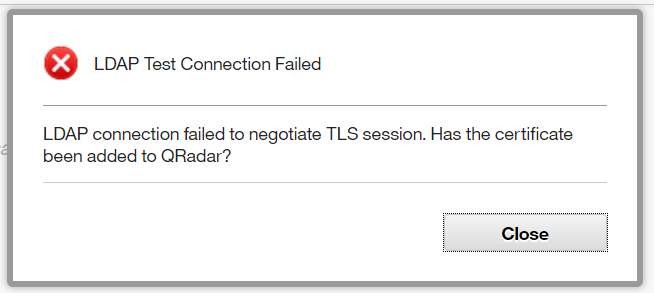
In the LDAP Authentication tab in the QRadar® UI, a pop-up window displays the following error message:
Symptom
Document Location
Worldwide
[{"Line of Business":{"code":"LOB77","label":"Automation Platform"},"Business Unit":{"code":"BU048","label":"IBM Software"},"Product":{"code":"SSBQAC","label":"IBM Security QRadar SIEM"},"ARM Category":[{"code":"a8m0z000000cwsyAAA","label":"Admin Tasks"}],"ARM Case Number":"","Platform":[{"code":"PF016","label":"Linux"}],"Version":"All Version(s)"}]
Log InLog in to view more of this document
This document has the abstract of a technical article that is available to authorized users once you have logged on. Please use Log in button above to access the full document. After log in, if you do not have the right authorization for this document, there will be instructions on what to do next.
Was this topic helpful?
Document Information
Modified date:
20 November 2020
UID
ibm16324869