Troubleshooting
Problem
Help collecting general information about the IBM i for technical support.
Diagnosing The Problem
The MustGather tools library (QMGTOOLS) contains the System Snapshot (SYSSNAP) program which collects general information about the IBM i from the command line interface. A typical SYSSNAP data collection will include many of the files shown below, depending on the current PTF level, and the options taken when the SYSSNAP was run.
Note: This list is dynamic. Depending on the current PTF level, some of the AA macro options might not be available.
- SYSSNAP
Analyze_Default_Passwords.txt
ASP_INFO.TXT
COMMAND_DFT_CHANGE_REPORT.csv
CS_Settings.txt
DDM_lowest_authentication.txt
DDM_Server_Authority.txt
Display_Authorized_Users.txt
Display_Function_Usage.txt
Display_Hardware_Resource.txt
Display_Job_Table.txt
DISPLAY_PLATFORM_INFO.txt
Display_Security_Attributes.txt
Display_Security_Auditing.txt
Display_Software_Resource.txt
DSPCLUINF.txt
DSPCRGINF.txt
DSPIPLA.txt
DSPJOB.txt
DSPNETA.txt
DSPUPSSTS.txt
Firmware_Status.txt
hardware_cmn.csv
hardware_crp.csv
hardware_csa.csv
hardware_lws.csv
hardware_prc.csv
hardware_stg.csv
JOB_QUEUE_ENTRIES_WAITING.csv
JOB_QUEUE_INFO.csv
Miscellaneous.txt
Print_Profile_Internals.txt
QADBERAP.txt
QHST.txt
QLZARCAPI.txt
QPRUV_library.txt
QPRUV_ObjectList.csv
QSECOFR_basic_info.txt
QSFWINV_program.txt
QSYSOPR_messages.txt
QSZRTVPR.txt
QTCPCTL_joblog.txt
QTCPWRK_joblog.txt
QTRXLSIX_QRECOVERY.txt
QUSRBRM_library.txt
QWCCRTECCALL_QWCCRTEC_api.txt
QWCRSSTS.txt
Rack_configuration.txt
SCPF_joblog.txt
SYSFIELDS_FIELDPROCS.csv
SYSFUNCS_INFO.csv
SYSPROCS_INFO.csv
SYSSNAP_joblog.txt
System_Entry_Point_Table.txt
System_Values.txt
Tool_log.txt
Tool_version.txt
Work_With_Subsystems.txt
WRKACTJOB.txt
WRKACTJOB_tempstorage.txt
WRKCTLD.txt
WRKDEVD.txt
WRKDSKSTS.txt
WRKENVVAR.txt
WRKJOBQ.txt
WRKJOBQ_QBATCH.txt
WRKJOBQ_QSYSNOMAX.txt
WRKJOBSCDE_basic.txt
WRKJOBSCDE_full.txt
WRKLIND.txt
WRKNWID.txt
WRKNWSD.txt
WRKRDBDIRE.txt
WRKREGINF.txt
WRKSHRPOOL.txt
WRKSYSSTS.txt - LICENSE
DSPLICKEY.txt
LZA_OBJECT_DIRECTORY.txt
QLZARTVK.txt
QLZAVXFR.txt
WRKLICINF.txt - NETSERVER
QAZLSCFG
QAZLSSHR - PALS
PALS.txt
PRTPALCLP_joblog.txt - PTF_INFO
DSPPTF.txt
DSPPTF_not_applied.txt
Group_PTFs.txt
Master_PTF_index.txt
PTF_INFO.csv - SSH
sshd_config.txt
ssh_config.txt
SSH_Version.txt - SSTDUMPS
ASMINFO_144.txt
BATTERYINFO.txt
BRIDGEFR.txt
CLUSTERINFO.txt
DEBUGDDD.txt
DISKALLDEBUG.txt
DSMINFO.txt
DUMPGSD.txt
DUMPMIRRORINFO.txt
DUMPTAPEINFO_DEVICES.txt
DUMPTAPEINFO_MPMAP.txt
DUMPVHRIPERS.txt
Flash_Levels.txt
GEOSTAT.txt
HEAPINFO.txt
IODD_ALLOBJECTS.txt
IOFR.txt
IOFR.txt_001
IOHRIDEBUG.txt
IONIOTAPE_-DMPPRMP.txt
IONIOTAPE_IDS.txt
IONIOTAPE_IDS_DEEP.txt
IONIOTAPE_LIB.txt
IOSW.txt
IOTAPEPATHS.txt
IPLFR.txt
LISTTAPEDEVICES_ALL_DETAIL.txt
LISTTAPEDEVICES_ALL_WIDE.txt
LLHISTORYLOG.txt
MSDINFO.txt
NETSTAT_PIF.txt
NVMEGAUGE.txt
OPSCONSOLE.txt
RMTSTG.txt
SID87.txt
SSDGAUGE.txt
TLSCONFIG.txt
TRACEINFO.txt
VIOFR.txt
WRKSQEVAR.txt - TCP
Line_descriptions.txt
prttcpifc.csv
prttcprte.csv
TCP_Connection_Status.txt
TCP_Connection_Status2.txt
TCP_Host_Table.txt
TCP_Interfaces.txt
TCP_Routes.txt
Tool_log.txt
WHOAMI.txt
WRKSRVTBLE.txt - WRKCFGSTS
WRKCFGSTS_CTL.txt
WRKCFGSTS_DEV.txt
WRKCFGSTS_LIN.txt
WRKCFGSTS_NWI.txt
WRKCFGSTS_NWS.txt - WRKPRB
DSPPRB_BASIC.csv
DSPPRB_CAUSE.csv
DSPPRB_FIX.csv
DSPPRB_SPTDTA.csv
DSPPRB_USRTXT.csv
Resolving The Problem
NOTE: Do not use if QMGTOOLS has a build date less than November 10, 2014 (APAR - SE60609) or the build date is between April 17, 2019 and before July 16, 2019.
| 1. |
Use the latest QMGTOOLS build. See the following document on how to download and install the QMGTOOLS toolkit on your IBM i server.
https://www.ibm.com/support/pages/mustgather-how-obtain-and-install-qmgtools-and-keep-it-current |
||||||||||||||||||||||||||||||||||||||||||||||||||
| 2. |
To run SYSSNAP from a command line, see the following URL.
Add QMGTOOLS to the library list (ADDLIBLE QMGTOOLS) and type GO MG.
Note: The user running this command needs to have some authority like QSECOFR to avoid errors.
|
||||||||||||||||||||||||||||||||||||||||||||||||||
| 3. |
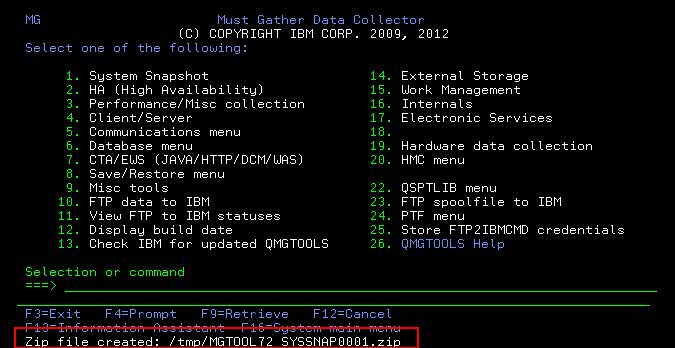
Select the System Snapshot option. In this example, it is Option 1.
|
||||||||||||||||||||||||||||||||||||||||||||||||||
| 4. |
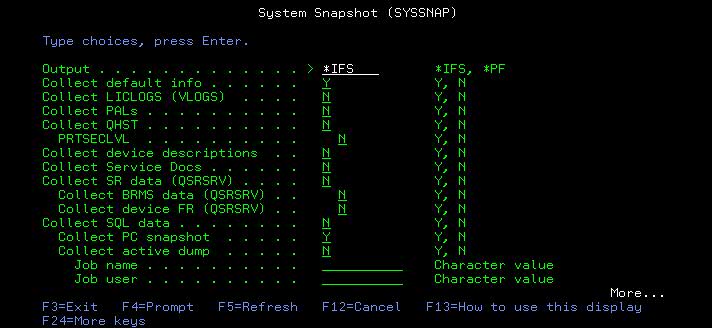
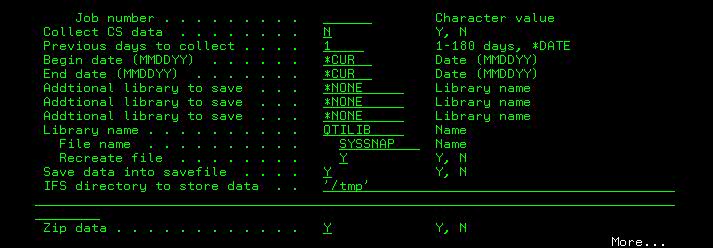
The options are as follows:
|
||||||||||||||||||||||||||||||||||||||||||||||||||
| 5. |
Once completed, you receive a notification similar to the following example regarding where the data is stored. If you do not see that message, check your job log for the data location.
 |



Collecting and sending diagnostic information to IBM Support
For assistance with uploading information to IBM Support, please see
http://www-01.ibm.com/support/docview.wss?uid=nas8N1019224
Historical Number
674355535
Was this topic helpful?
Document Information
Modified date:
17 April 2025
UID
nas8N1010353