Troubleshooting
Problem
QMGTOOLS HMC menu purpose is to assist in data collection on the HMC.
Resolving The Problem
Note: It is assume the IBM i can contact the HMC and if the HMC has SSH enabled. To enable SSH on the HMC, refer to this URL :
http://www-01.ibm.com/support/docview.wss?uid=nas8N1019050
Step 1
Obtain and install a copy of QMGTOOLS library from IBM. Follow the links below for instructions.
http://www-01.ibm.com/support/docview.wss?uid=nas8N1020164
http://www-01.ibm.com/support/docview.wss?uid=nas8N1011297
Step 2
Once installed, add QMGTOOLS to your library list via ADDLIBLE command. Run command GO MG to bring up the QMGTOOLS main menu. In the example, option 20 is the HMC menu. Take that option.


Check For User HSCPE On HMC
-

Since some functions require the use of user HSCPE, this option checks the HMC if the user exists or not.
- If the user does not exist, it will allow you to create the user along with specifying a password
- If the user does exist, you have the option of updating/changing the password if you do not know it

Function *CHKHSCPE - for checking user HSCPE on the HMC Remote HMC The remote HMC, you can use *MYSESSION if you are using port fowarding User ID/password User ID/password for the HMC. It is recommended to use ID hscroot Remote port Remote port (default 22) for the SSH connection to the HMC
Delete User HSCPE On HMC
-

Deletes user HSCPE from the HMC. You would choose this option if you created it temporary on the HMC for the purpose of collect data.
Function *DLTHSCPE - for deleting user HSCPE on the HMC Remote HMC The remote HMC, you can use *MYSESSION if you are using port fowarding User ID/password User ID/password for the HMC. It is recommended to use ID hscroot Remote port Remote port (default 22) for the SSH connection to the HMC
Collect PEDBG From HMC
-
This will collect PEDBG data from the HMC and try to FTP it back to the iSeries for uploading to IBM.
The default file that will be brought back will be in /tmp/qmgtools_pedbg.zip. Since PEDBG can be large, this file will be over written when a new PEDBG is requested.
If the file cannot be brought back to the IBM i, the file is under /dump/HMC*.zip on the HMC. Refer to this URL on how to access or send to IBM :
http://www-01.ibm.com/support/docview.wss?uid=nas8N1018878

Function *PEDBG - to dump and retrieve pedbg from the HMC Remote HMC The remote HMC, you can use *MYSESSION if you are using AOS port forwarding User ID/Password User ID/password for HMC. It is strongly recommended to use ID hscpe Remote port Remote port (default 22) for the SSH connection to the HMC -q level Default is 3. Other levels are listed :
1 = Network Information Only
2 = Network Information + base logs
3 = Network Information + base logs + extended logs
4 = Network Information + base logs + extended logs + archives
5 = Collects only those files in the /home/hscpe/ibmsupt directory
Retrieve PEDBG from HMC
-
This function retrieves a previously collected PEDBG from the HMC back to the IBM i system. It uses SCP to get the file. Once that file is retrieved, a user can upload that to IBM. The file will be stored in /tmp of the IFS. The naming convention is HMC*.zip.
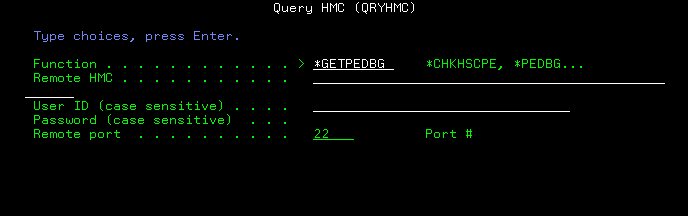
Function *GETPEDBG - for retrieving PEDBG from the HMC Remote HMC The remote HMC, you can use *MYSESSION if you are using port fowarding User ID/password User ID/password for the HMC. It is recommended to use ID hscroot Remote port Remote port (default 22) for the SSH connection to the HMC
ASMI/Piranha access on HMC
-
This function allows IBM support access piranha to PHYP or partition. Internal IBM usage only.
Uploading data to IBM
-
The following URL provides different methods to send the data to IBM.
http://www-01.ibm.com/support/docview.wss?uid=nas8N1019224
-
Was this topic helpful?
Document Information
Modified date:
18 December 2019
UID
nas8N1020884