Question & Answer
Question
How can IBM Installation Manager work when the Internet access requires a proxy but you only have a proxy auto-configuration file (.pac file) available for your proxy configuration ?
Answer
As you know, in IBM Installation Manager, you can only specify a proxy host and a port. You can not specify your proxy auto-config file there.
To solve this issue, you should edit your .pac file and locate in the file the proxy host and proxy port your environment is using. A pac file is like a script that can contain several proxy configurations depending on the network and your IP location so if you do not know the exact proxy host/port to pick, you can contact your system administrator who should be able to help you find the right one.
Once you have located your appropriate proxy host and proxy port, you can launch IBM Installation Manager then do:
- File -> Preferences
- Internet -> Proxy HTTP
- Enable the proxy and enter the proxy host/port you determined from your proxy auto-configuration file
- Save your changes
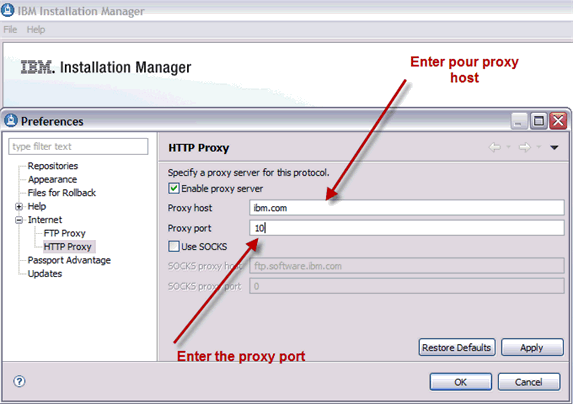
IBM Installation Manager will then be able to access the Internet.
Was this topic helpful?
Document Information
Modified date:
25 October 2021
UID
swg21392519