Troubleshooting
Problem
Poor performance due to the CPU frequency not increasing with workload.
Symptom
Slow IPLs or poor performance when the system has only a few jobs running.
Cause
A firmware defect FW678428 shows up as a performance issue. Clients might see slow IPLs or poor performance when the system has only a few jobs running.
The circumvention for this issue is shown in the Resolving the problem section. The resolution involves both disabling idle power saver and setting performance mode to maximum in ASMI. These settings take effect immediately.
The circumvention for this issue is shown in the Resolving the problem section. The resolution involves both disabling idle power saver and setting performance mode to maximum in ASMI. These settings take effect immediately.
Environment
Power9(P9) FW910.00 (910_073)
Diagnosing The Problem
Collection Services data shows something like the following. Notice that the black line, CPU power-saving rate (by using the secondary Y axis) is showing at 80% in interval 560 - 600 and < 100% in intervals 600 - 670. Also, notice in those intervals that CPU utilization is around 40%. What should happen during those intervals is that the rate should increase and be > 100% during those periods of CPU utilization. (For example, the same workload with maximum frequency and IPS disabled shows 130 - 150%.)
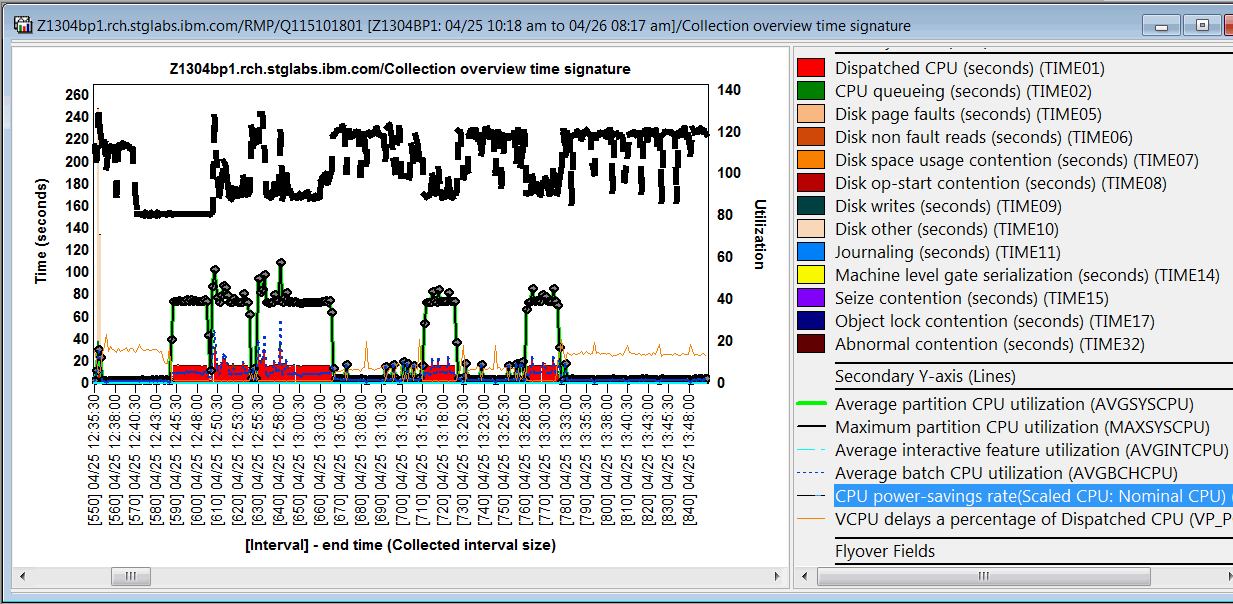
Power 9 Performance mode defaults to Dynamic Performance Mode. This is different than the default of Disable Power Saver mode on Power 8 and Power 7. Dynamic means the processor frequency can vary with the workload.
Power 7 and Power 8 the CSI graph show the CPU power-savings rate at around 100% when Idle Power Saver (IPS) isn't active.
Power 9 with Dynamic Performance Mode, also known as WOF (Workload Optimized Frequency), CPU power-savings rate vary anywhere in the range 80 - 150%, depending on the workload.
Power8 default:
System Configuration > Power Management > Power Mode Setup.
System Configuration > Power Management > Power Mode Setup.
Disable Power Saver mode: Disables the Power Saver mode. The processor clock frequency is set to its nominal value and the power that is used by the system remains at a nominal level.
Power9 default:
Power 9 Performance mode defaults to Dynamic Performance Mode. This is different than the default of Disable Power Saver mode on Power 8 and Power 7. Dynamic means the processor frequency can vary with the workload.
Power 7 and Power 8 the CSI graph show the CPU power-savings rate at around 100% when Idle Power Saver (IPS) isn't active.
Power 9 with Dynamic Performance Mode, also known as WOF (Workload Optimized Frequency), CPU power-savings rate vary anywhere in the range 80 - 150%, depending on the workload.
Power8 default:
System Configuration > Power Management > Power Mode Setup.
System Configuration > Power Management > Power Mode Setup.
Disable Power Saver mode: Disables the Power Saver mode. The processor clock frequency is set to its nominal value and the power that is used by the system remains at a nominal level.
Power9 default:
- Enable Dynamic Performance mode: Enabling this option causes the processor frequency to vary based on workload and active core count. As the workload or active core count decrease, the processor uses less power, which enables the frequency to be increased above nominal. During periods of very low utilization, the processor frequency is reduced to save energy. This mode provides consistent performance across all environmental operating conditions.
Resolving The Problem
Fixed in FW910.10 (910_107) and later.
The changes take effect immediately.
Disabling IPS (Idle Power Saver) and choosing Maximum Performance Mode:
In ASMI, expand System Configuration, then expand Power Management, select Idle Power Saver, set the New Value to Disabled:![[$3883C314246033C2.jpg]](/support/pages/system/files/support/nas/nastech.nsf/0/25d800bf45f7736585258282004c2eaf/Content/0.2FA.jpg) ![[$C6D706D462C3C59.jpg]](/support/pages/system/files/support/nas/nastech.nsf/0/25d800bf45f7736585258282004c2eaf/Content/0.3484.jpg) |
| Then click 'save settings' at the bottom: |
3:36:18 PM![[$6E7B9737ABEEB90E.jpg]](/support/pages/system/files/support/nas/nastech.nsf/0/25d800bf45f7736585258282004c2eaf/Content/0.6874.jpg) |
Then select Power and Performance Mode Setup:
3:37:02 PM![[$11C8112528A5967C.jpg]](/support/pages/system/files/support/nas/nastech.nsf/0/25d800bf45f7736585258282004c2eaf/Content/0.9724.jpg) |
| Click Enable Maximum Performance mode and click Continue. |
[{"Product":{"code":"SGYVHK","label":"FSP\/Firmware"},"Business Unit":{"code":"BU054","label":"Systems w\/TPS"},"Component":"Not Applicable","Platform":[{"code":"PF025","label":"Platform Independent"}],"Version":"none","Edition":"","Line of Business":{"code":"","label":""}}]
Was this topic helpful?
Document Information
Modified date:
27 March 2020
UID
nas8N1022564