How To
Summary
The View Port Parameter panel in the OSA Advance Facilities provides important statistical information on the OSA. It can be used for Link Problem Determination.
Objective
This Drupal provides a step by step procedure on how to use the View Port Parameter panel in the OSA Advance Facilities for link P/D.
Steps
How to Display the View Port Parameter Panel
1. Log on the HMC in Service Mode or Sysprog mode
2. Select the OSA Advance Facilities from Tasks Index
3. Select the PCHID and use the pull-down Select Action options and select View Port Parameters

4. The View Port Parameter panel displays the following
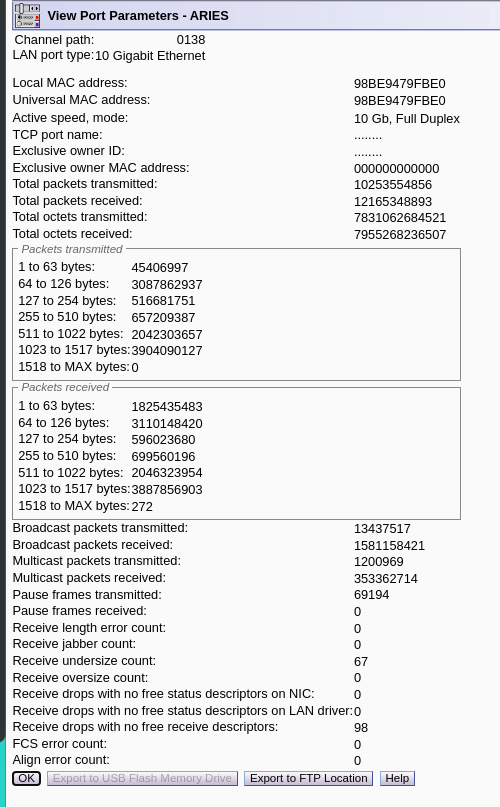
Understanding the counters
These counters are accumulated since the card was last reset. They are a snap shot of the actual counts at the time the panel is displayed. In order to see an update of the counts, it needs to pull the data again. This is performed by closing the panel and then reopening it. It is a static display and will not refresh.
Receive length error count: The packet size is different from what it says on the frame.
Receive jabber count: malformed frames
Receive undersize count: Frame size is smaller than the Ethernet protocol allows (60 bytes).
Receive oversize count: Frame size is bigger than the Ethernet protocol allows, MTU plus 18 bytes (header and CRC).
Receive drops with no free status descriptors on NIC: The NIC module ran out of status descriptors (buffers) and dropped the frame.
Receive drops with no free status descriptors on LAN driver: The LAN driver ran out of status descriptors (buffers) and dropped the frame.
Receive drops with no free receive descriptors: Dropped the frame due to a lack of inbound buffers available.
FCS error count: Frame Check Sequence error indicate that frames of data are being corrupted during the transmission. It is normally detected by bad CRC values.
Align error count: A count of the number of frames received that don't end with an even number of octets
Check if OSA is passing traffic
Pull (take photo) the View Port Parameter Panel at different times and check if the Total Number of Packets Transmitted/Received are increasing. If they are increasing the OSA is passing traffic.
Check if there are any error counts increasing
Small error counts are normal. If any error count is increasing between panel refreshes, it indicates a problem on the network. For example: When FCS is increasing rapidly, it indicates that OSA is receiving network traffic with CRC errors. It is the transmission error between the sender and receiver. It could be the cable, transmitter on switch, or the receiver on OSA. Please work with customer network personnel to pinpoint the problem. Wrap tests could be ran on the OSA to assist in problem isolation.
Document Location
Worldwide
[{"Type":"MASTER","Line of Business":{"code":"LOB16","label":"Mainframe HW"},"Business Unit":{"code":"BU058","label":"IBM Infrastructure w\/TPS"},"Product":{"code":"HW11S","label":"IBM z14"},"ARM Category":[],"ARM Case Number":[],"Platform":[{"code":"PF025","label":"Platform Independent"}]},{"Type":"MASTER","Line of Business":{"code":"LOB16","label":"Mainframe HW"},"Business Unit":{"code":"BU058","label":"IBM Infrastructure w\/TPS"},"Product":{"code":"z15_1","label":"IBM z15 (8561-T01)"},"ARM Category":[],"Platform":[{"code":"PF025","label":"Platform Independent"}],"Version":"All Versions"},{"Type":"MASTER","Line of Business":{"code":"LOB16","label":"Mainframe HW"},"Business Unit":{"code":"BU058","label":"IBM Infrastructure w\/TPS"},"Product":{"code":"HW11R","label":"IBM z13s"},"ARM Category":[],"Platform":[{"code":"PF025","label":"Platform Independent"}],"Version":"All Versions"},{"Type":"MASTER","Line of Business":{"code":"LOB56","label":"Z HW"},"Business Unit":{"code":"BU058","label":"IBM Infrastructure w\/TPS"},"Product":{"code":"z15_2","label":"IBM z15 (8562-T02)"},"ARM Category":[{"code":"","label":""}],"Platform":[{"code":"PF025","label":"Platform Independent"}],"Version":""}]
Was this topic helpful?
Document Information
Modified date:
15 March 2022
UID
ibm16476694