Question & Answer
Question
We want to establish the Connection between the Microsoft SQL Server and Netezza DB Servers and pull the data from Netezzaa Database to MSSQL. When we tried setting a Linked server in SQL Server with NZOLEDB Provider with port number 5480 and TEST Connection is Successful But we are not able to Query the DB (Select Queries) == Snip from SQL server SELECT * FROM [xxx.xxx.com].DB1.SCHEMA1.TAB1 ; Msg 7357, Level 16, State 2, Line 2 Cannot process the object ""DB1"."SCHEMA1"."TAB1"". The OLE DB provider "NZOLEDB" for linked server "xxx.xxx.com" indicates that either the object has no columns or the current user does not have permissions on that object
Cause
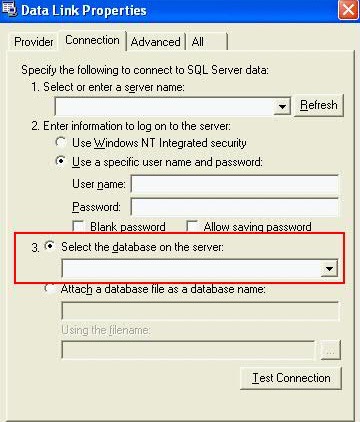
If this happened to post 7.1.0.7 and 7.2.0.6, check the OLEDB settings, to see if the database property is set to the user database the query is running ?
There are some important changes:
Issues Resolved in Release 7.1.0.7
100658 - Improves the ODBC and JDBC system views to improve performance. This change corrects an issue where the system views for version "2" (those named _V_JDBC_FUNCTION2, for example) were returning cross-database results; the views now return results for only the database where the query is running.
Issues Resolved in Release 7.2.0.6
100658 - Improves the ODBC and JDBC system views to improve performance. This change corrects an issue where the system views for version "2" (those named _V_JDBC_FUNCTION2, for example) were returning cross-database results; the views now return results for only the database where the query is running.
After these versions, the fix applied where the views now "ONLY return results for ONLY the database where the query is running", hence it is important to set the correct database in OLEDB settings.
You can run these 3 steps to see the new behaviour:
Step 1) Create a test database, and table:
nzsql -c "CREATE DATABASE TESTDB;"
nzsql testdb -c "CREATE TABLE TAB1 (COL1 INT, COL2 INT)"
Step 2) Run the following SQL in the target database: testdb
SELECT ORDINAL_POSITION , COLUMN_NAME
FROM _v_oledb_columns2
WHERE upper("TABLE_CATALOG") = 'TESTDB'
AND upper("TABLE_NAME") = 'TAB1';
$ nzsql testdb
TESTDB.ADMIN(ADMIN)=> SELECT ORDINAL_POSITION , COLUMN_NAME
TESTDB.ADMIN(ADMIN)-> FROM _v_oledb_columns2
TESTDB.ADMIN(ADMIN)-> WHERE upper("TABLE_CATALOG") = 'TESTDB'
TESTDB.ADMIN(ADMIN)-> AND upper("TABLE_NAME") = 'TAB1';
Expected output:-
ORDINAL_POSITION | COLUMN_NAME
------------------+-------------
1 | COL1
2 | COL2
(2 rows)
Step 3) If you are in any other database, like system database, teh same query in step 2 would return no rows:
For exmaple:
SYSTEM.ADMIN(ADMIN)=> \i sql
ORDINAL_POSITION | COLUMN_NAME
------------------+-------------
(0 rows)
SYSTEM.ADMIN(ADMIN)=> \c cf
You are now connected to database cf.
CF.ADMIN(ADMIN)=> \i sql
ORDINAL_POSITION | COLUMN_NAME
------------------+-------------
(0 rows)
* The reason for this change, is for performance concerns. If there are many databases in the system; it will take a long time to return the result.
The same changes affect too JDBC and ODBC drivers.
Answer
Please check the 'database' property settings, and make sure it set to the correct database name you are trying to access.
Was this topic helpful?
Document Information
Modified date:
17 October 2019
UID
swg21994756