Troubleshooting
Problem
Customer is suffering from an error when running a consolidation. As part of the troubleshooting process, superuser manually creates a new 32-bit Oracle ODBC System DSN.
During this process, an error appears.
Symptom
1. Launch a command prompt
2. Type the following: %systemdrive%\Windows\SysWow64\Odbcad32.exe
3. Click tab: System DSN
4. Click: Add
5. Choose: Oracle in OraClient12Home1_32bit

6. Click 'Finish'. An error appears:

Microsoft ODBC Administrator
The setup routines for the Oracle in OraClient12Home1_32bit ODBC driver could not be loaded due to system error code 126: The specified module could not be found.
(C:\app_32\client\Administrator\product\12.1.0\client_1\BIN\SQORAS32.dll).
[OK]
The setup routines for the Oracle in OraClient12Home1_32bit ODBC driver could not be loaded due to system error code 126: The specified module could not be found.
(C:\app_32\client\Administrator\product\12.1.0\client_1\BIN\SQORAS32.dll).
[OK]
7. Click OK and a second error appears:
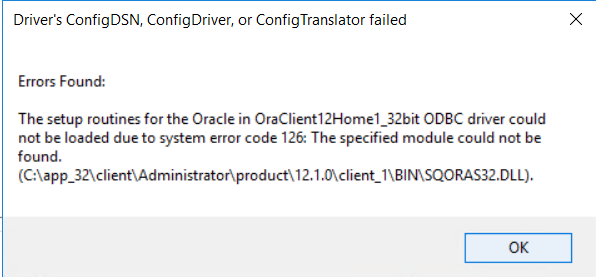
Driver's ConfigDSN, ConfigDriver or ConfigTranslator failed
Errors Found:
The setup routines for the Oracle in OraClient12Home1_32bit ODBC driver could not be loaded due to system error code 126: The specified module could not be found.
(C:\app_32\client\Administrator\product\12.1.0\client_1\BIN\SQORAS32.dll).
[OK]
Errors Found:
The setup routines for the Oracle in OraClient12Home1_32bit ODBC driver could not be loaded due to system error code 126: The specified module could not be found.
(C:\app_32\client\Administrator\product\12.1.0\client_1\BIN\SQORAS32.dll).
[OK]
Document Location
Worldwide
[{"Business Unit":{"code":"BU048","label":"IBM Software"},"Product":{"code":"SS9S6B","label":"IBM Cognos Controller"},"Component":"","Platform":[{"code":"PF033","label":"Windows"}],"Version":"10.4.1","Edition":"","Line of Business":{"code":"LOB76","label":"Data Platform"}},{"Product":{"code":"SSMRTZ","label":"IBM Cognos Controller on Cloud"},"Business Unit":{"code":"BU048","label":"IBM Software"},"Component":" ","Platform":[{"code":"","label":""}],"Version":"","Edition":"","Line of Business":{"code":"LOB76","label":"Data Platform"}}]
Log InLog in to view more of this document
This document has the abstract of a technical article that is available to authorized users once you have logged on. Please use Log in button above to access the full document. After log in, if you do not have the right authorization for this document, there will be instructions on what to do next.
Was this topic helpful?
Document Information
Modified date:
09 May 2025
UID
ibm11102713