Troubleshooting
Problem
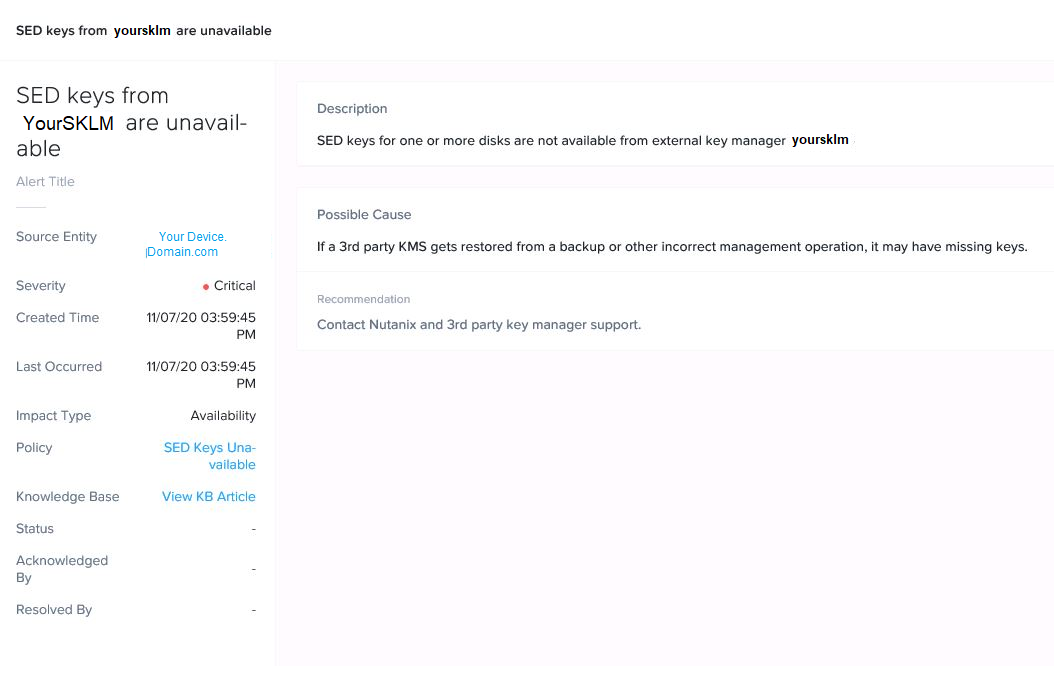
Nutanix reports a "missing SED disk passwords" or "SED keys for one or more disks are not available from external key manager YourSKLM", but there is no outtage of service and device are able to preform read and write operations without fail.
_____________________________________
Detailed information for sed_key_availability_check:
Node 10.10.10.1:
FAIL: KMS sklm1 missing SED disk passwords
Refer to KB 8223 (http://portal.nutanix.com/kb/8223) for details on sed_key_availability_check or Recheck with: ncc health_checks key_manager_checks sed_key_availability_check --cvm_list=10.XXX.XX.XX
+-----------------------+
| State | Count |
+-----------------------+
| Fail | 1 |
| Total Plugins | 1 |
+-----------------------+
Plugin output written to /home/nutanix/data/logs/ncc-output-latest.log
_______________________________________________
Symptom
Nutanix key availability check reports an issue finding keys on the Key Manager (SKLM) but no issues are seen on the SKLM side.
Devices function as expected.
Document Location
Worldwide
[{"Line of Business":{"code":"LOB76","label":"Data Platform"},"Business Unit":{"code":"BU048","label":"IBM Software"},"Product":{"code":"SSWPVP","label":"IBM Security Key Lifecycle Manager"},"ARM Category":[{"code":"a8m0z000000cvdLAAQ","label":"SKLM"}],"ARM Case Number":"TS004474399","Platform":[{"code":"PF025","label":"Platform Independent"}],"Version":"All Version(s)"}]
Log InLog in to view more of this document
This document has the abstract of a technical article that is available to authorized users once you have logged on. Please use Log in button above to access the full document. After log in, if you do not have the right authorization for this document, there will be instructions on what to do next.
Was this topic helpful?
Document Information
Modified date:
27 January 2021
UID
ibm16366707