General Page
This document describes the hypervisor-specific mitigations CVE-2018-3646 (L1 Terminal Fault - VMM) on Intel systems in IBM PureApplication System V2.2.6.0 and IBM Cloud Pak System V2.3.x.x.
DESCRIPTION:
IBM PureApplication System (Intel) V2.2.6.0 and IBM Cloud Pak System (Intel) V2.3.x.x addresses the security vulnerability of CVE-2018-3646 on Intel compute nodes. For more information, see these links:
CVE details:
Corresponding VMware articles:
https://www.vmware.com/security/advisories/VMSA-2018-0020.html (VMware Security Advisories)
https://kb.vmware.com/s/article/55806 (VMware response to CVE-2018-3646)
https://kb.vmware.com/s/article/55767 (Performance Impact Statement)
https://kb.vmware.com/s/article/56931 (HTAware Mitigation Overview and usage)
https://kb.vmware.com/s/article/56544 (ESXi 6.5 Patch Release)
https://kb.vmware.com/s/article/56534 (ESXi 6.7 Patch Release)
https://docs.vmware.com/en/VMware-vSphere/6.5/com.vmware.vsphere.vm_admin.doc/GUID-13AD347E-3B77-4A67-B3F4-4AC2230E4509.html (VMware 6.5 Virtual CPU Limitations)
https://docs.vmware.com/en/VMware-vSphere/6.7/com.vmware.vsphere.vm_admin.doc/GUID-13AD347E-3B77-4A67-B3F4-4AC2230E4509.html(VMware 6.7 Virtual CPU Limitations)
Corresponding Lenovo article:
Security vulnerability details about CVE-2018-3646 on IBM Support:
Intel has disclosed a new type of CPU speculative-execution vulnerability that is collectively known as L1 Terminal Fault or “Foreshadow”, which is vulnerable on Intel processor (s) that is used in IBM PureApplication System and and IBM Cloud Pak System. The vulnerability takes place when affected Intel microprocessors speculate beyond the authorized data access. This vulnerability allows Intel microprocessors to expose a new side-channel for attack and most importantly affects virtual machines running in hypervisor environments such as VMware. It allows a malicious virtual machine running on an affected CPU to speculate contents of the hypervisor or another VM’s privileged information that resides at the same time in the same core’s L1 Data cache.
Currently, Intel processors share the physically-address L1 Data Cache across both logical processors of a Hyperthreaded enabled core, simultaneous scheduling of software threads on both logical processors that can create the potential for security compromise and the stealing of information.
vCenter Server, ESXi, Workstation, and Fusion updates include Hypervisor-Specific Mitigations for L1 Terminal Fault - VMM. This issue may allow a malicious VM running on a given CPU core to effectively read the hypervisor’s or another VM’s privileged information that resides sequentially or concurrently in the same core’s L1 Data cache.
The Common Vulnerabilities and Exposures project (https://cve.mitre.org/) has assigned the identifier CVE-2018-3646 to this issue.
CVE-2018-3646 has two currently known attack vectors which will be referred to as "Sequential-Context" and "Concurrent-Context."
ATTACK VECTOR SUMMARY:
- Sequential-context attack vector: A malicious VM can potentially infer recently accessed L1 data of a previous context (hypervisor thread or other VM thread) on either logical processor of a processor core.
- Concurrent-context attack vector: A malicious VM can potentially infer recently accessed L1 data of a concurrently running context (hypervisor thread or other VM thread) on the other logical processor of the Hyper-Threading enabled processor core
MITIGATION SUMMARY:
- The Sequential-context attack vector is mitigated by vSphere updates and patch updates. This mitigation is dependent on Intel microcode updates (provided in separate ESXi patches for most Intel hardware platforms). This mitigation is enabled by default and does not impose a significant performance impact.
- The Concurrent-context attack vector is mitigated through enablement of a new feature known as the ESXi Side-Channel-Aware Scheduler. This feature may impose a non-trivial performance impact.
What does the ESXi Side-Channel-Aware Scheduler do? In basic terms, it will only schedule the hypervisor and VMs on one logical processor of an Intel Hyperthreading-enabled core. This means, the ESXi scheduler will not make use of all the hyperthreading cores presented. The feature has made a mention that it will impose a non-trivial performance impact. You can imagine that only scheduling of ESXi and VMs on a number of cores will certainly lower the performance of virtual machines as they would not be able to take advantage of all the hyperthreaded cores available.
PureApplication System V2.2.6.0 and IBM Cloud Pak System V2.3.x.x have enabled the mitigation for both the attack vectors as described earlier.
IMPACT:
As explained in the earlier sections about VMware articles – Enabling HyperThreadingMitigation/ESXi Side-Channel-Aware Scheduler feature on ESXi server has some impact on Performance, CPU core allocation limit on virtual machines, CPU Usage, etc.
- VMs configured with vCPUs greater than the physical cores available on the ESXi host:
In PureApplication System and IBM Cloud Pak System context, any virtual machine having vCPUs greater than 16 will have problems starting up. As PureApplication V2.2.6.0 and IBM Cloud Pak System V2.3.x.x have already enabled hyperthreadingMitigation (ESXi Side-Channel-Aware Scheduler), customers will not be able to power on or deploy any VM workloads with more than 16 vCPUs due to VMware Virtual CPU Limitations (A virtual machine cannot have more virtual CPUs than the number of logical cores on the host. The number of logical cores is equal to the number of physical cores if hyperthreading is disabled or two times that number if hyperthreading is enabled).
- CPU Usage:
The severity of the impact caused by enabling the ESXi Side-Channel-Aware Scheduler largely depends on the CPU over-commit ratio on a given host, the host usage, and the application itself.
Therefore, the impact will be applicable to the following listed conditions:
- VMs configured with vCPUs greater than the physical cores available on the ESXi host
- VMs configured with custom affinity or NUMA settings
- VMs with latency-sensitive configuration
- Compute nodes with Average CPU Usage greater than 70%
- Compute nodes with custom CPU resource management options enabled
- HA Clusters where a rolling upgrade will increase Average CPU Usage above 100%
For more information, see https://kb.vmware.com/s/article/55767 about accessing the performance impact.
PLANNING AND CONSIDERATIONS:
- During V2.2.6.0 or V2.3.x.x upgrade planning, customers must consider conducting a thorough capacity planning exercise to estimate capacity requirements and use the knowledge of their particular applications to evaluate whether the enablement of the ESXi Side-Channel-Aware Scheduler will cause a noticeable performance drop.
- Customers must check if they have virtual machine (s) with greater than 16 vCPUs in their environment. If found, customers must re-balance or re-configure their existing workloads to run on VMs with less than or equal to 16 vCPUs before starting the upgrade.
- Customers can check the CPU allocation of the VMs by getting a list of all VMs using the following steps:
1. Access the following REST API using a web browser.
https://<PSM_IP>/deployment/resources/instances
2. Search “cpu_count” in the results page.
3. Look for any number more than 16.
4. Note the instance (s) name that has more than 16 CPUs allocated.
https://<PSM_IP>/deployment/resources/instances
2. Search “cpu_count” in the results page.
3. Look for any number more than 16.
4. Note the instance (s) name that has more than 16 CPUs allocated.
If rebalancing of existing workloads can be achieved by using the available capacity, then customers must get it done before starting the PureApplication System V2.2.6.0 or/and Cloud Pak System V2.3.x.x upgrade.
The Cloud Pak System release 2.2.6 to 2.3.2.0 provides 2 different ESXi images. Here, ESXi Side-Channel-Aware Scheduler enabled is the default image, and the ESXi Side-Channel-Aware Scheduler disabled image is optional. Before you choose the disabled image option at deploy time, perform a risk assessment and acceptance, which are caused by the Concurrent-context attack vector. IBM does not make this decision on behalf of any organization.
The Cloud Pak System release 2.3.3.0 provides 2 different EXi images (SCAv1 and SCAv2). Here, SCAv1 image is the default image for the release and is Most Secure, whereas the SCAv2 image is optional, which the customer can choose during deployment.
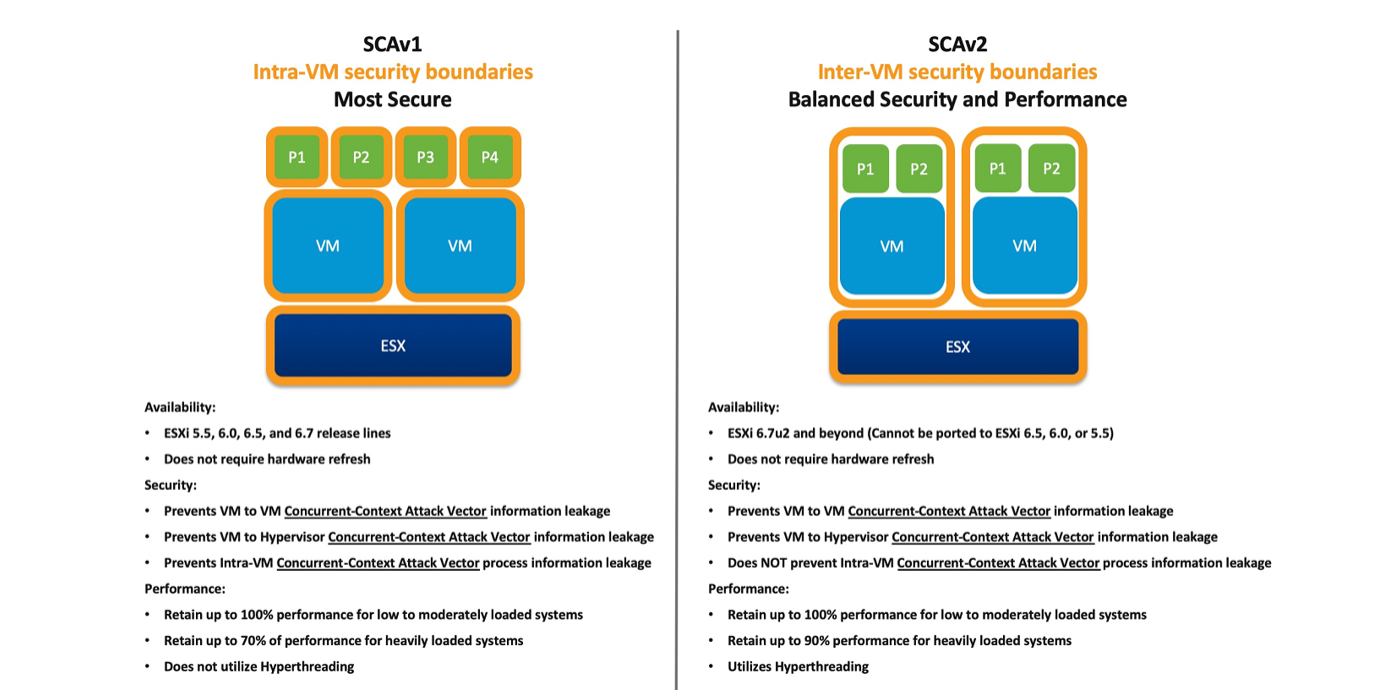
Figure: SCAv1 and SCAv2
Customers can choose not to enable the ESXi Side-Channel-Aware Scheduler after doing a risk assessment and accepting the risk that is posed by the Concurrent-context attack vector. IBM cannot make this decision on behalf of any organization.
Customers must assess their environment and can plan to deploy the optional ESXi image: Balanced Security and Performance - L1TF mitigated with SCAv2. Though they can utilize hyperthreading, it can expose and not prevent the Intra-VM Concurrent-Context Attach Vector process information leakage. For more information, see Figure: SCAv1 and SCAv2 or go through the VMware article VMware response to CVE-2018-3646.
Note: SCAv1/v2 is available only from Cloud Pak System 2.3.3.0 and higher.
For Systems with new M6 (W3500 and W3550 with Cascadelake processors) compute nodes (The model type 7x02 is a new Gen3+ model of a compute node called M6 compute node) and Gen4 (W4600), the vulnerability is not applicable. As M6 and Gen4 compute nodes are not vulnerable, ESXi Side-Channel-Aware Schedulers are not enabled on them. The hyperthreadingMitigation will not be enabled on these compute nodes and will be set with VMware defaults values.
Customers (compute nodes based on M5) can still preserve the hyperthreading option by opting for the non-default image and accepting the risk (in 2.2.6.0, the non-default image is without the hyperthreading mitigation scheduler. In 2.3.3.0 and higher, the non-default image is with SCAv2 image, which is with minimal risk.).
Note: If the customer chooses to accept the risk and use the non-default image, they get exposed to the vulnerability mentioned in this technote.
Impact of CloudGroup HighAvailability and System High Availability
The designated compute nodes for system HA must be the largest compute node in the system in terms of model, CPU, and memory.
For Cloud Groups containing M6 and M5 (Intel Haswell and Broadwell based compute nodes) Compute Nodes, the vCPU attributes fallback to a lower configuration.
[{"Line of Business":{"code":"","label":""},"Business Unit":{"code":"BU053","label":"Cloud & Data Platform"},"Product":{"code":"SSM8NY","label":"PureApplication System"},"ARM Category":[{"code":"a8m0z000000cwm2AAA","label":"Product Components"}],"ARM Case Number":"","Platform":[{"code":"PF033","label":"Windows"}],"Version":"2.2.6;2.3.0;2.3.1;2.3.2;2.3.3"},{"Line of Business":{"code":"LOB45","label":"Automation"},"Business Unit":{"code":"BU053","label":"Cloud & Data Platform"},"Product":{"code":"SSFQSV","label":"IBM Cloud Pak System Software"},"ARM Category":[],"Platform":[{"code":"PF033","label":"Windows"}],"Version":"2.2.6;2.3.0;2.3.1;2.3.2;2.3.3"}]
Was this topic helpful?
Document Information
Modified date:
08 February 2021
UID
ibm10958705