Troubleshooting
Problem
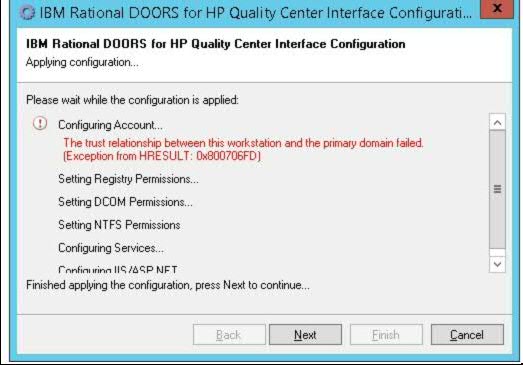
While running the configuration file, a window will appear like "Would you like to configure server now” and after clicking Next there is a "configuring account" error.
The trust relationship between this workstation and the primary domain failed. (Exception from HRESULT: 0x800706FD)
Symptom
Error Message Log:
Username: 'Administrator\IWSUSER'
Success
Granting 'Administrator\IWSUSER' batch logon right
Failure - System.Runtime.InteropServices.COMException (0x800706FD): The trust relationship between this workstation and the primary domain failed. (Exception from HRESULT: 0x800706FD)
at DCOMHelperLib.DCOMPermissionsClass.grantPrivilege(String principal, String priviledge)
at Telelogic.DOORS.TDIntegration.Configurer.ConfigureAccount()
--- Configuring Account End ---
Aborting..
Event Log Observation of the System
This computer was not able to set up a secure session with a domain controller in domain DATAMATO due to the following:
There are currently no logon servers available to service the logon request.
This may lead to authentication problems. Make sure that this computer is connected to the network. If the problem persists, please contact your domain administrator.
Event Log Observation of Doors Quality centre Services:
System.ServiceModel.EndpointNotFoundException: There was no endpoint listening at http://localhost:8080/DOORSTDIServices/DOORSTDIService.asmx that could accept the message. This is often caused by an incorrect address or SOAP action. See InnerException, if present, for more details. ---> System.Net.WebException: Unable to connect to the remote server ---> System.Net.Sockets.SocketException: No connection could be made because the target machine actively refused it 127.0.0.1:8080
at System.Net.Sockets.Socket.DoConnect(EndPoint endPointSnapshot, SocketAddress socketAddress)
at System.Net.ServicePoint.ConnectSocketInternal(Boolean connectFailure, Socket s4, Socket s6, Socket& socket, IPAddress& address, ConnectSocketState state, IAsyncResult asyncResult, Exception& exception)
--- End of inner exception stack trace ---
at System.Net.HttpWebRequest.GetRequestStream(TransportContext& context)
at System.Net.HttpWebRequest.GetRequestStream()
at System.ServiceModel.Channels.HttpOutput.WebRequestHttpOutput.GetOutputStream()
--- End of inner exception stack trace ---
Server stack trace:
at System.ServiceModel.Channels.HttpOutput.WebRequestHttpOutput.GetOutputStream()
at System.ServiceModel.Channels.HttpOutput.Send(TimeSpan timeout)
at System.ServiceModel.Channels.HttpChannelFactory`1.HttpRequestChannel.HttpChannelRequest.SendRequest(Message message, TimeSpan timeout)
at System.ServiceModel.Channels.RequestChannel.Request(Message message, TimeSpan timeout)
at System.ServiceModel.Channels.ServiceChannel.Call(String action, Boolean oneway, ProxyOperationRuntime operation, Object[] ins, Object[] outs, TimeSpan timeout)
at System.ServiceModel.Channels.ServiceChannelProxy.InvokeService(IMethodCallMessage methodCall, ProxyOperationRuntime operation)
at System.ServiceModel.Channels.ServiceChannelProxy.Invoke(IMessage message)
Exception rethrown at [0]:
at System.Runtime.Remoting.Proxies.RealProxy.HandleReturnMessage(IMessage reqMsg, IMessage retMsg)
at System.Runtime.Remoting.Proxies.RealProxy.PrivateInvoke(MessageData& msgData, Int32 type)
at Telelogic.DOORS.TDIntegration.DOORSTDIServices.IDOORSTDIService.Connect()
at Telelogic.DOORS.TDIntegration.Management.DOORSTDIWebServiceAdapter.Telelogic.DOORS.TDIntegration.Management.IDOORSTDIManagementService.Connect()
at Telelogic.DOORS.TDIntegration.Management.DOORSTDIServiceProvider.Connect(Uri uri, ICredentials credientials)
at Telelogic.DOORS.TDIntegration.Services.ScheduleTimer._timer_Elapsed(Object sender, ElapsedEventArgs e)
Cause
Resolving The Problem
1)The system should not be in the Domain. Remove the system from Domain and try to run the Configuration file. It should run successfully for Configuring account.
2)Double check that IWSUSER is created and this user is a member of the LOCAL Administrators group.
3) Check if IWSUSER is part of the Integration user group that you have created and that group is a local group.
4)Check whether the system on which you are installing the integration is a Domain Controller/ Not.
Document Location
Worldwide
Product Synonym
Rational Doors NG;HPQC
Was this topic helpful?
Document Information
Modified date:
20 June 2019
UID
ibm10887837