Product Documentation
Abstract
Business Automation Content Services on Cloud is supported as a backend for exporting scanned pages from on-premise Datacap deployments.
Content
Business Automation Content Services on Cloud is supported as a backend for exporting scanned pages from on-premise Datacap deployments with IBM Content Navigator and Datacap plug-in also deployed on-premise. In this use case, if you want to retrieve documents already scanned and stored in Business Automation Content Services on Cloud, you need to use IBM Content Navigator deployed in Business Automation Content Services on Cloud and not IBM Content Navigator deployed on-premise.
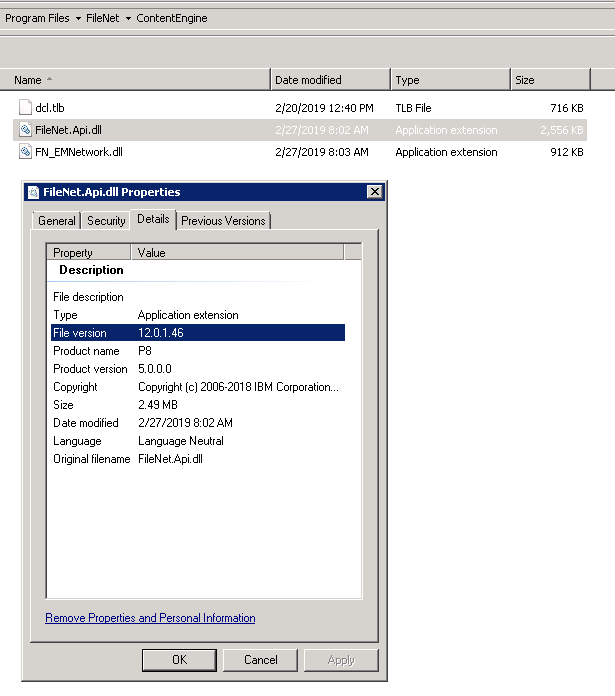
In order to connect to Business Automation Content Services on Cloud as a backend, you need to download and install the Content Platform Engine API package from the Business Automation Content Services on Cloud user portal. Using FileNetApiSetup.msi from the Content Platform Engine API package, install and register FileNet.Api.dll.
After the installation is complete, review and confirm the version of FileNet.Apil.dll file in the ContentEngine folder as shown below:
Document Location
Worldwide
[{"Business Unit":{"code":"BU053","label":"Cloud & Data Platform"},"Product":{"code":"SSZRWV","label":"IBM Datacap"},"Component":"","Platform":[{"code":"PF033","label":"Windows"}],"Version":"All Versions","Edition":"","Line of Business":{"code":"LOB45","label":"Automation"}}]
Was this topic helpful?
Document Information
Modified date:
08 September 2020
UID
ibm10880847