Troubleshooting
Problem
[This abstract has been truncated due to length constraints] Lenovo and IBM Servers based on Intel x86 architecture may exhibit poor virtual machine application performance when processor power management is implemented either by VMware ESXi/ESX or by the server hardware via Unified Extensible Firmware Interface (UEFI) settings. Symptoms: Virtual machine application performance is poor when compared to another host. Applications run slower than expected. When they are moved to another host, performance improves. Virtual machines encounter higher than expected Central Processing Unit (CPU) %Ready times in ESXTOP. Processor Power Management (Power Saving, Power Scaling) is impacting application performance on virtual machines. vDGA/vSGA performance is sluggish on View desktops. Tera2800 performance is less than expected in a View PCoIP session. Note: In some situations it was observed that disabling power management policies in system UEFI and vSphere Client has resolved inte
Resolving The Problem
Source
RETAIN tip: H214692
Symptom
Lenovo and IBM Servers based on Intel x86 architecture may exhibit poor virtual machine application performance when processor power management is implemented either by VMware ESXi/ESX or by the server hardware via Unified Extensible Firmware Interface (UEFI) settings.
Symptoms:
- Virtual machine application performance is poor when compared to another host.
- Applications run slower than expected. When they are moved to another host, performance improves.
- Virtual machines encounter higher than expected Central Processing Unit (CPU) %Ready times in ESXTOP.
- Processor Power Management (Power Saving, Power Scaling) is impacting application performance on virtual machines.
- vDGA/vSGA performance is sluggish on View desktops.
- Tera2800 performance is less than expected in a View PCoIP session.
Note: In some situations it was observed that disabling power management policies in system UEFI and vSphere Client has resolved intermittent 'Uncorrectable Bus Errors' or system reboots.
(where PCoIP = PC Over IP)
Affected configurations
The system is configured with at least one of the following:
- Lenovo Custom Image for ESXi 5.1.0, any model Any Update
- Lenovo Custom Image for ESXi 5.5.0, any model Any Update
- Lenovo Custom Image for ESXi 6.0.0, any model Any Update
- VMware ESX Server 4.0, any Update
- VMware ESX Server 4.1, any Update
- VMware ESXi 4.0 Embedded, any Update
- VMware ESXi 4.0 Installable, any Update
- VMware ESXi 4.1 Embedded, any Update
- VMware ESXi 4.1 Installable, any Update
- VMware ESXi 5.0, any Update
- VMware ESXi 5.1, any Update
- VMware ESXi 5.5, any model, any Update
- VMware ESXi 6.0, any model Any Update
- VMware vSphere Hypervisor 4.1 with IBM Customization Embedded, any Update
- VMware vSphere Hypervisor 4.1 with IBM Customization Installable, any Update
- VMware vSphere Hypervisor 5.0 with IBM Customization Installable, any Update
- VMware vSphere Hypervisor 5.1 with IBM Customization Installable, any Update
- VMware vSphere Hypervisor 5.5 with IBM Customization Installable, any model, any Update
This tip is not system specific.
This tip is not option specific.
The system has the symptom described above.
Note: This does not imply that the network operating system will work under all combinations of hardware and software.
Please see the compatibility page for more information:
http://www.ibm.com/systems/info/x86servers/serverproven/compat/us/Workaround
In order to work around the issue processor power management has to be disabled in system UEFI and vSphere Client.
To change power policies using server UEFI settings:
- Turn on the server.
Note: If necessary, connect a keyboard, monitor, and mouse to the console breakout cable and connect the console breakout cable to the compute node.
- When the prompt 'Press <F1> Setup' is displayed, press F1 and enter UEFI setup. Follow the instructions on the screen.
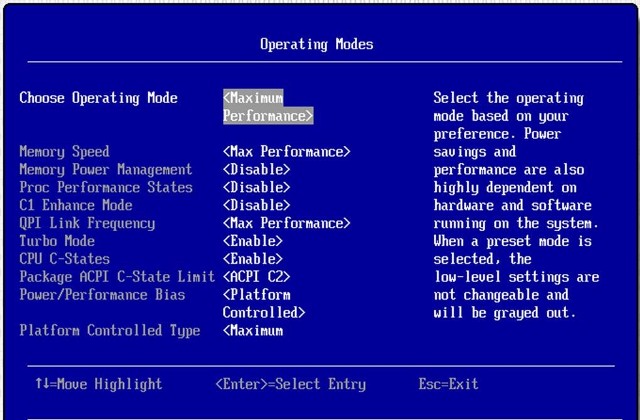
- Select System Settings --> Operating Modes and set it to 'Custom Mode' as shown in 'Custom Mode' figure, then set UEFI settings as follows:
Choose Operating Mode <Custom>
Memory Speed <Max Performance>
Memory Power Management <Disabled>
Proc Performance States <Disabled>
C1 Enhanced Mode <Disabled>
QPI Link Frequency <Max Performance>
QPI Link Disable <Enable All Links>
Turbo Mode <Enable>
CPU C-States <Disable>
Power/Performance Bias <Platform Controlled>
Platform Controlled Type <Maximum Performance>
Uncore Frequency Scaling <Disable>
- Press Escape key 3 times, and Save Settings.
- Exit Setup and restart the server so that UEFI changes take effect.
Next, change power policies using the vSphere Client:
- Select the host from the inventory and click the Manage tab and then the Settings tab as shown in 'Power Management view from the vSphere Web Client' figure.

- In the left pane under Hardware, select Power Management.
- Click Edit on the right side of the screen.
- The Edit Power Policy Settings dialog box appears as shown in 'Power policy settings' figure.

- Choose 'High performance' and confirm selection by pressing 'OK' radio button.
If vSphere Web client is not available, alternatively following ESXi 5 Scriptable Power Management Settings Commands esxcfg-advcfg and esxcli can be used:Â Â
|  # Get the current Active Policy     # Low Power     # Balanced     # High Performance     # Get the current Active Policy     # Low Power     # Balanced     # High Performance |
Additional information
For more details refer to knowledge base articles listed below:
Poor virtual machine application performance may be caused by processor power management settings (1018206):
Intel Xeon 5600 series processor C6-State refresh erratum - IBM System x (MIGR-5091950):
https://www-947.ibm.com/support/entry/portal/docdisplay?brandind=5000008&lndocid=MIGR-5091950
CPU x VRD fault with C-States enabled - IBM System x and BladeCenter (MIGR-5091926):
https://www-947.ibm.com/support/entry/portal/docdisplay?brandind=5000008&lndocid=MIGR-5091926
Document Location
Worldwide
Was this topic helpful?
Document Information
Modified date:
30 January 2019
UID
ibm1MIGR-5098137