Troubleshooting
Problem
4.5GB and 9.1GB Wide Ultra SCSI hard disk drives - Your drive is shipped with four jumpers already on the jumper block. These jumpers are the only ones you need to configure the drive for your system. To correctly place the jumpers:
Resolving The Problem
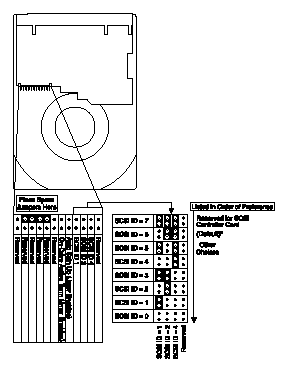
Your drive is shipped with four jumpers already on the jumper block. These jumpers are the only ones you need to configure the drive for your system. To correctly place the jumpers:
- Set up an address between 0 and 6 per the table above. Your hard drives must have the highest priority for your controller's attention. Therefore, give preference to 6, then 5, then 4, and so on.
- Because SCSI controllers all issue staggered start unit commands to each recognized SCSI drive, do not place a jumper on the Auto Spin Up position unless you have a third party controller that does not start your drive.
- Many newer systems have an active terminator circuit built into the device end of the cable. If you see such a device on the end of the cable, you must not enable On-Drive Active Termination on any of the devices on the cable. If your system does not have an active terminator circuit, be sure that the last device on a 68-pin cable is a 68-pin device, and that active termination is enabled on only that device. (50-pin devices, such as SCSI CD-ROMs or tape drives, should be attached only to one of the middle cable connectors on the 68-pin cable, through 68-pin cable to 50-pin device converters.)
Be sure to enable active termination only on the last device on the 50-pin cable. - Store up to two spare jumpers for future use in the positions shown above.
You must purchase a pin converter ( PN 01K1326) to use your new 68-pin drive in systems cabled for 50-pin devices. This pin converter is keyed, that is, it fits only one way, ensuring correct cable connections. The 68-pin side (connects to the drive) will be female and the 50-pin side will be male (connects to cable). After you install the pin converter, your drive will run in the SCSI 8-bit mode, and its maximum burst data transfer rate is reduced to be compatible with the highest capability of the cable and the controller.
Document Location
Worldwide
[{"Type":"HW","Business Unit":{"code":"BU016","label":"Multiple Vendor Support"},"Product":{"code":"QU00DEX","label":"System x Hardware Options->Hard drive - SCSI->4 GB->01K1327"},"Platform":[{"code":"PF025","label":"Platform Independent"}],"Line of Business":{"code":"","label":""}},{"Type":"HW","Business Unit":{"code":"BU016","label":"Multiple Vendor Support"},"Product":{"code":"QU00DEY","label":"System x Hardware Options->Hard drive - SCSI->9 GB->01K1328"},"Platform":[{"code":"PF025","label":"Platform Independent"}],"Line of Business":{"code":"","label":""}}]
Was this topic helpful?
Document Information
Modified date:
28 January 2019
UID
ibm1YAST-3TKRNY