Troubleshooting
Problem
GitHub Copilot frequently enters an extended or permanent "Thinking..." state (often >2 minutes). While responses stream, IBM DevOps Test UI (DTUI) experiences UI stuttering, input lag, or temporary freezing.
Symptom
Observed symptoms:
- The background Language Server (org.eclipse.lsp4e) successfully receives HTTP 200 responses from Copilot endpoints (api.business.githubcopilot.com),but the response fails to render properly.
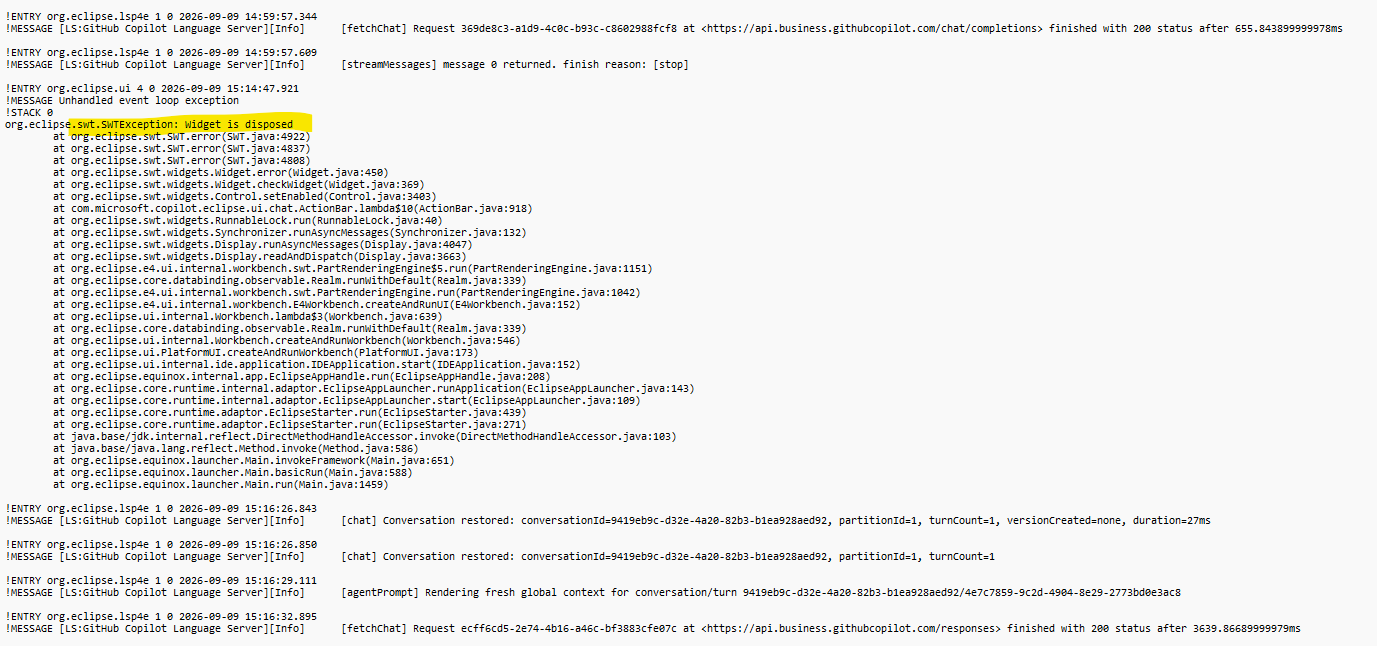
- The UI thread crashes with org.eclipse.swt.SWTException: Widget is disposed inside com.microsoft.copilot.eclipse.ui.chat.ActionBar.
- Copilot in Agent Mode initiates recursive workspace scans (e.g., Searching for files matching query: Script1.java).
- The frozen UI and long response delays occur primarily on environments with limited CPU/RAM resources. Machines with higher hardware specifications process smaller workspace projects without getting stuck.
- The freeze occurs most frequently when processing complex prompt instructions or referencing external rule files for script refactoring. While the AI generates the output in the background, the UI rendering synchronization stalls.

Cause
SWT Race Condition: When response streaming delays occur or active tabs are switched, Eclipse unmounts or disposes of underlying UI handles. Asynchronous updates to the action bar reference a destroyed component, throwing an unhandled org.eclipse.swt.SWTException: Widget is disposed exception in .metadata/.log. This leaves the UI permanently stuck in a "Thinking.." state after background job completion.
LSP4E Adapter Bridge: The extension relies on an adapter bridge (LSP4E) binding asynchronous Language Server responses to synchronous Eclipse UI widgets. Delays in thread synchronization during high resource usage cause UI freezes.
Wildcard Workspace Traversal: When searching for scripts without direct file context (e.g., #filename), Copilot initiates a wildcard workspace search (**/...). In large projects containing heavy test logs or execution results, recursive Java I/O operations consume high CPU percentages and stall execution.
Resolving The Problem
Best Practices & Workarounds:
Maintain Open Target Scripts: Open the relevant Java test script as the active tab in the editor prior to prompting Copilot, or explicitly reference the script using #filename (e.g., #Script1.java). This prevents recursive workspace scans.
Monitor CPU Consumption & Terminate Non-Essential Processes: Identify non-essential background applications, orphaned node.exe tasks, or unused background processes that consume high CPU cycles and terminate them to free up processing power for the IDE.
Reset the Chat View: If Copilot enters a persistent "Thinking..." state, close and reopen the Chat view (Window > Show View > Other... > GitHub Copilot > Copilot Chat or Ctrl + Alt + I) to restore disposed widget handles.
Clear Conversation Context: Select New Chat (+) periodically to clear token history. Prompts exceeding tens of thousands of tokens increase thread processing delays.
Re-authenticate Session: Sign out and sign back in to GitHub Copilot if network calls stall.
Restart DTUI Periodically: Restart DTUI when switching between heavy test execution runs to flush the background Language Server (LSP4E) and release memory.
Missing Plugin Dependencies: Environment analysis revealed missing plugin components (com.microsoft.copilot.eclipse.core) in the workspace metadata, which required reinstalling the extension to restore base functionality. Upgrading the GitHub Copilot extension to v0.21.0 or higher resolved the persistent "Thinking..." hang for standard workspace scripts and smaller projects.
Tune Heap Allocation (Optional): Adjust the -Xms (initial heap size) and -Xmx (maximum heap size) parameters in eclipse.ini to allocate sufficient heap space relative to available physical RAM. This prevents out-of-memory errors and reduces heap expansion overhead.
Document Location
Worldwide
Was this topic helpful?
Document Information
Modified date:
26 October 2026
UID
ibm17292840