How To
Summary
This configuration allows MQ users to authenticate with Active Directory/LDAP credentials through the RHEL PAM/SSSD framework while continuing to use MQ authorization controls such as MCAUSER and OAM.
Objective
This document describes how to configure IBM MQ Connection Authentication to allow MQ users to authenticate using Active Directory (AD) / LDAP domain credentials on RHEL systems integrated with SSSD. The configuration uses AUTHTYPE(IDPWOS) with AUTHENMD(PAM) to delegate authentication to the operating system while continuing to use MCAUSER and OAM authorities for authorization. Customers using domain users authenticated through RHEL SSSD/LDAP may observe MQ Explorer connection failures similar to:
AMQ5534E: User ID '' authentication failed
EXPLANATION:
The user ID and password supplied by the 'MQ Explorer 9.3.1' program could not be
authenticated.
Additional information: 'Pipe returned 2035 [FAILED]'.
Environment
IBM MQ 9.3 and above on RHEL/Linux
IBM MQ Explorer 9.3 or above
LDAP/SSSD configured on the MQ host
Steps
Step 1. Verify PAM Integration
When using the Linux PAM framework for LDAP authentication in IBM MQ. Ensure that the PAM configuration used by IBM MQ is correctly configured for the operating system and authentication provider.
For example, on RHEL systems, verify the file:
/etc/pam.d/ibmmq
contains entries similar to:
auth include system-auth
account include system-auth
password include system-auth
session include system-auth
Step 2. Verify LDAP Configuration on the MQ Host
Verify that the domain user can be resolved on the queue manager host:
id <userid>
getent passwd <userid>
sssctl user-checks -a auth user
Please note: If the above checks fails, MQ Authentication also fails
Step 3. Configure the AUTHINFO object to use PAM authentication
ALTER AUTHINFO(USE.LOCAL.OS)
AUTHTYPE(IDPWOS)
AUTHENMD(PAM)
CHCKCLNT(REQDADM)
ADOPTCTX(YES)
Why AUTHENMD(PAM) is required?
On Linux, AUTHTYPE(IDPWOS) supports two authentication methods:
AUTHENMD(OS)
AUTHENMD(PAM)
When AUTHENMD(OS) is used, IBM MQ authenticates users using the operating system authentication interfaces.
In environments where user authentication is provided through SSSD/LDAP or Active Directory integration, AUTHENMD(OS) may not successfully authenticate domain users. Changing AUTHENMD(PAM) allows MQ to delegate authentication through the Linux PAM stack, which in turn communicates with SSSD and the configured LDAP/Active Directory provider.
Step 4. Associate the AUTHINFO object with the queue manager
ALTER QMGR CONNAUTH(USE.LOCAL.OS)
Step 5. Refresh security or a QMGR restart
REFRESH SECURITY TYPE(CONNAUTH)
or Alternatively you can also do a full QMGR restart to apply the new settings.
Step 6. Configure CHLAUTH and MCAUSER
DEFINE CHANNEL(MQ.ADMIN.SVRCONN)
CHLTYPE(SVRCONN)
TRPTYPE(TCP)
Example CHLAUTH rule:
SET CHLAUTH(MQ.ADMIN.SVRCONN)
TYPE(ADDRESSMAP)
ADDRESS(*)
USERSRC(MAP)
MCAUSER('mq_user')
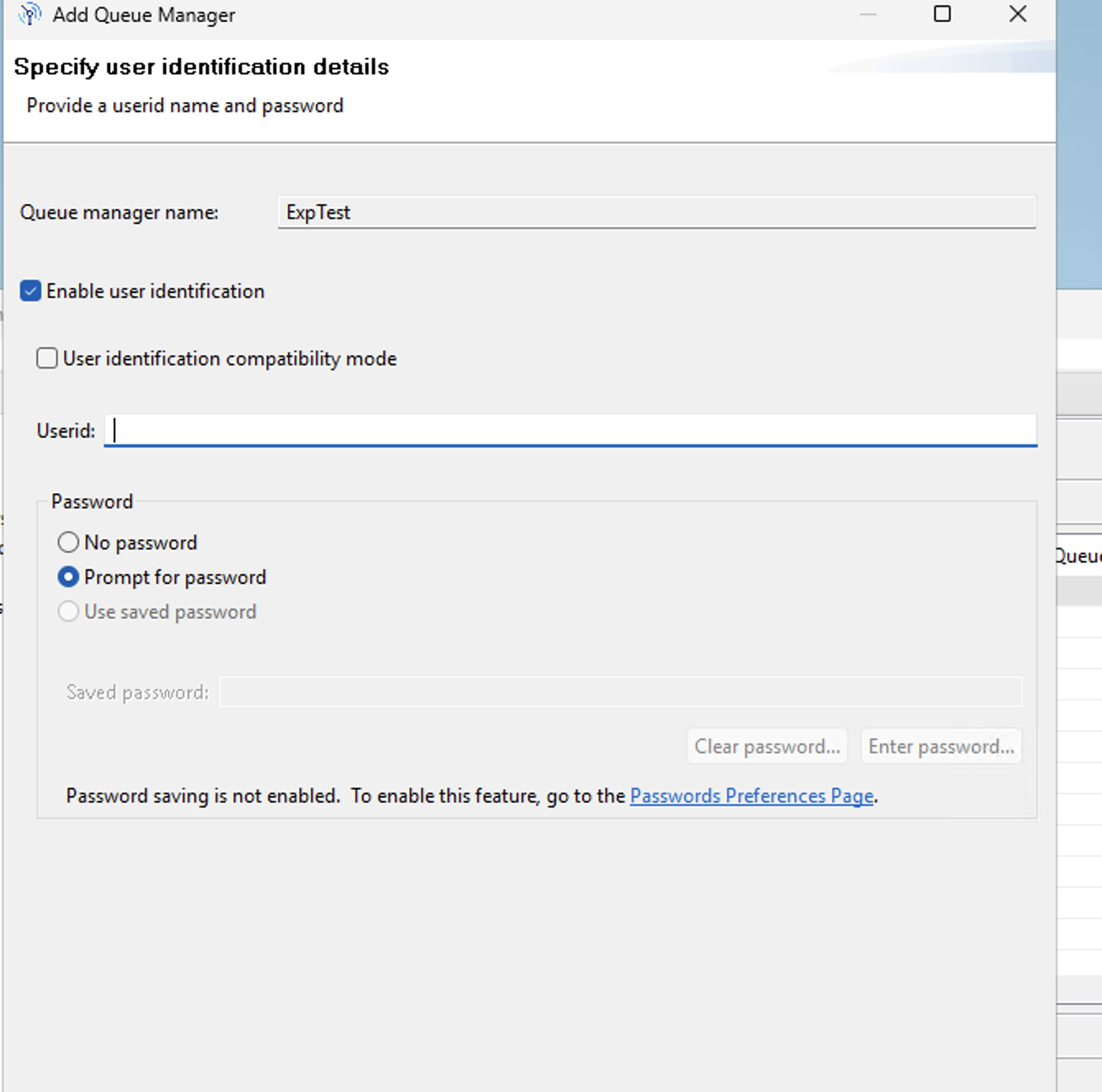
Step 7. Configure MQ Explorer and verify IBM MQ – PAM/LDAP authentication is working
Open MQ explorer
Add/edit the QMGR connection details
Navigate to the User Identification
Enable User identification and provide the domain user account.
See Image below:
Additional Information
IBM References:
Planning authorization: https://www.ibm.com/docs/en/ibm-mq/9.4.x?topic=requirements-planning-authorization
Connection authentication: https://www.ibm.com/docs/en/ibm-mq/9.4.x?topic=authentication-connection-configuration
Authorization to use with IBM MQ Explorer: https://www.ibm.com/docs/en/ibm-mq/9.4.x?topic=explorer-authorization-use-mq
Using the PAM method: https://www.ibm.com/docs/en/ibm-mq/9.4.x?topic=users-using-pluggable-authentication-method-pam
Troubleshooting:
If authentication still fails after configuring AUTHENMD(PAM):
• Verify SSSD can resolve the user:
id username
getent passwd username
• Verify PAM authentication:
sssctl user-checks -a auth username
• Verify
/etc/pam.d/ibmmq
• Confirm
DISPLAY QMGR CONNAUTH
• Confirm
DISPLAY AUTHINFO(USE.LOCAL.OS) ALL
• Refresh security
REFRESH SECURITY TYPE(CONNAUTH)
• Restart QMGR
• Review QMGR logs(AMQERR01.LOG) for AMQ5534E
Notes:
MQ user authenticates using domain credentials through PAM/SSSD. Successful authentication does not automatically grant MQ authorities. After authentication succeeds, MQ performs authorization using the MCAUSER (or adopted user context, depending on the configuration). Ensure the mapped user has the required OAM authorities.
CHCKCLNT(REQDADM)requires administrative users to authenticate. Other client connections may not be challenged for credentials unless they are considered administrative users.Changing
AUTHENMD(OS)toAUTHENMD(PAM)changes the authentication mechanism for all clients that use thatAUTHINFOobject.
Document Location
Worldwide
Product Synonym
IBM MQ
Was this topic helpful?
Document Information
Modified date:
24 September 2026
UID
ibm17286034