How To
Summary
zHyperLink fiber cables implementation best practices on IBM Z mainframe servers.
Objective
This document serves as a resource for customers and IBM field agents involved in implementing zHyperLink fiber cables on IBM Z mainframe servers.
Environment
IBM zHyperLink is a technology that provides a low-latency, point-to-point connection between IBM Z systems (z15, z16, z17) and IBM DS8880 storage systems and later models. It supports reading and writing ECKD data records and delivers up to a fivefold reduction in I/O service time for I/O requests.
The zHyperLink Express feature is a PCIe adapter installed in the PCIe I/O drawer and can be shared across multiple LPARs.
On the DS8000 side, the fiber optic cable connects to a zHyperLink PCIe interface in an I/O bay.
The zHyperLink Express feature offers the same quality of service as other IBM Z I/O channel features.
For a detailed overview of concepts, business perspectives, and reference architecture, refer to the IBM Redpaper™ publication: Getting Started with IBM zHyperLink for z/OS (https://www.redbooks.ibm.com/redpapers/pdfs/redp5493.pdf).
The following are complementary recommendations when preparing the features installation as part of the Hardware deployment ( see chapter 3.1.4) when installing zHyperLink cables within a Mainframe environment.
Steps
When preparing for zHyperLink feature installation as part of hardware deployment, follow these recommendations:
1. Timing of Fiber Cable Installation
Once a zHyperLink fiber cable is installed on both the IBM Z CPC and DS8K sides, the link becomes active and monitored—even if the I/O configuration is not yet set up. IBM recommends installing the fiber cables only when you plan to configure and use them.
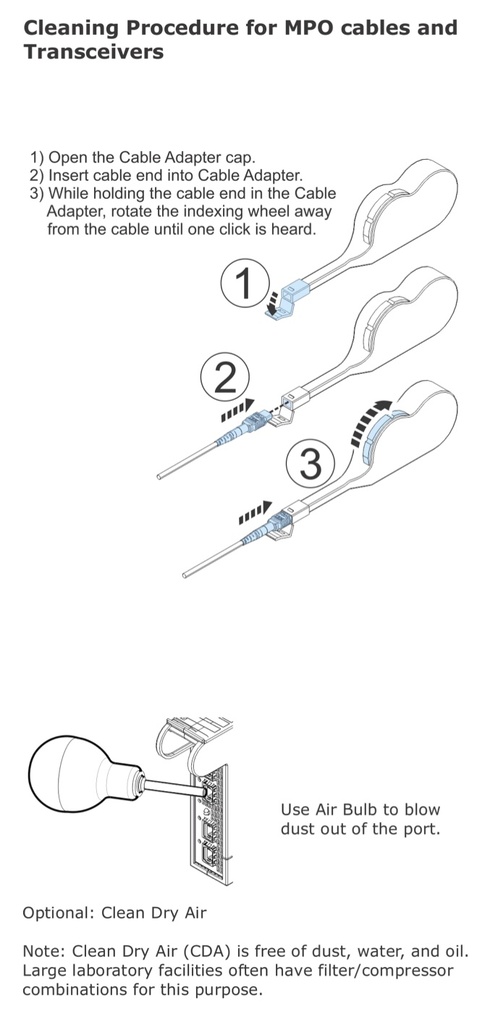
2. Fiber Cable Cleaning
With increasing optical speeds, cleanliness is critical for optimal performance and error-free transmission. Modern optics have tighter tolerances, making contamination levels that were acceptable at lower speeds problematic at higher speeds such as those used by zHyperLink.
Procedure:
Clean MPO/MTP-24 connector faces using the IBC 'One-Click' MPO/MTP cleaning tool or an equivalent device.
Perform cleaning on both the DS8K and IBM Z CPC sides—even if transceivers and cables are new and equipped with dust covers.
Refer to Appendix F of Maintenance Information for Fiber Optic Links (FICON/FCP, Coupling Links, and Open Systems Adapters): https://www.ibm.com/docs/en/module_1675371155154/pdf/SY27-7697-01.pdf
3. Sequence of Installation
Connecting or disconnecting a fiber while the IBM Z CPC link is active can trigger unnecessary I/O recoveries.
Recommendations:
Begin installation on the DS8K side before connecting fiber cables to the IBM Z CPC side.
When connecting fibers on the IBM Z CPC side, proceed one zHyperLink adapter at a time, validating each connection before moving to the next.
(See Chapter 3.1.7: Verifying zHyperLink Cables for details.)
Additional Information
Fiber Cleaning Tools
MPT/MPO Fiber Optic Trunk Connector Cleaner: 43W3044
Air Pump (Ship Group): 45D2645
References
- IBM Redpaper™: Getting Started with IBM zHyperLink for z/OS
- IBM Maintenance Guide: Maintenance Information for Fiber Optic Links
Related Information
Document Location
Worldwide
Was this topic helpful?
Document Information
Modified date:
18 December 2025
UID
ibm17254412