Troubleshooting
Problem
While processing an inbound EDI data file manually, using Commands/Process file Compost hangs.
There are Red Papers in the OUT?
The GENTRAN Services must be manually stopped and restarted to end the process. See this link
Also, the Documents need to be Reset. View/Processing/highlight the documents and then click Reset.
Symptom
In the auditlog it indicates 3-1-1729 Translator:Relationship not found
Translator: Primary key: PARTNER, PartnerName, DIRECTION: Out, AGENCY: X, VERSION: 004010
Translator:######; TRANSACTION SET: 999, RELEASE: 0, TEST MODE: T
Translator: Header: BYTE OFFSET: 846, HEX
Import Session Started C:\GENSRVNT\Temp\AKG7C38.tmp
Immediate acknowledgment generation is starting for InterchangeKey 186
Cause
The Inbound Partner Relationship/Inbound Group entry (for the inbound received), under the Group Advanced button, had for the Ack Transaction Set ID had 999 selected in the drop-down. There was not an Outbound Relationship for a 999 set up in the partner, as the 997 should have been selected in the Inbound/Group relationship.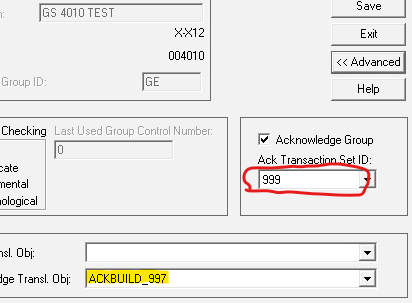
Diagnosing The Problem
In checking the Auditlog it is unable to find a Relationship for the 999, because the Functional Ack set up in the Partner Outbound Relationship is for a 997 
Resolving The Problem
Change the Inbound Group Advanced button for the Ack Transaction Set ID to 997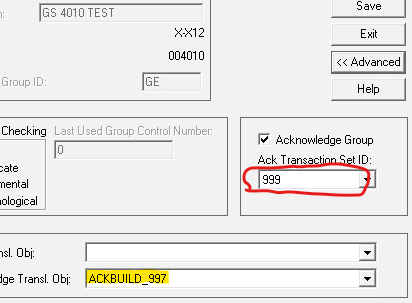
And the 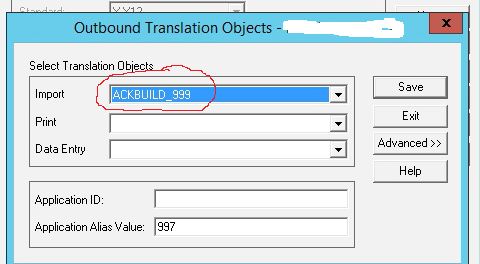
Document Location
Worldwide
Was this topic helpful?
Document Information
Modified date:
23 January 2026
UID
ibm17250731