Detailed System Requirements
Abstract
This document details the IBM Storage Defender Data Resiliency Service network requirements.
Content
To connect IBM Storage Defender Data Resiliency Service (DRS) as well as the IBM Storage Defender connection manager with storage systems, backup systems, workload hosts, and resources the connections need to be configured. This document provide a visualization of all possible connections and a table with the required network settings for those connections.
Use the following links to go to:
Visualization of all connections
Overall Architecture (Vertical Layout)
High-level system overview showing data flow from user access through authentication, SaaS services, core components, agents, and infrastructure integrations.
Notes:
- All authentication flows route through IBM Security Verify, even when using customer IdP
- Connection Manager requires internet access to DRS endpoints: *.storage-defender.ibm.com
- Clock synchronization via NTP is critical to prevent authentication failures
Storage Systems Integration
Connection Manager integration with storage systems for metadata collection and governance.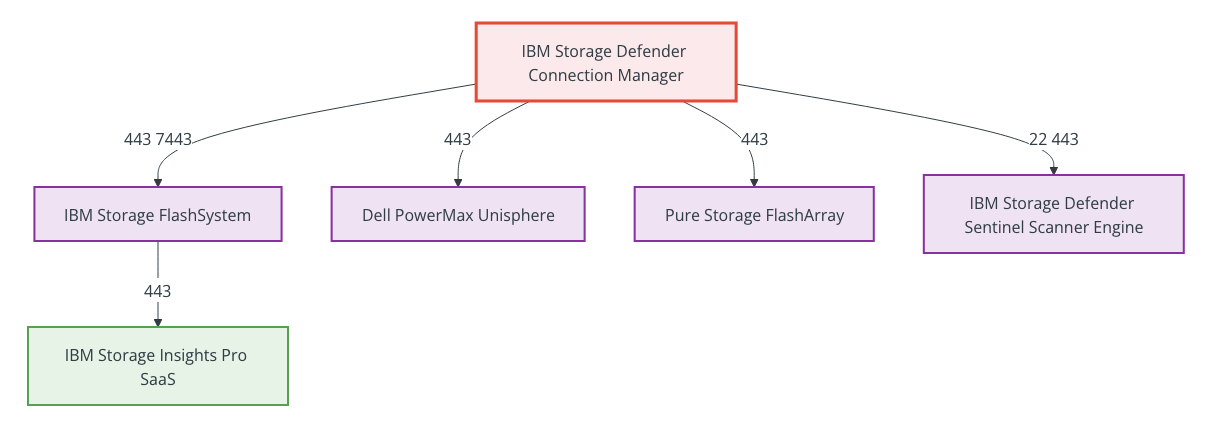
Notes:
- Fiber Channel or iSCSI must be configured between Sentinel scanner engine and FlashSystem
- FlashSystem must be registered in IBM Storage Insights Pro
- Connection between DRS tenant and Storage Insights Pro tenant must be requested
- Metadata collection supports governance and test recovery operations
Backup & Protection Integration
Connection Manager integration with backup and data protection systems.
Notes:
- IBM Storage Protect port 1500 is default but configurable
- SAP HANA connection currently supports system databases only
- Data Protect replication ports used for backup data between clusters
- Archive to external target requires Storage Protect object agent
- SSH access (port 22) requires Ansible for Oracle client installation only
- Access to IBM Storage Protect server required for backup operations
- Copy Data Management uses HTTPS (443) for metadata collection to support governance and test recovery operations
VMware vSphere Integration
Connection Manager and Data Protect integration with VMware infrastructure for production and clean room environments.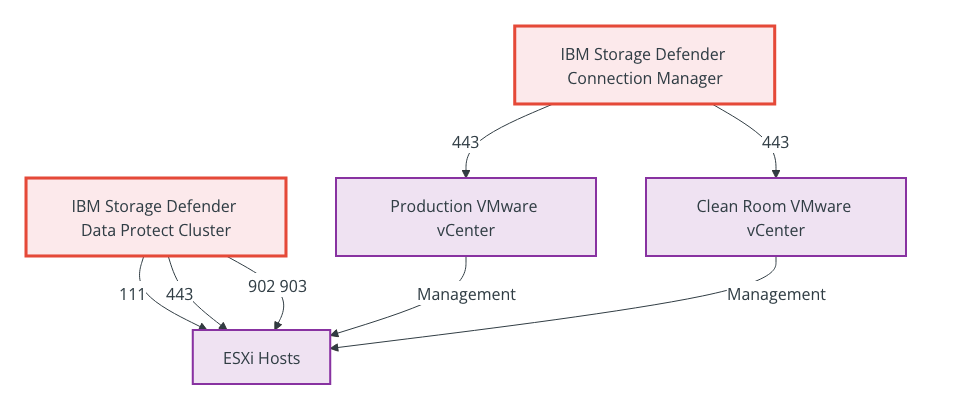
Notes:
- Production vCenter used for metadata collection and governance
- Clean room vCenter supports test recovery operations
- Fiber Channel or iSCSI must be configured between clean room ESXi hosts and FlashSystem
- Data Protect cluster requires direct access to ESXi hosts for VM operations
- NFC traffic (port 903) used for copying VM data during recovery operations
Security & SIEM Integration
Connection Manager integration with SIEM systems and sensor management.
Notes:
- Default sensor control node is included in Connection Manager
- Dedicated sensor control node is optional (Ansible Control Node)
- Sensors send heartbeats and alerts to Connection Manager via REST API
- SSH used for sensor installation on virtual machines
- Threat alerts forwarded to SIEM solutions for security monitoring
- Splunk HEC receives data over HTTPS on TCP port 8088
Table of network requirements for all connections
The following table details the IBM Storage Defender Data Resiliency Service (DRS) network requirements.
| Added with version | Description | Source component | Source Internet Protocol (IP) or Fully Qualified Domain Name (FQDN) | Target component | Target IP or FQDN | Target Port | Comment |
|---|---|---|---|---|---|---|---|
| 2.1.0 | Authentication to IBM Storage Defender | IBM Security Verify | Required for IBM Security Verify core function: ibmstoragedefender.verify.ibm.com idaas-us01a.ice.ibmcloud.com login.ibm.com www.ibm.com Required to enable fonts, analytics, and trust/consent: 1.www.s81c.com awppcivuse1.advanced-web-analytics.com consent.truste.com | Customer web browser | Customer's end-user of IBM Storage Defender IP or FQDN | 443 TCP (HTTPS) | Allow the source URLs to enable login to IBM Storage Defender Services. This is required even when a customer-provided identity provider (IdP) is in use, because all IBM Storage Defender authentication flows are routed through IBM Security Verify. |
| 2.1.0 | Dell PowerMax | IBM Storage Defender connection manager | IBM& Storage Defender connection manager IP or FQDN | Dell Unisphere for PowerMax | Dell Unisphere IP or FQDN | 443 TCP (HTTPS) | To collect metadata from Dell PowerMax for governance using IBM Storage Defender. |
| 2.1.0 | Domain Name Service (DNS) | all related systems | _ | DNS server | _ | 53 TCP | The connection manager must be able to resolve domain names. |
| 2.1.0 | IBM Fusion Backup and Restore | IBM Storage Defender connection manager | IBM Storage Defender connection manager IP or FQDN | IBM Fusion Cluster OpenShift instance | IBM Fusion user interface IP or FQDN | 443 TCP (HTTPS) | IBM Fusion Cluster URL |
| 2.1.0 | IBM Storage Defender Sentinel | IBM Storage Defender connection manager | IBM Storage Defender connection manager IP or FQDN | IBM Storage Defender Sentinel scanner engine | IBM Storage Defender Sentinel scanner engine IP or FQDN | 22 TCP 443 TCP (HTTPS) | Fiber channel or iSCSI needs to be configured between the Sentinel scanner engine and FlashSystem. |
| 2.1.0 | IBM Storage Defender Data Protect | IBM Storage Defender connection manager | IBM Storage Defender connection manager IP or FQDN | IBM Storage Defender Data Protect cluster | all IBM Storage Defender Data Protect cluster node IPs and Virtual IPs or FQDN | 443 TCP (HTTPS) | To collect metadata from connected IBM Storage Defender Data Protect cluster to support governance and enable test recovery operations. |
| 2.1.0 | IBM Storage Defender Data& Protect | VMware vCenter and ESX hosts | _ | IBM Storage Defender Data Protect cluster | all IBM Storage Defender Data Protect cluster node IPs and Virtual IPs or FQDN | 111 UDP & TCP: NFS Portmapper | Secure Shell (SSH) used for sensor installation REST API used for heartbeats and alerts between sensor and connection manager. Only used if a Defender sensor control node (Ansible Control Node) is used. |
| 2.1.0 | IBM Storage Defender Data Protect | IBM Storage Defender Data Protect cluster | _ | VMware vCenter and ESX hosts | Production and clean room VMware vCenter IP or FQDN | 443 TCP 902 TCP: VMware VIX, used for control traffic to ESXi hosts. 902 TCP & 903 TCP: Used for NFC (Network File Copy) traffic for copying VM data. | Fiber channel or iSCSI needs to be configured between the clean room ESXi host and FlashSystem. |
| 2.1.0 | IBM Storage Defender Data Resiliency Service | IBM Storage Defender connection manager | IBM Storage Defender connection manager IP or FQDN | IBM Storage Defender Data Managment Service SaaS Instance | *.storage-defender.ibm.com, demw09w5z99jx.cloudfront.net, cm-logbundle-us-east-2-prod.s3.us-east-2.amazonaws.com | 443 TCP (HTTPS) | IBM Storage Defender connection manager uses: - WebSocket (Secure) protocol to talk to the DRS. - HTTPS protocol to download updates from AWS CloudFront. - HTTPS protocol to upload support log packages to AWS S3. In all cases, the IBM Storage Defender connection manager must be able to connect to the internet endpoints on port 443 (HTTPS). |
| 2.1.0 | IBM Storage Defender sensor | VMs with IBM Storage Defender sensors | Virtual machines (used for sensor installation) IP or FQDN | IBM Storage Defender connection manager | IBM Storage Defender connection manager IP or FQDN | 443 TCP (HTTPS) | REST API used for heartbeats and alerts between sensor and connection manager. See Defender sensor control node. |
| 2.1.0 | IBM Storage Defender sensor control node (optional) | IBM Storage Defender sensor control node | IBM Storage Defender< sensor control node IP or FQDN | VMs with IBM Storage Defender sensors | IBM Storage Defender connection manager IP or FQDN | 22 TCP 443 TCP (HTTPS) | The default sensor control node is included in the connection manager. The dedicated control node is optional. SSH used for sensor installation REST API used for heartbeats and alerts between sensor and connection manager. Only used if a IBM Storage Defender sensor control node (Ansible Control Node) is used. |
| 2.1.0 | IBM Storage Insights (Production) | IBM Storage FlashSystem | _ | IBM Storage Insights Pro SaaS | *.storageinsights.ibmcloud.com esupport.ibm.com | 443 HTTPS (TCP) | Storage must be registered in IBM Storage Insights Pro. The connection between the IBM Storage Defender DRS tenant and IBM Storage Insights Pro tenant need to be requested. |
| 2.1.0 | IBM Storage Protect | IBM Storage Defender connection manager | IBM Storage Defender connection manager IP or FQDN | IBM Storage Protect server | IBM Storage Protect server IP or FQDN | TCP PORT (1500 as default) | To collect metadata from connected IBM Storage Protect server to support governance and enable test recovery operations. |
| 2.1.0 | IBM Storage Protect for Oracle client | IBM Storage Defender connection manager | IBM Storage Defender connection manager IP or FQDN | IBM Storage Protect for Oracle client | IBM Storage Protect system (used for the Oracle client installation) IP or FQDN | 22 TCP | SSH is required by Ansible. Also require access to the IBM Storage Protect server used for backup. |
| 2.1.0 | IBM Storage FlashSystem | IBM Storage Defender connection manager | IBM Storage Defender connection manager IP or FQDN | IBM Storage FlashSystem management IP | IBM Storage FlashSystem IP or FQDN | 443 TCP (HTTPS GUI) 7443 TCP (HTTPS GUI) | To collect metadata from connected IBM Storage FlashSystem to support governance and enable test recovery operations. |
| 2.1.0 | Network Time Protocol (NTP) | IBM Storage Defender connection manager | IBM Storage Defender connection manager IP | NTP server(s) | NTP server IP or FQDN | 123 UDP | Resolving failure to connect to Data Resiliency due to clock skew |
| 2.1.0 | Pure FlashArray | IBM Storage Defender connection manager | IBM Storage Defender connection manager IP or FQDN | Pure Storage FlashArray | Pure Storage FlashArray IP or FQDN | 443 TCP (HTTPS) | To collect metadata from connected Pure FlashArray to support governance. |
| 2.1.0 | SAP HANA | IBM Storage Defender connection manager | IBM Storage Defender connection manager IP or FQDN | SAP HANA | SAP HANA DB server IP or FQDN | SAP HANA system database Port | Port: Currently DRS supports the connection to SAP HANA system databases only. Also require access to the IBM Storage Protect server used for backup. |
| 2.1.0 | SIEM | IBM Storage Defender connection manager | IBM Storage Defender connection manager IP or FQDN | SIEM: IBM QRadar syslogd | Qradar server IP or FQDN | 514 (UDP & TCP) | Sending threat alerts to the SIEM solution. |
| 2.1.0 | SIEM | IBM Storage Defender connection manager | IBM Storage Defender connection manager IP or FQDN | SIEM: Splunk | Splunk server IP or FQDN | 8088 TCP (HTTPS) | Sending threat alerts to the SIEM solution. HTTP Event Collector (HEC) receives data over HTTPS on TCP port. |
| 2.1.0 | Single Sign-On (SSO) using customer-provided identity provider (IdP) | IBM Security Verify | ibmstoragedefender.verify.ibm.com idaas-us01a.ice.ibmcloud.com | Customer-provided identity provider (IdP) | Identity provider (IdP) IP or FQDN | 443 TCP (HTTPS) | Required to enable usage of customer-provided identity provider (IdP). Used to exchange of URLs, certificates, and configuration settings between IBM Security Verify and customer-provided identity provider. |
| 2.1.0 | VMware vSphere (Clean room) | IBM Storage Defender connection manager | IBM Storage Defender connection manager IP or FQDN | Clean room vCenter | Clean room VMware vCenter IP or FQDN | 443 TCP (HTTPS) | To collect metadata from connected clean room VMware vCenter to support governance and enable test recovery operations. |
| 2.1.0 | VMware vSphere (Production) | IBM Storage Defender connection manager | IBM Storage Defender connection manager IP or FQDN | Production vCenter | Production VMware vCenter IP or FQDN | 443 TCP (HTTPS) | To collect metadata from connected production VMware vCenter to support governance. |
| 2.1.5 | IBM Storage Defender Copy Data Management | IBM Storage Defender connection manager | IBM Storage Defender connection manager IP or FQDN | IBM Storage Defender Copy Data Management | IBM Storage Defender Copy Data Management Server IP or FQDN | 443 TCP (HTTPS) | To collect metadata from connected IBM Storage Defender Copy Data Management to support governance and enable test recovery operations. |
| 2.1.5 | IBM Storage Defender Data Protect Replication | IBM Storage Defender Data Protect | IBM Storage Defender Data Protect cluster IP or FQDN | IBM Storage Defender Data Protect | IBM Storage Defender Data Protect cluster IP or FQDN | 443 TCP 111111 TCP 20000 TCP 23335 TCP 23336 TCP 244444 TCP | Backup data replication between IBM Storage Defender Data Protect clusters. |
| 2.1.5 | IBM Storage Defender Data Protect Archive | IBM Storage Defender Data Protect | IBM Storage Defender Data Protect cluster IP or FQDN | IBM Storage Protect object agent | IBM Storage Protect object agent IP or FQDN | 9000 TCP | IBM Storage Defender Data Protect archive to external target IBM Storage Protect. |
| 2.1.5 | IBM Storage Defender Data Protect Support | IBM Storage Defender Data Protect | IBM Storage Defender Data Protect cluster IP or FQDN | Customer support servers | Customer support servers IP or FQDN | 443 TCP (HTTPS) | Access for support team. |
Related Information
Was this topic helpful?
Document Information
Modified date:
25 June 2026
UID
ibm17245394