How To
Summary
Content Platform Engine 5.7.0 introduces a technology preview of a new dual-indexing based migration mechanism for Content Based Retrieval. With this mechanism, an object store can seamlessly transition from using Content Search Services to using Elasticsearch or OpenSearch as the CBR engine. The migration mechanism allows a period of dual indexing, in which new documents are indexed into both CSS and the new search engine (Elasticsearch or OpenSearch). It also provides a sweep mechanism that allows documents that were previously indexed in CSS to be also indexed into the new search engine. During this period, the CBR searches use CSS and thus correctly search the entire corpus of indexed documents. When all desired documents are indexed in both engines, CSS can be decommissioned and CBR searches will then use the new search engine (Elasticsearch or OpenSearch) and its now complete corpus of indexed documents.
Objective
By default, CSS supports a broader and diverse set of native language codes. In contrast, Elasticsearch offers a limited range of built-in language analyzers. This mismatch can lead to inconsistent multilingual search behavior when both systems are used in dual indexing mode. To ensure alignment between the two systems, you need to explicitly configure language analyzers in Elasticsearch to match the language codes used in CSS. To achieve this, you can do one of the following:
- Use a native Elasticsearch language analyzer that corresponds to the language code that is defined in CSS.
- For languages that are not natively supported by Elasticsearch:
- Deploy a custom analyzer in Elasticsearch that supports the required language.
- If a suitable custom analyzer is unavailable, default to English in both CSS and Elasticsearch to maintain uniform behavior.
Dual indexing introduces a new database table for an object store called the IndexPairs table. The table is used to track the indexation_id of content that is indexed into both Elasticsearch and CSS. When an object is indexed into both systems, the indexation_id of the object transforms into a dual_id. The dual_id serves as a reference that links back to the original indexation_id in CSS and the class_id used in Elasticsearch.
The IndexPairs table includes the following fields:
- dual_id - A unique identifier for objects indexed in both systems.
- verity_id - Stores the Elasticsearch
class_id. - cascade_id - Represents the original
indexation_idfrom CSS.
For object stores that have already been migrated to Elasticsearch from CSS, this table already exists.
The following diagram illustrates how a newly ingested document is processed across the three configurations - CSS only, Elasticsearch only, dual mode with CSS and Elasticsearch:

When a CBR-enabled class is reindexed, the system creates an indexing job. With dual-indexing, the indexing job concurrently generates indexing requests for both the CSS and Elasticsearch engines. As a result, all existing documents of the specific class-type are reindexed by both engines.
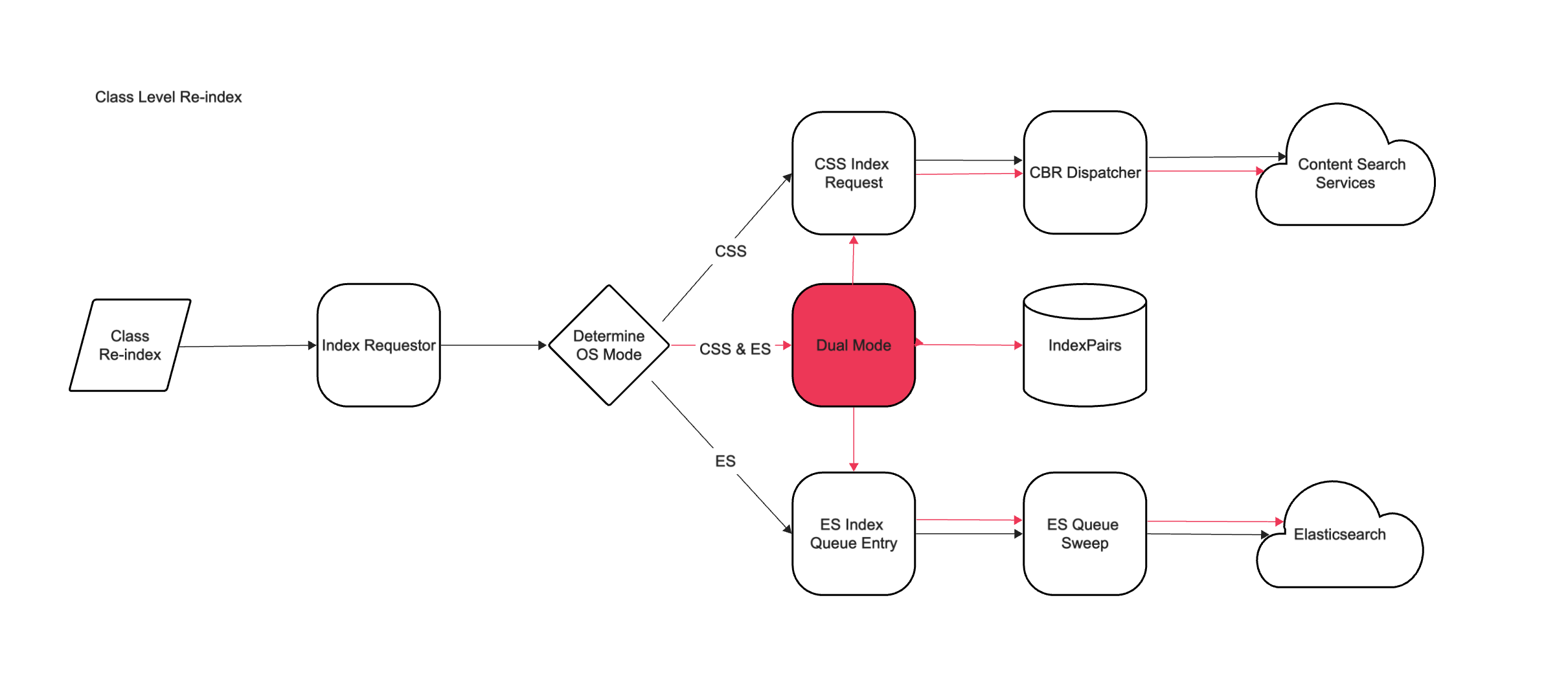
Alternatively, when you enable CBR and run an indexing job for a class that was not previously indexed, all existing documents of the specific class-type are reindexed by both engines in dual mode.
Similar to class-level reindexing, when a CBR-enabled object (document) is reindexed, the system creates an indexing job. With dual-indexing, the indexing job will generate an indexing request to index the object into both CSS and ES.
When you reindex a CSS index area(Collection-level), it triggers reindexing of every CBR-enabled object within that index area into CSS only. Reindexing at this level is not supported into Elasticsearch.
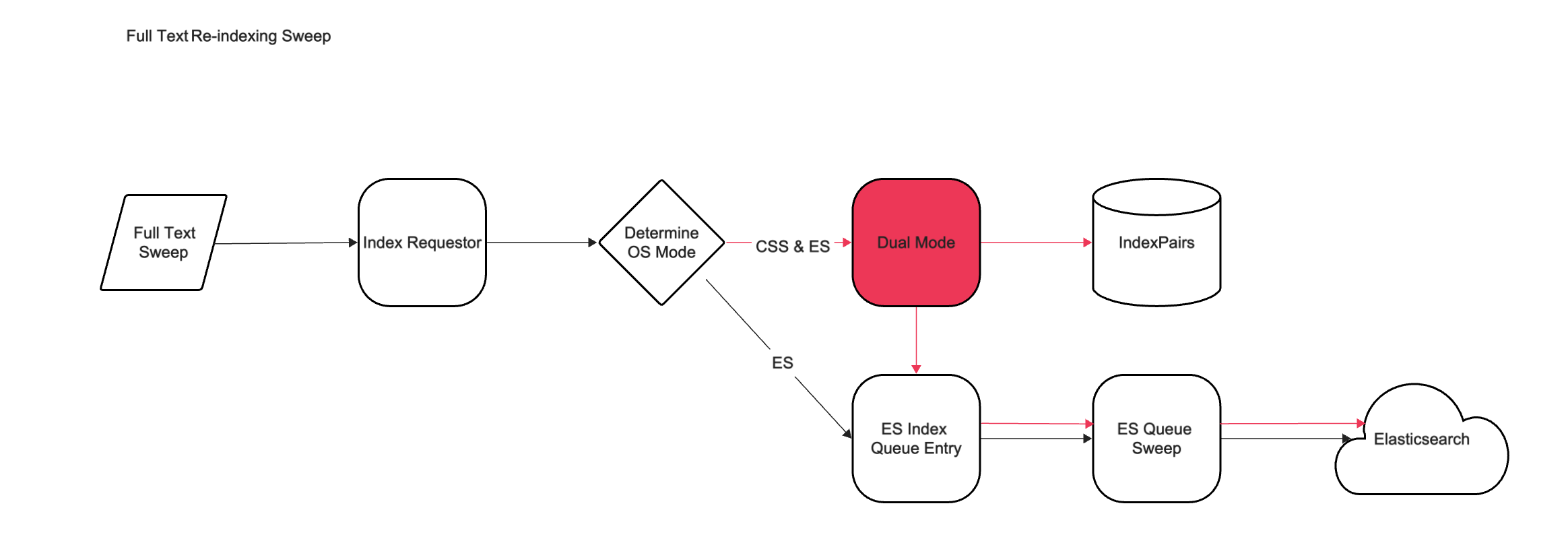
In either CSS Single Mode or ES Single Mode, the Full Text Re-indexing Sweep (FTRS) has not changed in behavior. However, in Dual Mode the FTRS will generate indexing requests into Elasticsearch only. The FTRS can be used to create indexing requests for documents that were previously indexed into CSS only.
Environment
- When an object store uses CSS as its indexing engine, has a configured CSS index area, and Content Based Retrieval (CBR) is enabled.
- When Elasticsearch is added as a second indexing engine to such an object store. In this case, you must configure an Elasticsearch index area alongside the existing CSS index area.
Steps
- Add an Elasticsearch cluster to your P8 domain. You can skip this step if you already configured the Elasticsearch cluster for another object store within your P8 domain. For more information, see the topic Configuring CPE to use Elasticsearch in the FNCM documentation.
- Make sure that your object store has an already configured CSS index area and is enabled for CBR.
- In the ACCE console, go to the object store and select Design -> Text Search. The Dual mode is enabled checkbox remains unchecked. It is read-only and changes value only when index areas for both CSS and ES are present.
- Create an Elasticsearch index area for the same object store. For more information, see the topic Configuring an Elasticsearch index area in the FNCM documentation.
- After you create the Elasticsearch index area, go to the object store and select Design -> Text Search. The Dual mode is enabled checkbox is automatically selected and indicates that dual mode is enabled.
- Select a language analyzer to finalize the dual mode configuration. For more information, see the topic Selecting text languages or text analyzers for an object store in the FNCM documentation.
An SQL query search on a document class can be performed using a query similar to the following:
SELECT d.This FROM Document d INNER JOIN ContentSearch c
ON d.This = c.QueriedObject
WHERE CONTAINS(d.*, 'content')
Here, the ‘content’ parameter is the full word text search to be performed on the object store.
CSS is the default search engine. An “elasticsearch” parameter can be added to the query to search inside of Elasticsearch instead. There is no mechanism to search in both engines and merge the results. The following query example can be used to search inside of Elasticsearch:
SELECT d.This FROM Document d INNER JOIN ContentSearch c
ON d.This = c.QueriedObject
WHERE CONTAINS(d.*, 'content', elasticsearch)SELECT d.This FROM Document d INNER JOIN ContentSearch c
ON d.This = c.QueriedObject
WHERE CONTAINS(d.*, 'content', lucene)
Document Location
Worldwide
Was this topic helpful?
Document Information
Modified date:
01 December 2025
UID
ibm17235820