How To
Summary
This guide is to assist with gathering error reports from DataPower, which may be having issues with downloads via UI, or in which you are not able to get files from the appliance. Please note that while this document is specific to error reports, it can be used to gather any file from DataPower.
Steps
Using a tool such as PuTTY, open the application and find the Session -> Logging section. In here, you will want to set your logging to capture All session output, and make sure to have the file written to a location you can easily find.
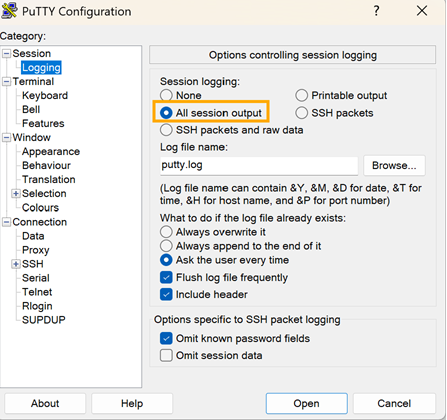
Connect to your DataPower instance, and run the following commands:
idg# co
Global mode
idg(config)# save error-report
DataPower will then begin to generate an error report for you, and when it is done, will tell you the name of the report. Error reports, by default, follow the following naming convention:
temporary:///error-report.SerialNumber.TimeStamp.txt.gzFinally, all you will need to do will be to run the show file command as shown below:
idg(config)# show file temporary:///error-report.SerialNumber.TimeStamp.txt.gzAllow PuTTY enough time to fully display everything in the file, as the file is quite long and can take a second or two to fully finish printing to the console. Once it is done, you can close PuTTY, and check your putty.log file to ensure completeness. You can then share this file with IBM DataPower support, and inform them that the error report is present in the putty log.
Document Location
Worldwide
[{"Type":"MASTER","Line of Business":{"code":"LOB77","label":"Automation Platform"},"Business Unit":{"code":"BU048","label":"IBM Software"},"Product":{"code":"SS9H2Y","label":"IBM DataPower Gateway"},"ARM Category":[{"code":"a8m50000000CdrrAAC","label":"DataPower-\u003EMGMT (MM)-\u003ECLI"}],"ARM Case Number":"","Platform":[{"code":"PF025","label":"Platform Independent"}],"Version":"All Versions"}]
Was this topic helpful?
Document Information
Modified date:
04 June 2026
UID
ibm17156402