How To
Summary
The example provides steps to setup of a Federated Repository that uses a SAF repository and an LDAP repository.
Objective
The instructions use the Admin Console to log in with a SAF userid or an LDAP userid. The example provides the minimal steps to move from stand-alone SAF registry to a Federated Repository containing only a SAF registry. The example concludes by combining both the SAF and LDAP user registries into a single Federated Repository for which a user in either of the repositories can log in to the administrative console.
Environment
Network Deployment or Base WebSphere for z/OS server setup initially with a SAF local user registry and SAF authorization
Steps
1. Enabling the user registry bridge as a custom repository
Initial Settings for a Federated Repository shows the file-based InternalFileRepository
Global Security -> Federated Repositories
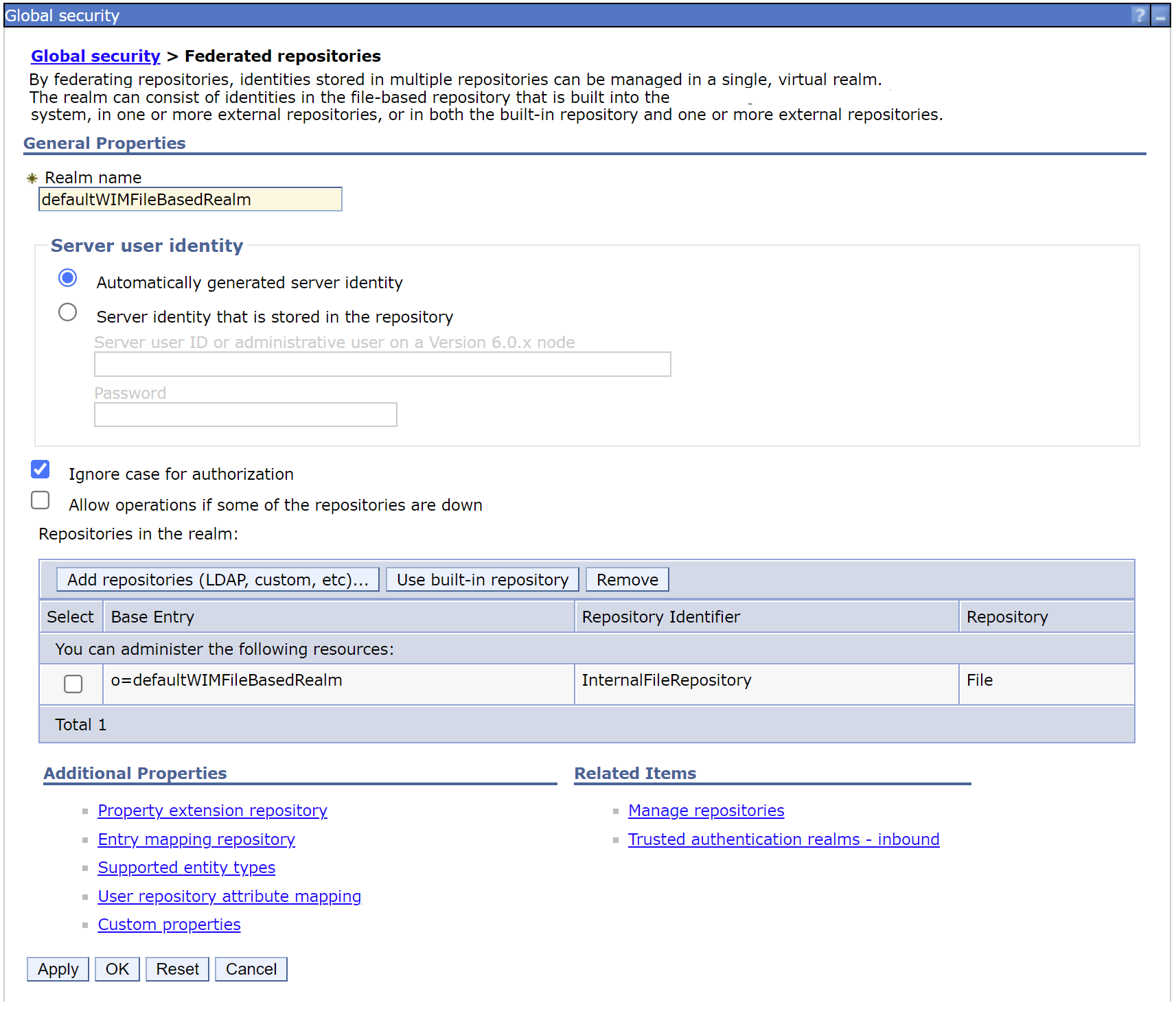
a. Run the wsadmin commands to enable the User Registry Bridge for the Federated Repository
Configuring the user registry bridge for federated repositories that use wsadmin scripting
Jython Commands
wsadmin.sh -lang jython -conntype none
AdminTask.createIdMgrCustomRepository('-id urbRACF -adapterClassName com.ibm.ws.wim.adapter.urbridge.URBridge')
AdminTask.addIdMgrRepositoryBaseEntry('-id urbRACF -name o=local')
AdminConfig.save()
exit
or
JACL commands
wsadmin -conntype none
$AdminTask createIdMgrCustomRepository {-id urbRACF -adapterClassName com.ibm.ws.wim.adapter.urbridge.URBridge}
$AdminTask addIdMgrRepositoryBaseEntry {-id urbRACF -name o=local}
$AdminConfig save
exit
$AdminTask createIdMgrCustomRepository {-id urbRACF -adapterClassName com.ibm.ws.wim.adapter.urbridge.URBridge}
$AdminTask addIdMgrRepositoryBaseEntry {-id urbRACF -name o=local}
$AdminConfig save
exit
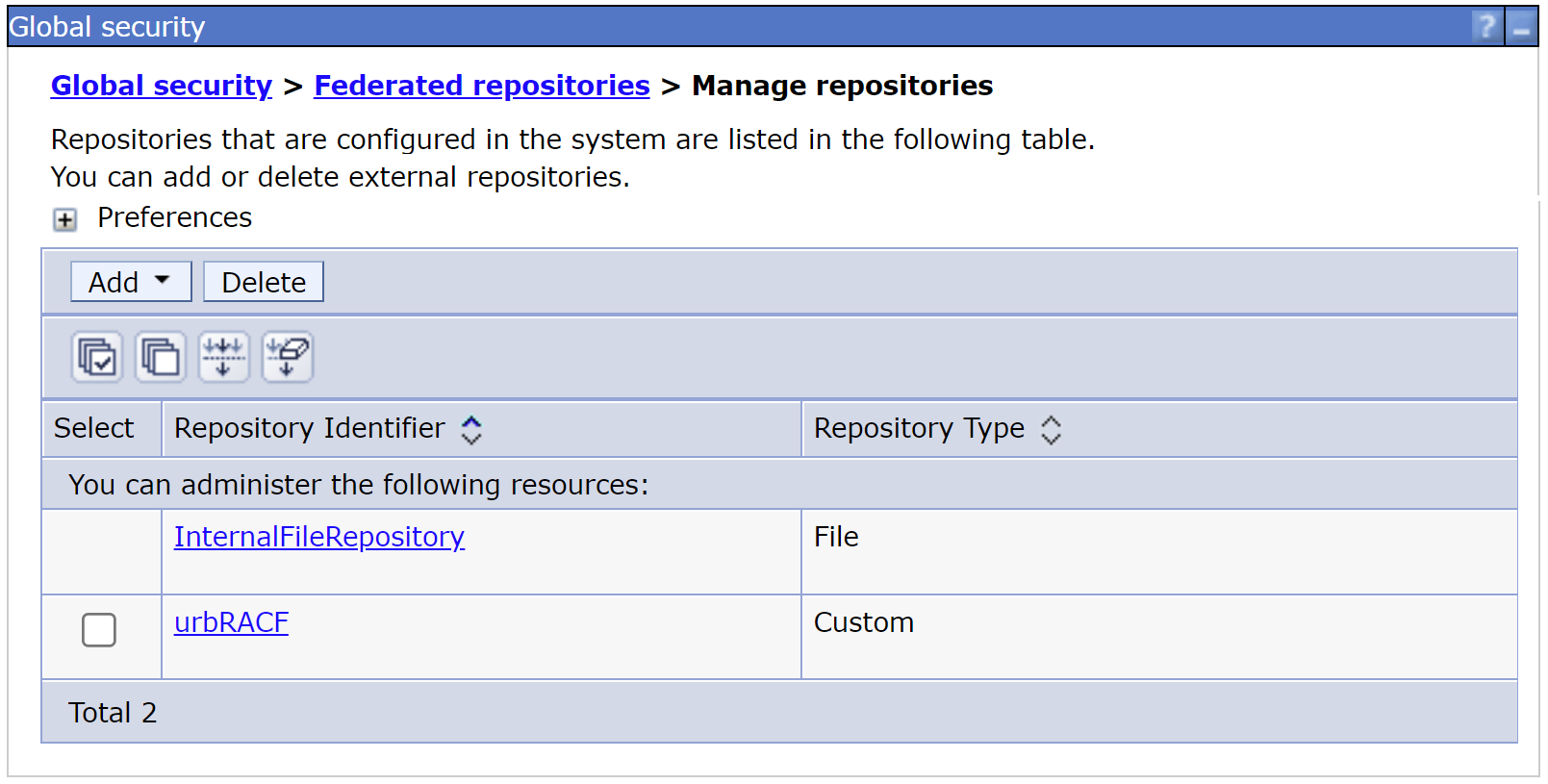
b. Logging on to the administrative console shows the user registry bridge as a custom repository with repository identifier urbRACF.
Global Security -> Federated Repositories -> Manage Repositories
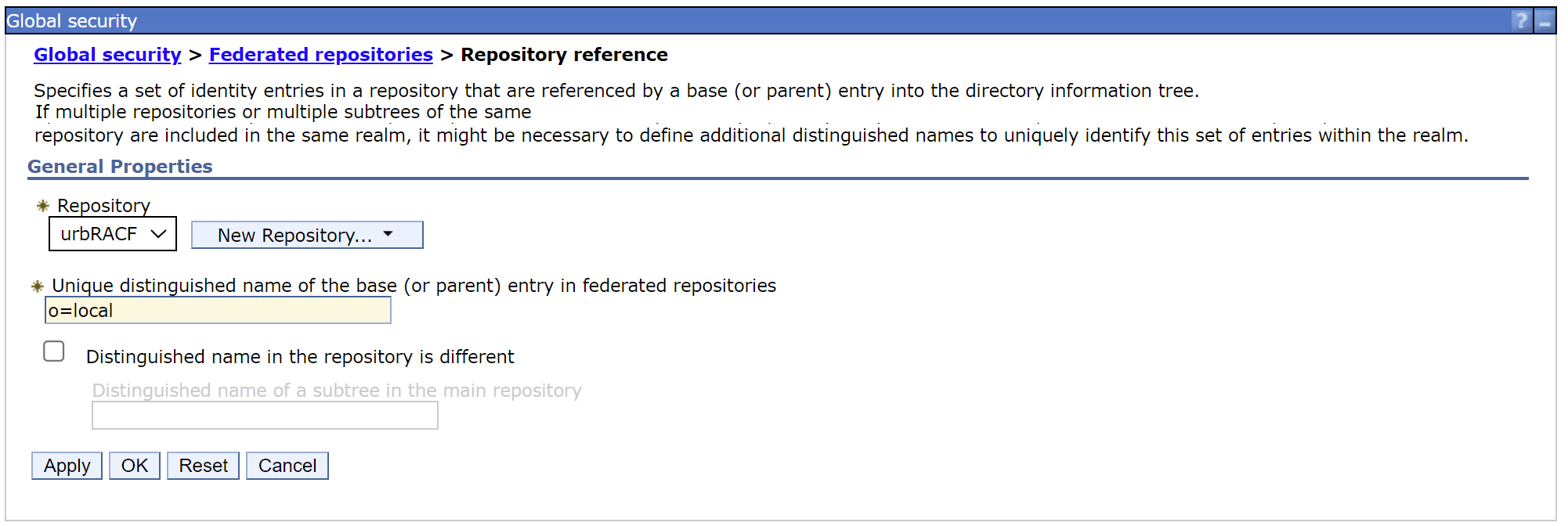
c. Add the urbRACF repository to the Federated Repository.
In this example, the distinguished name is set to o=local
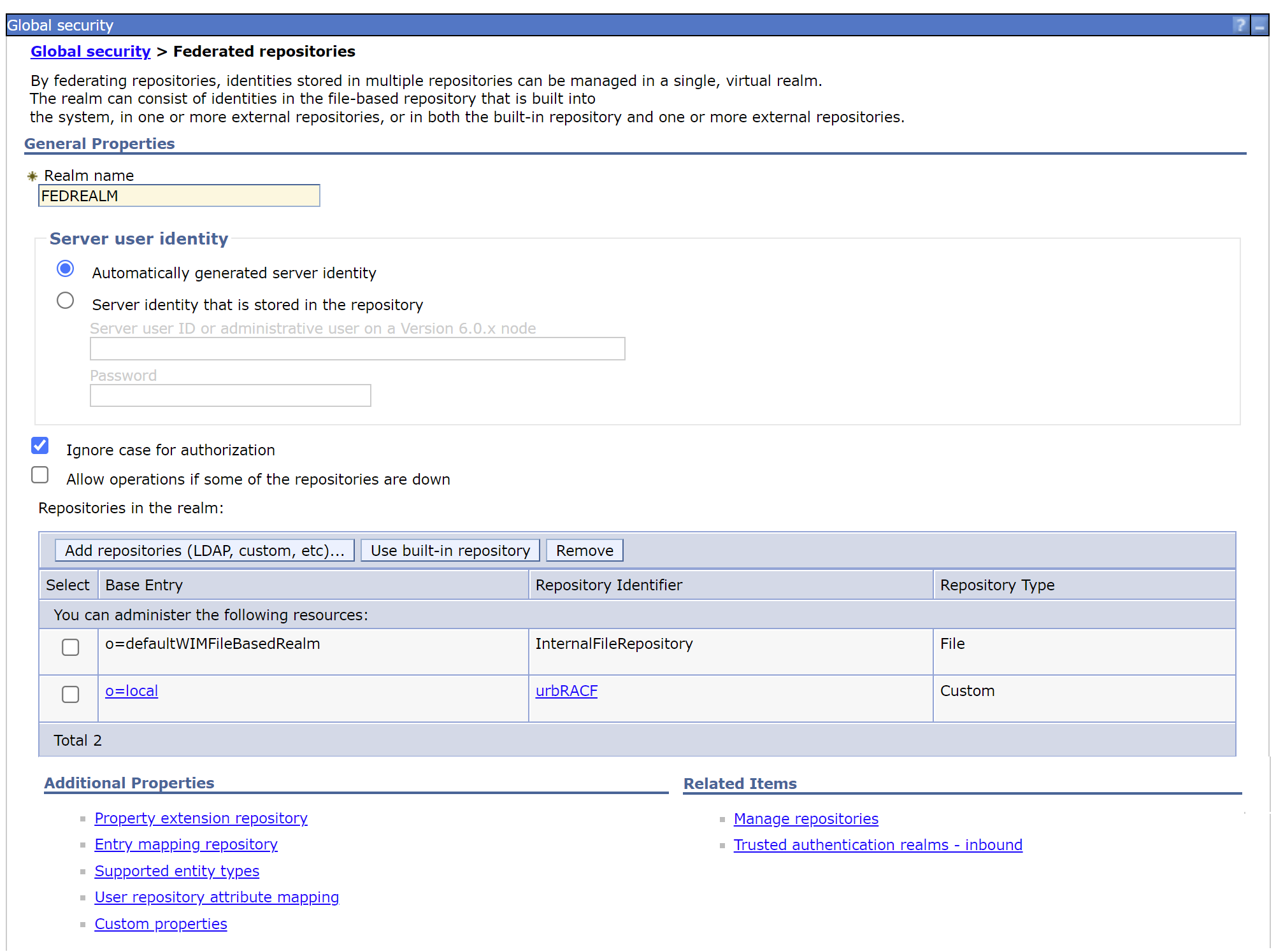
d. Change the Federated Repository REALM name to be a unique string.
In this example, the realm was set to FEDREALM.
In this example, the realm was set to FEDREALM.
2. Configuring a custom System Authorization Facility mapping module for federated repositories
If you have a development environment, create SampleVMMSAFMappingModule.jar following
or
Perform the steps a-f to compile and create the SampleVMMSAFMappingModule.jar on z/OS
a. Copy the SampleVMMSAFMappingModule.java sample from the infocenter to an empty directory on your z/OS file system.
b. Add the necessary jars to the CLASSPATH to compile the SampleVMMSAFMappingModule.java sample.
In this example, WebSphere is installed in /WebSphere directory.
export CLASSPATH=/WebSphere/plugins/org.eclipse.emf.commonj.sdo.jar:/WebSphere/plugins/com.ibm.ws.runtime.wim.base.jar:/WebSphere/plugins/com.ibm.ws.runtime.wim.base.jar
c. Compile the SampleVMMSAFMappingModule.java to create SampleVMMSAFMappingModule.class
javac SampleVMMSAFMappingModule.java
d. Create a jar file SampleVMMSAFMappingModule.jar containing the SampleVMMSAFMappingModule.class
jar -cvf SampleVMMSAFMappingModule.jar *.class
e. Copy the SampleVMMSAFMappingModule.jar to WAS_HOME/classes directory
In this example, the SampleVMMSAFMappingModule.jar was copied to directories
In this example, the SampleVMMSAFMappingModule.jar was copied to directories
- /WebSphere/DeploymentManager/classes
- /WebSphere/AppServer/classes
f. Change the owner and permissions for the SampleVMMSAFMappingModule.jar so that the WebSphere administrative group has read and execute permission.
Set the Federated Repository as the current repository and save the change.
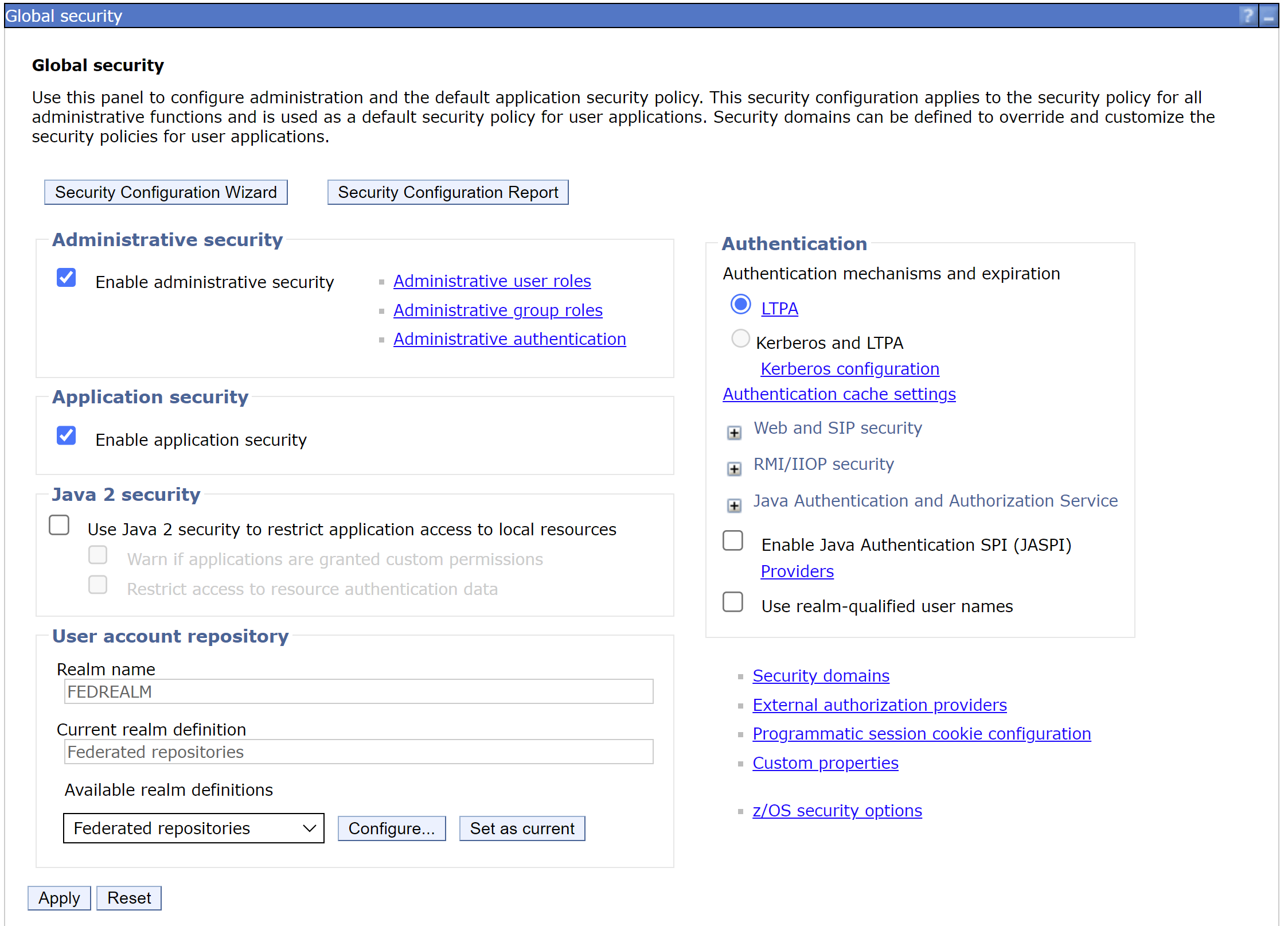
Restart the server and attempt to log on to the admin console with an administrative userid.
A successful logon indicates that the Federated Repository is correctly configured to use the urBridge and SampleVMMSAFMappingModule.jar to work with a SAF user registry with SAF authorization enabled.
If there are issues logging in to the administrative console, follow the steps to disable security by using wsadmin.sh.
wsadmin.sh -conntype NONE
securityoff
Restart the server to correct any changes needed to enable the Federated Repository to use the urBridge and SampleVMMSAFMappingModule.jar
3. Add an LDAP user registry as a new repository
a. On the administrative console, add the LDAP user registry as a repository.
Global security > Federated repositories > Manage repositories
Under Add
Select LDAP Repository
Global security > Federated repositories > Manage repositories
Under Add
Select LDAP Repository
Add the LDAP hostname, LDAP port, bind distinguished name, and bind password
In this example, SSL was not enabled for the initial part of the setup.
In this example, SSL was not enabled for the initial part of the setup.
Apply and Save

b. Confirm that LDAP is set up correctly by performing a Test Query
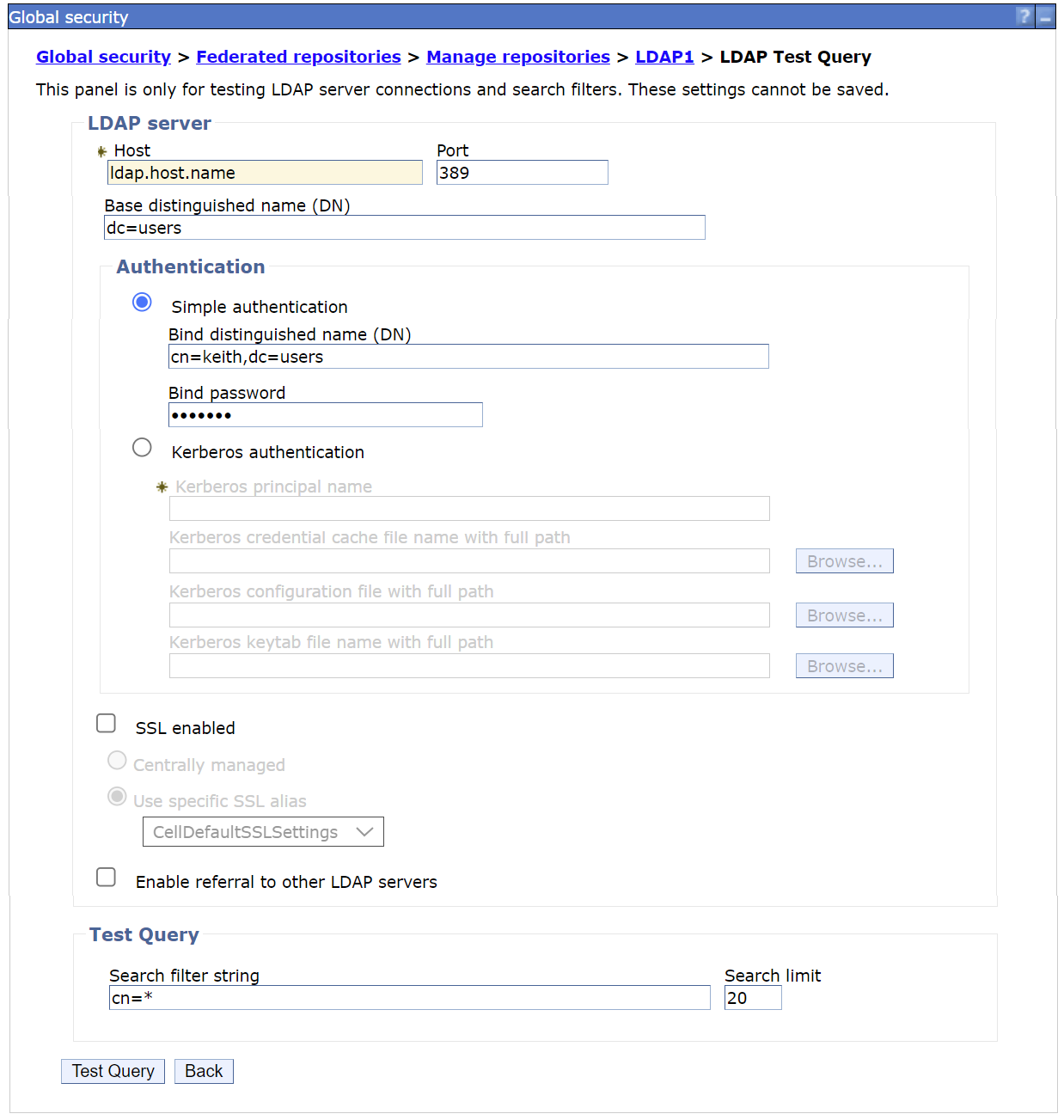
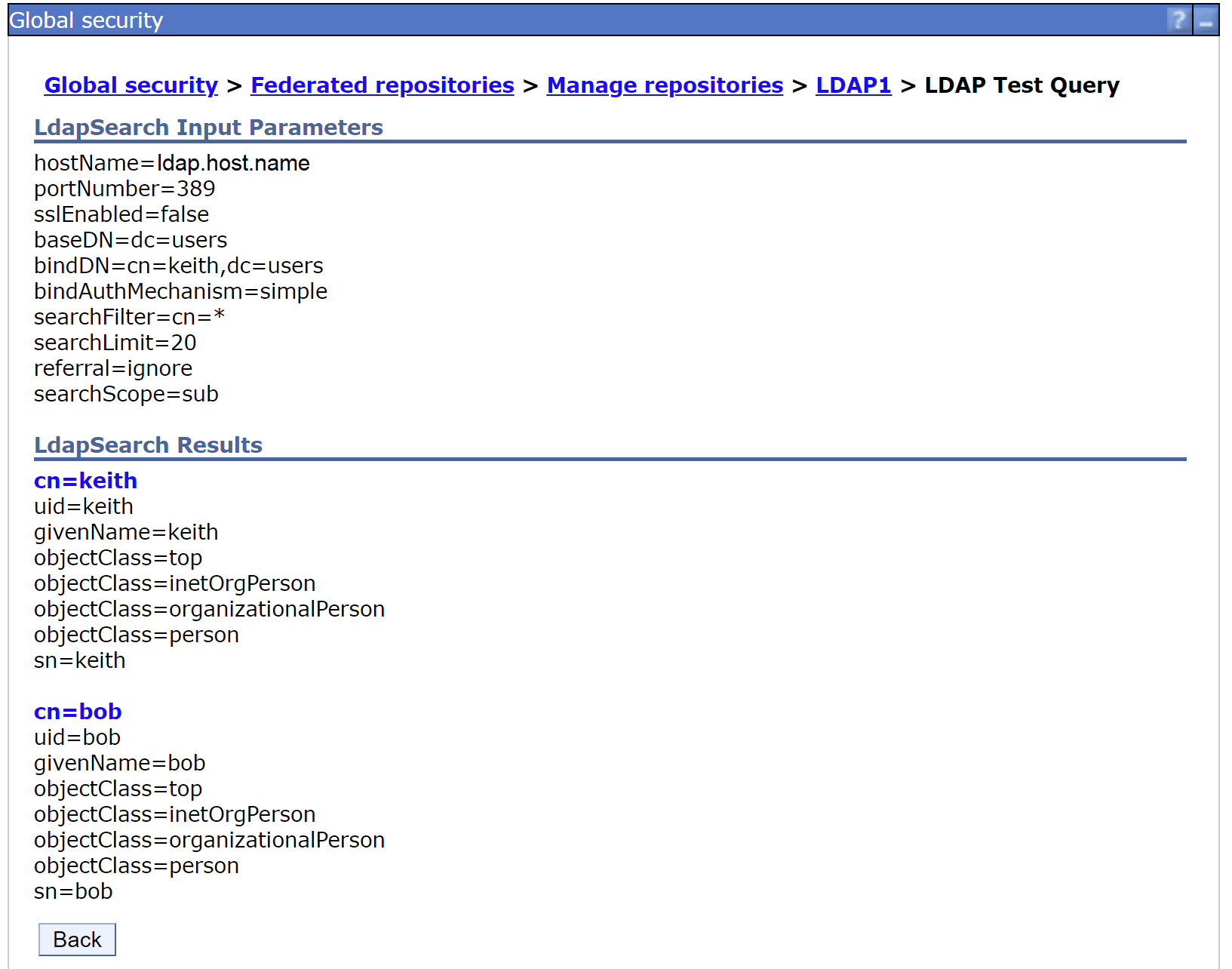
Confirm that the output contains the output from the Search Filter.
The LDAP server tested has two users.
The LDAP server tested has two users.
4. Add an LDAP user registry to the Federated Repository
a. On the administrative console, add the LDAP user registry to the Federated Repository
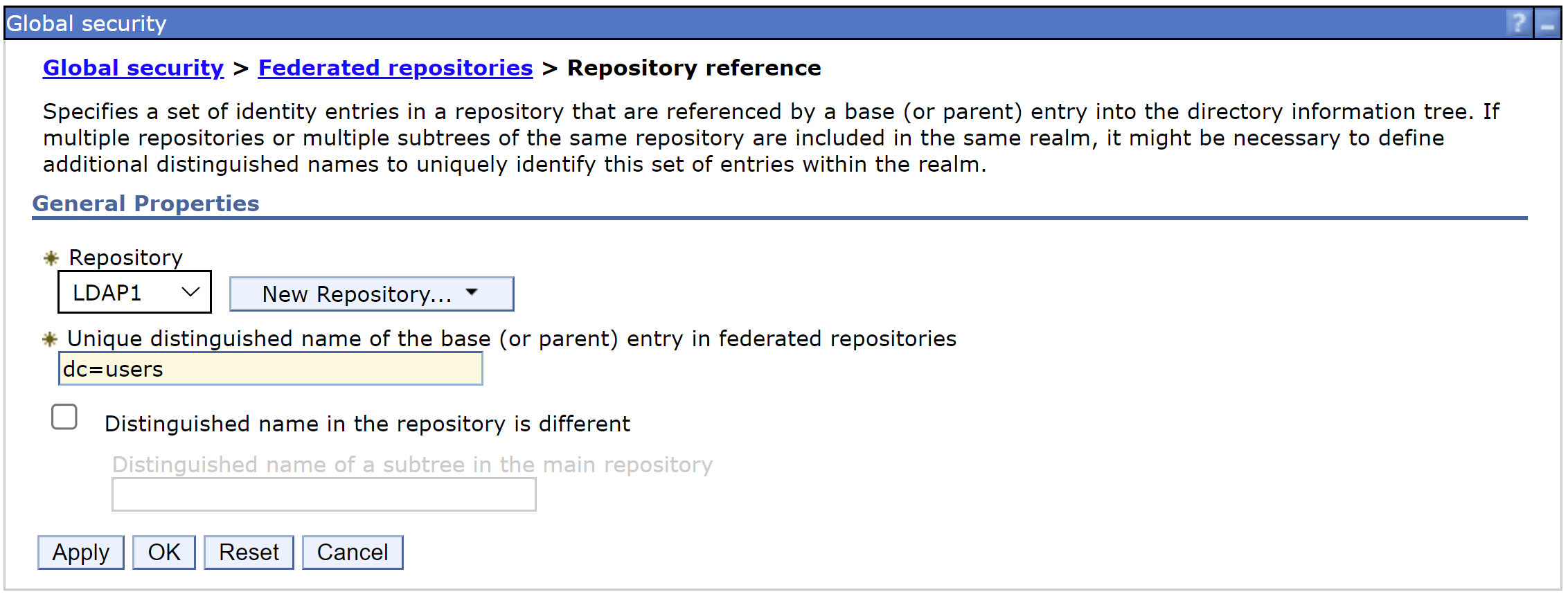
Global security > Federated repositories > Repository reference
Select the LDAP1 repository and provide the LDAP base distinguished name.
The name dc=users was used in this example.
Apply and Save
b. Confirm that the LDAP user registry is added to the Federated Repository
The administrative console shows both user repositories
Global security > Federated repositories
The administrative console shows both user repositories
Global security > Federated repositories

4. Create the distributed identity mapping to map the LDAP identity to SAF ID.
The DeploymentManager has SAF authorization enabled.
The LDAP identity needs a mapping to a SAF ID.
a. Create the distributed identity mapping.
In this example, the ldap identity "cn=keith,dc=users" maps to SAF ID KEITH1
The users in each user repository must be unique.
Since user keith exists in LDAP, the unique SAF user KEITH1 is used to ensure the ID is unique.
RACMAP ID(KEITH1) MAP USERDIDFILTER(NAME('cn=keith,dc=users')) REGISTRY(NAME('FEDREALM')) WITHLABEL('KEITH_LDAPMAP')
SETROPTS RACLIST(IDIDMAP) REFRESH
SETROPTS RACLIST(IDIDMAP) REFRESH
b. Verify the distributed identity mapping
RACMAP ID(KEITH1) LISTMAP(LABEL('KEITH_LDAPMAP'))
Mapping information for user KEITH1:
Label: KEITH_LDAPMAP
Distributed Identity User Name Filter:
>CN=keith,DC=users<
Registry Name:
>FEDREALM<
Distributed Identity User Name Filter:
>CN=keith,DC=users<
Registry Name:
>FEDREALM<
c. Permit the ID KEITH1 to the administrator role
PERMIT administrator CLASS(EJBROLE) ID(KEITH1) ACCESS(READ)
SETROPTS RACLIST(EJBROLE) REFRESH
SETROPTS RACLIST(EJBROLE) REFRESH
d. Verify that the ID KEITH1 is permitted to the administrator role.
RLIST EJBROLE administrator ALL
CLASS NAME
----- ----
EJBROLE administrator
----- ----
EJBROLE administrator
USER ACCESS ACCESS COUNT
---- ------ ------ -----
WSCFG1 READ 000000
WSADMIN READ 000000
KEITH1 READ 000000
---- ------ ------ -----
WSCFG1 READ 000000
WSADMIN READ 000000
KEITH1 READ 000000
e. Restart the DeploymentManager and attempt to log on to the administrative console with the LDAP ID "keith".
Additionally you can log on to the administrative console with an existing SAF ID (for example WSADMIN) that is permitted to the administrator role.
Additional Information
Reference Links
Document Location
Worldwide
[{"Type":"MASTER","Line of Business":{"code":"LOB45","label":"Automation"},"Business Unit":{"code":"BU059","label":"IBM Software w\/o TPS"},"Product":{"code":"SS7K4U","label":"WebSphere Application Server for z\/OS"},"ARM Category":[{"code":"a8m50000000CdKsAAK","label":"WebSphere Application Server traditional-All Platforms-\u003ESecurity-\u003ESecurity zOS Only"}],"ARM Case Number":"","Platform":[{"code":"PF035","label":"z\/OS"}],"Version":"9.0.5"}]
Was this topic helpful?
Document Information
Modified date:
11 July 2023
UID
ibm17006463