Troubleshooting
Problem
This document discusses what causes the message ID HTP8351 "Secure Sockets session failed to initialize successfully" found in the joblog of an HTTP Server.
Symptom
None of the HTTP server jobs stay active in the QHTTPSVR subsystem. When reviewing the HTTP server's job log, the following message might be logged.
HTP8351 Diagnostic 10 QZSRAPR QHTTPSVR *STMT QZSRVSSL QHTTPSVR *STMT
From module . . . . . . . . : QZSRSNDM
From procedure . . . . . . : sendMessageToJobLog_CCSID
Statement . . . . . . . . . : 27
To module . . . . . . . . . : MOD_SSL
To procedure . . . . . . . : ssl_initializer
Statement . . . . . . . . . : 189
Message . . . . : Secure Sockets session failed to initialize successfully.
Cause . . . . . : Secure Sockets failed to initialize successfully.
Cause
Three scenarios can produce the HTP8351 message:
- The certificate assigned to the application definition in the HTTP Apache configuration has expired.
- There is no certificate assigned to the application definition in Digital Certificate Manager (DCM).
- The application definition defined in the HTTP Apache configuration does not exist in DCM.
Environment
IBM i OS
Resolving The Problem
- Review the HTTP server's configuration file to locate the SSLAppName HTTP directive

- Log into DCM (http://systemname:2006 or https://systemname:2007/dcm).
- Click 'Open Certificate Store', then click *SYSTEM and provide the password.
- Click on 'Manage Application Definitions'.
- Type the application ID found in the HTTP Apache configuration 'SSLAppName' directive in the Search form field. If no application definition exists, it is possible that application definition does not exist or the 'SSLAppName' directive has the wrong application definition name
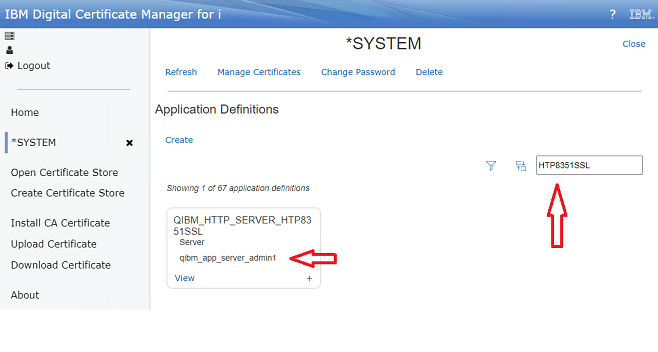
- If you notice No certificates assigned, you will need to assign one. For information on assigning a certificate, click here
- If there is a certificate assigned, you will want to check to see in the certificate is expired. To check, click on Manage Certificates and locate the certificate. If the certificate is expired, you may want to renew it. If the certificate was signed locally, click here. If the certificate was signed by a Certificate Authority external to the IBM i, click here.
[{"Type":"MASTER","Line of Business":{"code":"LOB57","label":"Power"},"Business Unit":{"code":"BU058","label":"IBM Infrastructure w\/TPS"},"Product":{"code":"SWG60","label":"IBM i"},"ARM Category":[{"code":"a8m0z0000000CISAA2","label":"Digital Certificate Manager"},{"code":"a8m0z0000000CIcAAM","label":"IBM i Administration Server"},{"code":"a8m0z0000000CGqAAM","label":"IBM i HTTP Server"}],"ARM Case Number":"","Platform":[{"code":"PF012","label":"IBM i"}],"Version":"All Versions"}]
Was this topic helpful?
Document Information
Modified date:
31 May 2023
UID
ibm16999693