Newsletters
Abstract
In some cases, after the upgrade from 4.5.x or 4.6.1 or 4.6.2 to 4.6.3 or later, searches for assets will fail with "an unexpected error occurred".
Content
In some cases, after the upgrade from 4.5.x or 4.6.1 or 4.6.2 to 4.6.3 or later, searches for assets will fail with "an unexpected error occurred" - "Something went wrong performing a catalogs action".
The issue happens because in some cases the old catalog-api pods incorrectly perform some of the upgrade logic. The incorrect processing causes required database indexes to be removed. Without the indexes, the assets cannot be found when the software runs queries.
How to Prevent the Issue from Occurring
In general, we recommend the following upgrade process to avoid this issue:
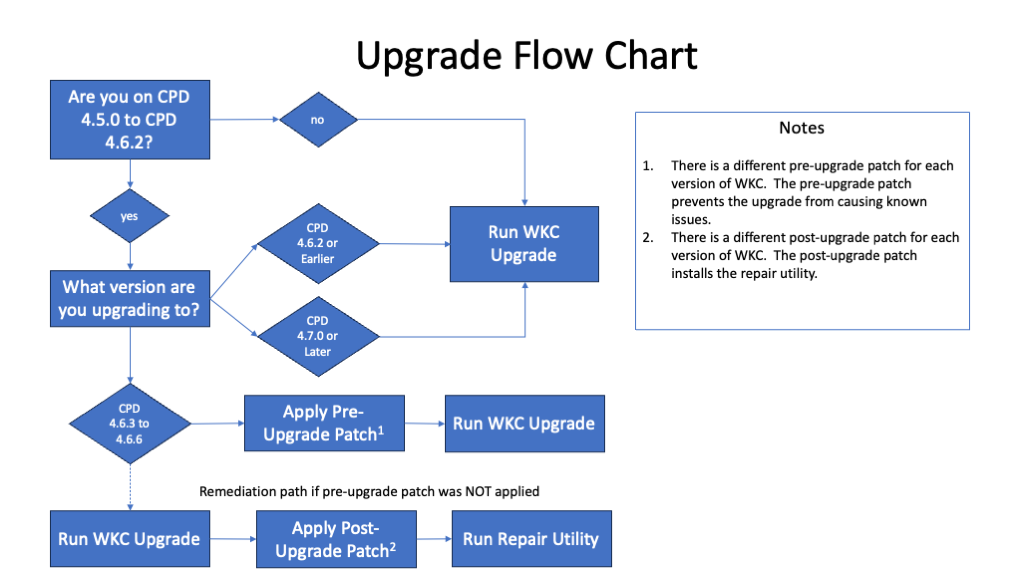
The issue can be avoided by applying the pre-upgrade patch that corresponds to your version of WKC. This method of avoiding this issue is recommended because it allows the upgrade to happen without incurring any downtime.
Preferred Avoidance Method: Apply pre-upgrade patch before upgrade
The issue can be avoided without incurring any downtime by applying a patch to the catalog-api pods before running the upgrade. The patch to apply is different for each version of WKC:
Patch installation instructions for each CP4D version are attached to this document (see Patch Installation Instructions.zip).
Alternate Avoidance Method: Scale down to 0 catalog-api pods before upgrade
| CP4D Version | Patch Details |
|---|---|
| 4.5.0 | Image: cp.icr.io/cp/cpd/catalog_master:2.0.0-20230613011539-5b0629052 Sha: sha256:5655b694cf51ee56aba2f022885236b63e55549f6c9c479fc958ece35267c70 |
| 4.5.1 | Image: cp.icr.io/cp/cpd/catalog_master:2.0.0-20230612234414-cfc981a22 Sha: sha256:2cb51b566c258db0111df486cea1ae0066b557585038e05000f3edc91b646d73 |
| 4.5.2 | Image: cp.icr.io/cp/cpd/catalog_master:2.0.0-20230609220623-255e65c14 Sha: sha256:2972785d36b846805f0bc47acd53608634c6114544081601dfb8048cc32af1ed |
| 4.5.3 | Image: cp.icr.io/cp/cpd/catalog_master:2.0.0-20230609234105-2f23f78f6 Sha: sha256:4f22b2c48914b73ac714c309f962f0da2a17ae27b78acbe263ba0ccae9a07e36 |
| 4.6.0 | Image: cp.icr.io/cp/cpd/catalog_master:2.0.0-20230609154847-1d97f8d28 Sha: sha256:1103d9030e7f32040df9e0c585113d1f43505917fe3d7492632b193488a1c1a8 |
| 4.6.1 and 4.6.2 | Image: cp.icr.io/cp/cpd/catalog_master:2.0.0-20230522161050-f7e4c2465 Sha: sha256:159c725e6728cbb882970082a3fa02057f840adb22cc1bb484938672df05c79b |
Patch installation instructions for each CP4D version are attached to this document (see Patch Installation Instructions.zip).
Alternate Avoidance Method: Scale down to 0 catalog-api pods before upgrade
There is an alternate method that can also be used to prevent this issue from occurring. The alternate method is to scale down the catalog-api pods to have 0 instances before the upgrade is performed. When this method is used, the UI is unavailable during the upgrade. The scale down must happen before upgrading the CR (Custom Resource) for any components that have a dependency on CCS (Common Core Services).
To scale down the catalog-api pods, execute the following command:
To scale down the catalog-api pods, execute the following command:
oc scale deploy catalog-api --replicas 0Once the catalog-api pods are scaled down, the upgrade can be safely performed.
There is no need to explicitly scale the catalog-api pods back up after the upgrade. The upgrade process automatically scales up again to the original number of replicas.
Note: RStudio server runtime component requires catalog-api pods. So we should wait until catalog-api pods upgraded and then continue RStudio server runtime component upgrade via command "apply_cr" for RStudio. For more details, please refer to https://www.ibm.com/docs/en/cloud-paks/cp-data/4.6.x?topic=runtimes-upgrading
How to Fix the Issue
If this issue could not be prevented by performing the steps described earlier, it can be fixed after running the upgrade. When the issue occurs, the assets still exist, they just can no longer be located since the query fails. The issue can be fixed by repairing the indices so that they are able to locate the assets.
If this issue could not be prevented by performing the steps described earlier, it can be fixed after running the upgrade. When the issue occurs, the assets still exist, they just can no longer be located since the query fails. The issue can be fixed by repairing the indices so that they are able to locate the assets.
To fix the issue, perform the following steps:
- Install a version-specific post-upgrade patch. The patch installs the repair utility.
- Run the script index_repair_utility.sh to fix the issue.
The post-upgrade patch to install is specific to the version of CP4D:
Patch installation instructions are attached to this document (See Patch Installation Instructions.zip)
| CP4D Version | Patch Details |
|---|---|
4.6.3 |
Image: cp.icr.io/cp/cpd/catalog_master:2.0.0-20230526163947-204c200c1 Sha: sha256:879ea01d33a303c1809da0ffdfa34f01a063effd30426eb20fc6b6595543616f |
4.6.4 |
Image: cp.icr.io/cp/cpd/catalog_master:2.0.0-20230526231710-114c0ecb1 Sha: sha256:62c8053fad73dad872710ce3e08a83554cf9cabf7b4ce0e0294d2cf83806379d |
4.6.5 and 4.6.6 |
Image: cp.icr.io/cp/cpd/catalog_master:2.0.0-20230525004340-9b10b051d Sha: sha256:263ec4b5f84d115e1627d134a5d7e520e886411828238e37c24c863f246b39bb |
Patch installation instructions are attached to this document (See Patch Installation Instructions.zip)
To run the repair utility:
1. Run the "oc login" command to log in to the cluster.
2. Execute the index repair utility in preview mode first
./index_repair_utility.sh start_task --namespace [your namespace] --preview true --monitor true
In the output, "stuck_design_docs" should be nonzero and you should see a list of IDs in the field "stuck_design_doc_ids". If the value of "stuck_design_docs" is 0, then the issue cannot be resolved by this tool. In that case, you are most likely experiencing a different issue.
3. Then, run the same command with preview mode turned off to do the actual cleanup
./index_repair_utility.sh start_task --namespace [your namespace]--preview false --monitor true
Note: If there are stuck temporary design documents processed by the tool, you would see the related information in the stuck design docs portion.
[{"Type":"MASTER","Line of Business":{"code":"LOB10","label":"Data and AI"},"Business Unit":{"code":"BU048","label":"IBM Software"},"Product":{"code":"SSHGYS","label":"IBM Cloud Pak for Data"},"ARM Category":[{"code":"a8m3p000000UoRRAA0","label":"Administration-\u003EUpgrade"}],"Platform":[{"code":"PF025","label":"Platform Independent"}],"Version":"All Versions"}]
Was this topic helpful?
Document Information
Modified date:
24 December 2024
UID
ibm16995571