Troubleshooting
Problem
This document provides instructions how to use the HMC to update/upgrade server firmware to a specific level (instead of only the most current) using the IBM service Web site.
Resolving The Problem
This document provides instructions how to use the HMC to update/upgrade server firmware to a specific level (instead of only the most current) using the IBM service web site.
To use the HMC to update/upgrade server firmware to a specific level, you should do the following:
1. Select the System, and click Updates.
2. Click Change Licensed Internal Code for the current release:
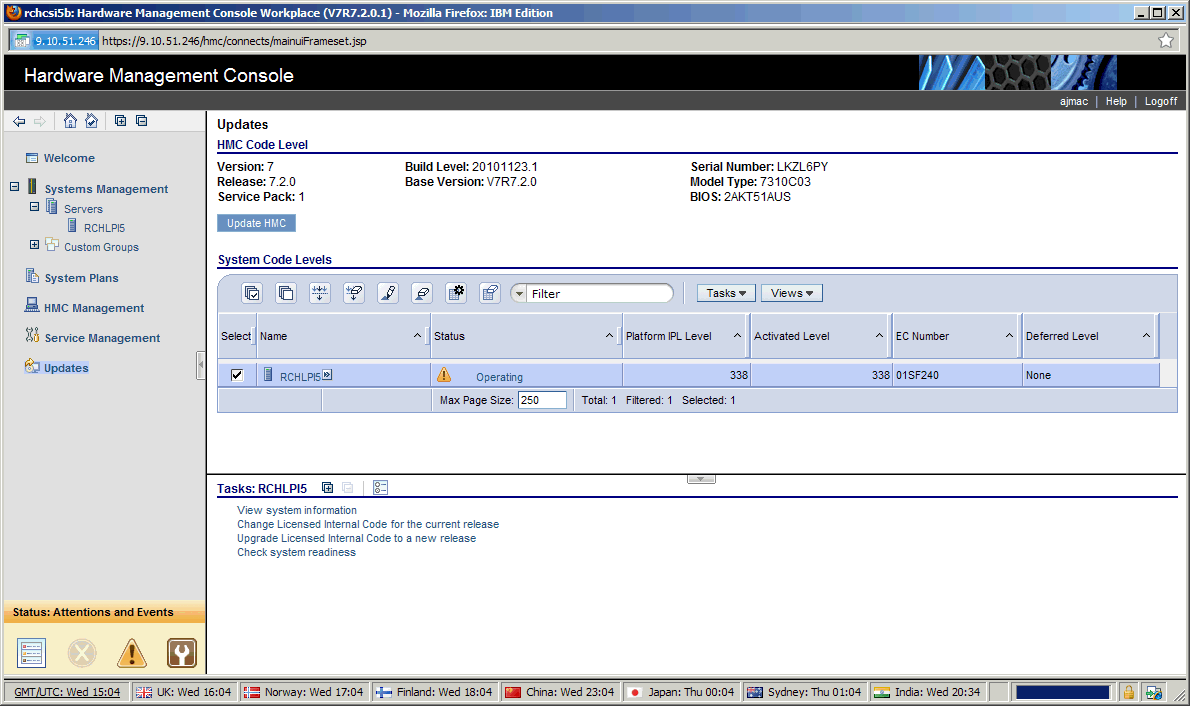
3. Click Select advanced features, and then click OK:

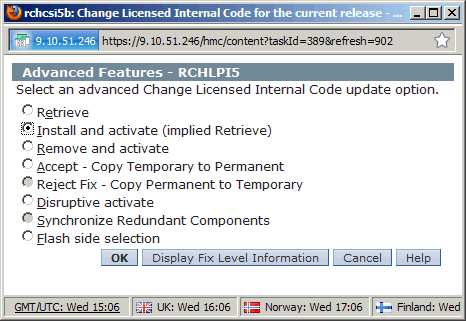
4. Click Install and activate (implied Retrieve), and then click OK:
5. Click OK:

6. Click IBM service web site, and then click OK:

7. Click Specific levels, and then click OK:

8. Click the desired level, select Change Level, and then click OK:

9. Click the desired level, and then click OK:

10. Click OK:
 \
\
11. Click the desired type of installation, and then click OK:

12. Read and accept the License Agreement by clicking Accept:

13. Confirm the action, and then click OK:

14. Allow the action to complete:

Historical Number
608095537
Was this topic helpful?
Document Information
Modified date:
18 December 2019
UID
nas8N1011390