Troubleshooting
Problem
This document reviews some of the basic actions to take on the HMC when an IBM i native partition fails to IPL from a DVD or TAPE, with partition ref code B2004158.
Resolving The Problem
This document reviews some of the basic actions to take on the HMC when an IBM i native partition fails to IPL from a DVD or TAPE, with partition ref code B2004158.
This is for the case of a D M ipl from alternate IPL device, either tape or DVD. Not virtual but native devices.
If the IPL fails for ref code B2004158, B7005122, or B2003110.
1. Check the LEDs on the device, tape or DVD, and see if there is rapid flashing during the IPL. If so then the media is being read and the problem is most likely a media issue.
If the LED on the device is not flashing fast and frequently then the media is not being read and the problem is that the device is not being searched for the load source to IPL from. Some of the things to check in this case are below.
This process presumes you know exactly what physical location you will choose for ALTERNATE RESTART, that attached the DVD or TAPE you wish to use. The HMC goes by bus numbers and also phy locations and not resource names from the IBM i. You can find the location from GO HARDWARE, work with storage resources, type 9 next to the DCxx device and enter to look for the dvd or tape you plan to use for example:
Work with Storage Resources
System: RCHASC6A
Type options, press Enter.
7=Display resource detail 9=Work with resource
Opt Resource Type-model Status Text
CMB01 2844-001 Operational Combined function IOP
9 DC01 5709-001 Operational Storage Controller
Then place a 7 in front of the device you wish to D IPL from:
Opt Resource Type-model Status Text
DC01 5709-001 Operational Storage Controller
DD013 4326-074 Operational Disk Unit
DD001 4326-074 Operational Disk Unit
DD002 4326-074 Operational Disk Unit
7 OPT01 6337-002 Operational Optical Storage Unit
ENTER
Note the location:
Resource name . . . . . . . : OPT01
Text . . . . . . . . . . . . : Optical Storage Unit
Type-model . . . . . . . . . : 6337-002
Serial number . . . . . . . : 00-00000
Part number . . . . . . . . : 0000000P4774
Location: U787A.001.DNZ0BWF-P1-T10-L6-L0 <======== so you would use this U787A.001.DNZ0BWF-P1-T10 as the Alternate Restarts tag and verify also it is owned by the partition as below in steps 2 and 3.
2. Verify the device really is TAGGED as alt restart for the partition on the HMC. The screen below is from selecting the partition, select the >> pop up menu to the right of the partition name or in the task menu below select Properties. Then select the SETTINGS tab as below. Note the information after the U787A.001 is the unit serial number.

In this case. the TAGGING for Alternate restart is the T10 Raid controller in the system unit. That attaches the internal DVD device in the system unit.
Once you have confirmed that really is the selection you want for alternate restart, to IPL the IBM i partition from a D M IPL, you should proceed to verifying that it is owned by the partition.
3. To verify the slot tagged for alternate restart is owned by the partition, select the server (not the partition, but the server). On HMC select systems management on the right window, select servers. On the left, it will display the servers on the HMC. Then select the server in the left window and select properties from the >> pop up menu to the right of the server name or below in the Tasks menu. Select the IO tab, look for the alternate restart tagged slot as below:

Now look at the column named "Owner". This is the partition that currently owns that resource. In this example, it is the same partition trying to be D M IPLed so it is correct. If that is not correct, you should use DLPAR to move the resource over to the partition trying to use the resource for D M IPL. To DLPAR it, shut down the partition doing the D M IPL, the one at ref code B2004158. Then, on the partition that presently owns the slot attaching the device you wish to use for the D M IPL, do a DLPAR remove of that slot. Next, do a DLPAR ADD to the partition you want it to be on for the D M IPL.
4. If this is all OK (Alternate restart is tagged OK and the partition owns it), you should collect the REF CODE history as follows.
On HMC select the failing partition, select the >> popup menu to the right of the partition name or the Serviceability option on the Tasks menu below. Select reference code history as shown:
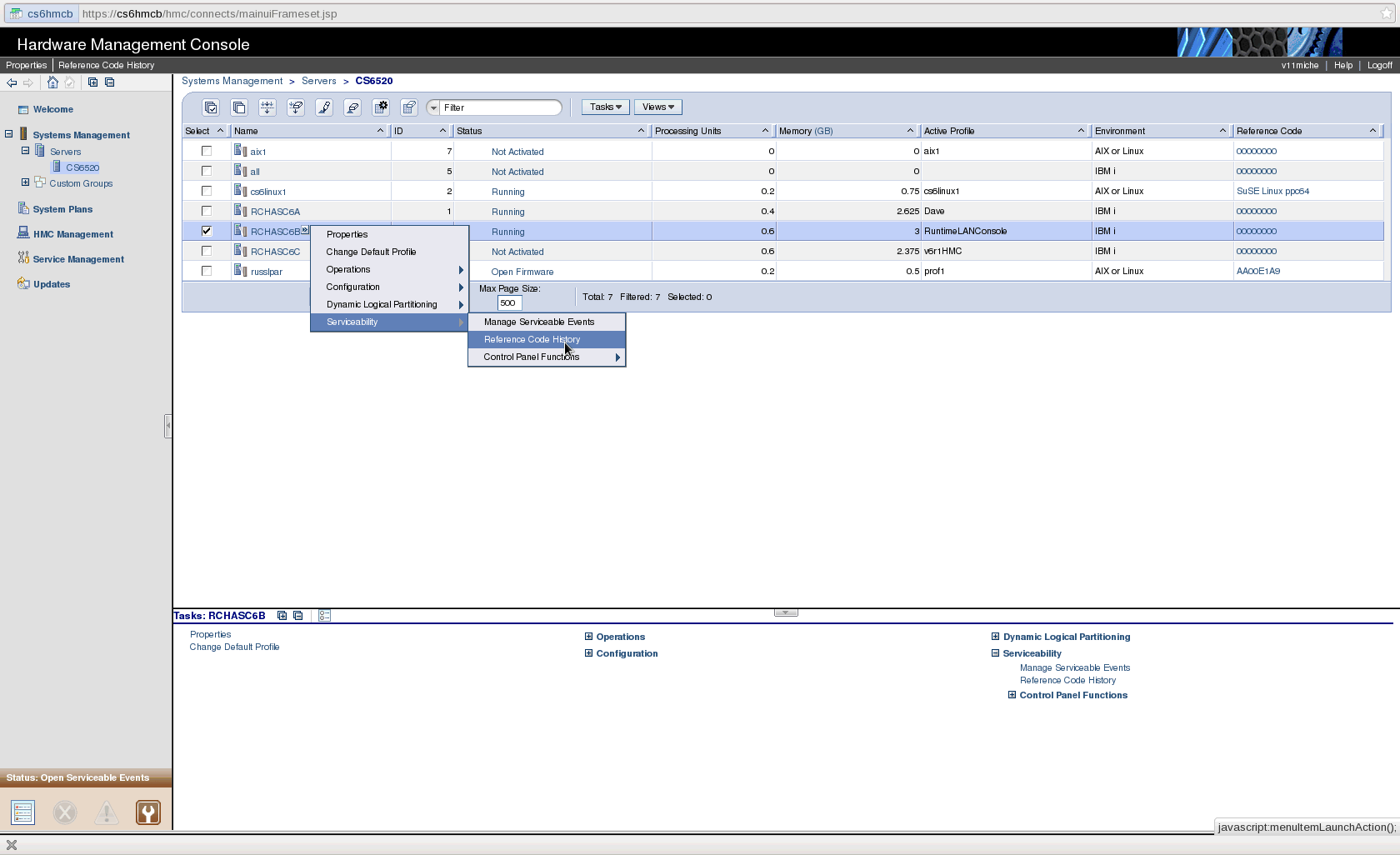
It can take a few minutes to get the screen and it will look similar to the following (note this is taken as an example from a different system and partition, it is only an example):

When you select the B2004158, on the right it will display additional 'words' of the reference code. Record those and also check for any other B2 type code in the list prior to the B2004158 on that same IPL that might give further information to technical support on what the problem is.
Historical Number
663596483
Was this topic helpful?
Document Information
Modified date:
22 September 2021
UID
nas8N1010468