Troubleshooting
Problem
IP addresses that are categorized as local in Log Activity are recognized as remote by a rule causing false positives.
Symptom
In the following example, the admin wants to identify events with some QID or characteristics, but only when the source IP address is remote.
So, the following rule is created with these tests:
- when the event QID is one of the following (3503982) IP ip WebVPN session started.
- when the source is Remote

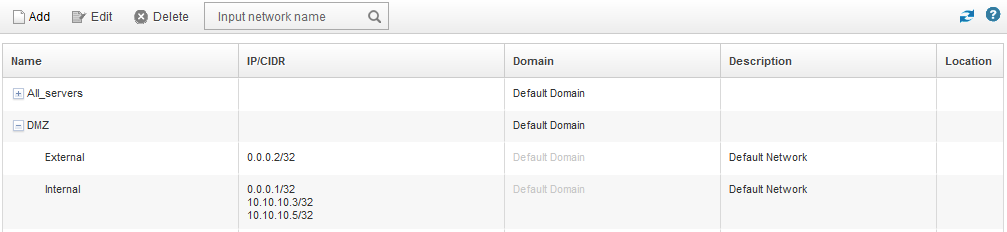
The Network Hierarchy is defined as follows. The IP 10.10.10.5 has an entry, so it is a local IP:
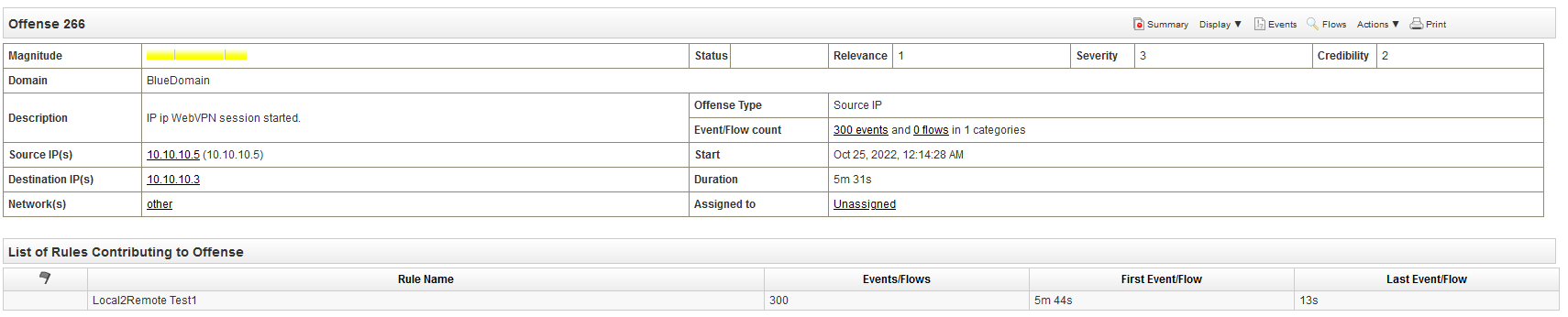
Although the IP is defined as local in the Network Hierarchy, the rule detects this IP as a remote IP address generating false positives offenses:
Document Location
Worldwide
[{"Type":"MASTER","Line of Business":{"code":"LOB77","label":"Automation Platform"},"Business Unit":{"code":"BU048","label":"IBM Software"},"Product":{"code":"SSV4BL","label":"IBM QRadar"},"ARM Category":[{"code":"a8m0z000000cwtrAAA","label":"Rules"}],"ARM Case Number":"TS010177353","Platform":[{"code":"PF025","label":"Platform Independent"}],"Version":"All Versions"},{"Product":{"code":"SSTZMA","label":"QRadar Appliance Hardware"},"Business Unit":{"code":"BU048","label":"IBM Software"},"Component":" ","Platform":[{"code":"","label":""}],"Version":"","Edition":"","Line of Business":{"code":"LOB77","label":"Automation Platform"}}]
Log InLog in to view more of this document
This document has the abstract of a technical article that is available to authorized users once you have logged on. Please use Log in button above to access the full document. After log in, if you do not have the right authorization for this document, there will be instructions on what to do next.
Was this topic helpful?
Document Information
Modified date:
31 October 2022
UID
ibm16831789