Troubleshooting
Problem
The resource dump function can be used to generate power hypervisor resource dumps, partition firmware dumps, SR-IOV dumps, and power hypervisor macro resource dumps.
Resolving The Problem
Follow these instructions to Initiate a resource dump from the V10R3 SP1061 or later HMC:
- The HMC is only authorized to system administrator resource selectors.
- The information pertains to HMCs at Version 10R3 SP1061 or later.
- It is recommended that the HMC be running the latest service packs and fixes.
- Resource dumps are concurrent meaning that they can be performed with the server and partitions running. There is no impact on running partitions except for some specific selectors such as the SRIOV adapter "restart" dump as noted.
Step 1: Click the HMC's 'Open Menu' icon in the upper left, expand Service management, which shows the Dumps subsection, and then select the System of interest.
Step 2: After selecting the system, go to the right side Initiate dump selection menu, and then select the Initiate resource dump menu item.
STOP! If the following dialog is displayed, the wrong option was selected! Click Cancel and choose Initiate resource dump

Step 3: In the Initiate resource dump dialog, enter the Resource selector as described in the notes, or as specified by IBM Support. Press Initiate to initiate the dump.
Step 4: Look for the following success dialog:
Notes:
- A non-disruptive Hypervisor Resource Dump, initiated by using selector system generates a SYSDUMP dump file. The time to offload to the HMC can vary from about 15 - 30 minutes for entry-level systems, to up to around 4 - 5 hours for fully populated and complex high-end systems. The dump status shows 'In Progress' until it completes. If IBM Support did not specify a selector, then it is the desired dump type.
- A non-disruptive Partition Resource Dump (previously called Partition Firmware Dump), initiated by using selector lp X (where X is the partition ID number) generates an RSCDUMP dump file.
- This dump type is useful for:
- problems involving SRCs CAxxxxxx, BAxxxxxx, or AAxxxxxx, and SMS-level issues.
- problems involving IBM i partitions that are unable to IPL to DST, or crashing with an SRC on the panel.
- This dump type does NOT capture partition level data, like an AIX 'system dump', a Linux Kernel dump, a Linux or AIX Firmware Assisted Dump (FWAD), or an IBM i Main Storage Dump.
- This dump will not function if the partition is Off, in a B200xxxx Failed state, or if it is IBM i and the partition is IPLed up completely.
- This dump type is useful for:
- A non-disruptive Hypervisor Resource Macro Dump, initiated by using any other valid, IBM Support specified, selector generates an RSCDUMP dump file.
- A non-disruptive VMI dump, initiated by using selector vmi init-dump generates two RSCDUMP files, one very small and one a bit larger. This dump type is useful for problems involving the Virtual Management Interface on BMC-based Power Systems, such as being able to reach the BMC ASMI, but not being able to manage the partitions via the HMC. Events with SRC B7005192, B7005193, B700519x are VMI-related.
- A non-disruptive SR-IOV Firmware Dump, on an SR-IOV capable adapter in SR-IOV mode, initiated by using selector sriov {location code of the adapter} generates a LPADUMP dump file. It collects firmware data for the functions that manage the adapter, but does not collect adapter diagnostic data. ***The dump type does not apply to SR-IOV capable adapters running in Dedicated (non-SR-IOV mode) or to SR-IOV capable adapters in non-SR-IOV capable slots***
- A disruptive SR-IOV Adapter Dump, on an SR-IOV capable adapter in SR-IOV mode, interrupts communications for any partitions that are using shared logical ports from that specific adapter. The dump is initiated by using selector sriov {location code of the adapter} restart . It generates an LPADUMP dump file that contains firmware data and the adapter diagnostic data. ***The dump type does not apply to SR-IOV capable adapters running in Dedicated (non-SR-IOV mode) or to SR-IOV capable adapters in non-SR-IOV capable slots***
Alternatively, these dump types might be initiated from the HMC command line, by using:
startdump -m {managed server} -t resource -r "{resource selector}"
Example 1: startdump -m 9119-MME*21ABCDE -t resource -r "system"
Generates a non-disruptive Hypervisor Resource Dump, SYSDUMP type, for server 9119-MME*21ABCDE
Example 2: startdump -m 9119-MME*21ABCDE -t resource -r "lp 17"
Generates a non-disruptive Partition Firmware Dump, RSCDUMP type, for partition 17 on server 9119-MME*21ABCDE
Example 3: startdump -m 9119-MME*21ABCDE -t resource -r "sriov U78C7.001.KIEFGHI-P1-C11 restart"
Generates an SR-IOV Adapter Dump, LPADUMP type, for the adapter in location U78C7.001.KIEFGHI-P1-C11
Example 4: startdump -m 9105-22A*21EDCBA -t resource -r "vmi init-dump"
Generates two VMI Dump files, RSCDUMP type, for server 9119-MME*21ABCDE

Alternatively, the dump progress may be monitor from the HMC Command Line Interface.
Open an HMC command line, and issue the following command:
ls -lrt /dump/*DUMP*
It displays all dump files, with the most recent listed last.
Example:
-rw-rw-r-- 1 ccfw ccfw 11122312 Jan 17 13:28 FSPDUMP.1054321.8B80000B.20240117202717
-rw-rw-r-- 1 ccfw ccfw 11920213 Jan 17 13:30 FSPDUMP.1054321.9B80000B.20240117202917
-rw-rw-r-- 1 ccfw ccfw 16353882 Dec 21 15:11 SYSDUMP.21ABCDE.10000003.20241221182303.raw678581376.gz
-rw-rw-r-- 1 ccfw ccfw 4637550 Jan 17 15:25 SYSDUMP.1054321.10000003.20240117222433.gz.IN_PROGRESS
If the last file (most recent) matches the time of your dump, and it shows .IN_PROGRESS on the end, the offload is not yet complete. Once the offload is complete, the .IN_PROGRESS ending is dropped, and the dump can then be transferred.
Dump naming conventions:
- Resource dumps created with 'system' or the default (blank) resource selector appear as type SYSDUMP with an Identifier that begins with the digit 1 (1xxxxxxxx).
- Resource dumps using the 'sriov' selector appear as type LPADUMP.
- Resource dumps created with other resource selectors appear as type RSCDUMP.
Look through the list for the dump file with the current datestamp. If the filename ends in .IN_PROGRESS, the offload is not completed. Once the offload is complete, the .IN_PROGRESS ending is dropped, and the dump can then be transferred. Sorting on the Date column sorts alphabetically by the name of the month, not by ascending/descending date.
Step 6: Send the dump to IBM Support.
If the HMC is configured for remote support, the dump can be sent directly to IBM Support using the Selected menu, Call home dump... function. It can also be copied from the HMC and sent to IBM Support at https://www.ecurep.ibm.com/app/upload_sf .
Follow these instructions to Initiate a resource dump from the V10R3 or later HMC:
- The HMC is only authorized to system administrator resource selectors.
- The information pertains to HMCs at Version 10R3 or later.
- It is recommended that the HMC be running the latest service packs and fixes.
- Resource dumps are concurrent meaning that they can be performed with the server and partitions running. There is no impact on running partitions except for some specific selectors such as the SRIOV adapter "restart" dump as noted.
Step 1: Click the HMC's 'Open Menu' icon in the upper left, expand Serviceability, select Dumps, and then select the System of interest.
Step 2: After selecting the system, go to the right side Initiate dump selection menu, and then select the Initiate resource dump menu item.
STOP! If you see this following dialog, you have taken the wrong option! Click Cancel and choose Initiate resource dump
Step 3: In the Initiate resource dump dialog, enter the Resource selector as described in the notes, or as specified by IBM Support. Press Initiate to initiate the dump.
Step 4: Look for the following success dialog:
Notes:
- A non-disruptive Hypervisor Resource Dump, initiated by using selector system generates a SYSDUMP dump file. The time to offload to the HMC can vary from about 15 - 30 minutes for entry-level systems, to up to around 4 - 5 hours for fully populated and complex high-end systems. The dump status shows 'In Progress' until it completes. If IBM Support did not specify a selector, then it is the desired dump type.
- A non-disruptive Partition Resource Dump (previously called Partition Firmware Dump), initiated by using selector lp X (where X is the partition ID number) generates an RSCDUMP dump file.
- This dump type is useful for:
- problems involving SRCs CAxxxxxx, BAxxxxxx, or AAxxxxxx, and SMS-level issues.
- problems involving IBM i partitions that are unable to IPL to DST, or crashing with an SRC on the panel.
- This dump type does NOT capture partition level data, like an AIX 'system dump', a Linux Kernel dump, a Linux or AIX Firmware Assisted Dump (FWAD), or an IBM i Main Storage Dump.
- This dump will not function if the partition is Off, in a B200xxxx Failed state, or if it is IBM i and the partition is IPLed up completely.
- This dump type is useful for:
- A non-disruptive Hypervisor Resource Macro Dump, initiated by using any other valid, IBM Support specified, selector generates an RSCDUMP dump file.
- A non-disruptive VMI dump, initiated by using selector vmi init-dump generates two RSCDUMP files, one very small and one a bit larger. This dump type is useful for problems involving the Virtual Management Interface on BMC-based Power Systems, such as being able to reach the BMC ASMI, but not being able to manage the partitions via the HMC. Events with SRC B7005192, B7005193, B700519x are VMI-related.
- A non-disruptive SR-IOV Firmware Dump, on an SR-IOV capable adapter in SR-IOV mode, initiated by using selector sriov {location code of the adapter} generates a LPADUMP dump file. It collects firmware data for the functions that manage the adapter, but does not collect adapter diagnostic data. ***The dump type does not apply to SR-IOV capable adapters running in Dedicated (non-SR-IOV mode) or to SR-IOV capable adapters in non-SR-IOV capable slots***
- A disruptive SR-IOV Adapter Dump, on an SR-IOV capable adapter in SR-IOV mode, interrupts communications for any partitions that are using shared logical ports from that specific adapter. The dump is initiated by using selector sriov {location code of the adapter} restart . It generates an LPADUMP dump file that contains firmware data and the adapter diagnostic data. ***The dump type does not apply to SR-IOV capable adapters running in Dedicated (non-SR-IOV mode) or to SR-IOV capable adapters in non-SR-IOV capable slots***
Alternatively, these dump types might be initiated from the HMC command line, by using:
startdump -m {managed server} -t resource -r "{resource selector}"
Example 1: startdump -m 9119-MME*21ABCDE -t resource -r "system"
Generates a non-disruptive Hypervisor Resource Dump, SYSDUMP type, for server 9119-MME*21ABCDE
Example 2: startdump -m 9119-MME*21ABCDE -t resource -r "lp 17"
Generates a non-disruptive Partition Firmware Dump, RSCDUMP type, for partition 17 on server 9119-MME*21ABCDE
Example 3: startdump -m 9119-MME*21ABCDE -t resource -r "sriov U78C7.001.KIEFGHI-P1-C11 restart"
Generates an SR-IOV Adapter Dump, LPADUMP type, for the adapter in location U78C7.001.KIEFGHI-P1-C11
Example 4: startdump -m 9105-22A*21EDCBA -t resource -r "vmi init-dump"
Generates two VMI Dump files, RSCDUMP type, for server 9119-MME*21ABCDE
Alternatively, the dump progress may be monitor from the HMC Command Line Interface.
Open an HMC command line, and issue the following command:
ls -lrt /dump/*DUMP*
It displays all dump files, with the most recent listed last.
Example:
-rw-rw-r-- 1 ccfw ccfw 11122312 Jan 17 13:28 FSPDUMP.1054321.8B80000B.20240117202717
-rw-rw-r-- 1 ccfw ccfw 11920213 Jan 17 13:30 FSPDUMP.1054321.9B80000B.20240117202917
-rw-rw-r-- 1 ccfw ccfw 16353882 Dec 21 15:11 SYSDUMP.21ABCDE.10000003.20241221182303.raw678581376.gz
-rw-rw-r-- 1 ccfw ccfw 4637550 Jan 17 15:25 SYSDUMP.1054321.10000003.20240117222433.gz.IN_PROGRESS
If the last file (most recent) matches the time of your dump, and it shows .IN_PROGRESS on the end, the offload is not yet complete. Once the offload is complete, the .IN_PROGRESS ending is dropped, and the dump can then be transferred.
Dump naming conventions:
- Resource dumps created with 'system' or the default (blank) resource selector appear as type SYSDUMP with an Identifier that begins with the digit 1 (1xxxxxxxx).
- Resource dumps using the 'sriov' selector appear as type LPADUMP.
- Resource dumps created with other resource selectors appear as type RSCDUMP.
Look through the list for the dump file with the current datestamp. If the filename ends in .IN_PROGRESS, the offload is not completed. Once the offload is complete, the .IN_PROGRESS ending is dropped, and the dump can then be transferred. Sorting on the Date column sorts alphabetically by the name of the month, not by ascending/descending date.
Step 6: Send the dump to IBM Support.
If the HMC is configured for remote support, the dump can be sent directly to IBM Support using the Selected menu, Call home dump... function. It can also be copied from the HMC and sent to IBM Support at https://www.ecurep.ibm.com/app/upload_sf .
Follow these instructions to Initiate a resource dump from the V10R2:
- The HMC is only authorized to system administrator resource selectors.
- The information pertains to HMCs at Version 10R2.
- It is recommended that the HMC be running the latest service packs and fixes.
- Resource dumps are concurrent meaning that they can be performed with the server and partitions running. There is no impact on running partitions except for some specific selectors such as the SRIOV adapter "restart" dump as noted.
Step 1: Click the HMC's 'Open Menu' icon in the upper left, and choose Systems.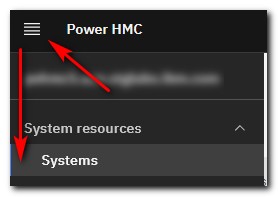
Step 2: Select the target system by selecting the checkbox to the left of the system name.

Step 3: Once the checkbox is selected, click the Service drop-down menu, and select the Manage Dumps item in the menu.
Step 4: In the Manage Dumps dialog that is presented, select the Initiate Dump menu, and then the Initiate Resource Dump menu item.
Step 5: In the Initiate Resource Dump dialog, enter the Resource Selector as described in the notes, or specified by IBM Support. Press OK to initiate the dump.
Step 6: Look for the following success dialog:
Notes:
- A non-disruptive Hypervisor Resource Dump, initiated by using selector system generates a SYSDUMP dump file. The time to offload to the HMC can vary from about 15 - 30 minutes for entry-level systems, to up to around 4 - 5 hours for fully populated and complex high-end systems. The dump status shows 'In Progress' until it completes. If IBM Support did not specify a selector, then it is the desired dump type.
- A non-disruptive Partition Resource Dump (previously called Partition Firmware Dump), initiated by using selector lp X (where X is the partition ID number) generates an RSCDUMP dump file.
- This dump type is useful for:
- problems involving SRCs CAxxxxxx, BAxxxxxx, or AAxxxxxx, and SMS-level issues.
- problems involving IBM i partitions that are unable to IPL to DST, or crashing with an SRC on the panel.
- This dump type does NOT capture partition level data, like an AIX 'system dump', a Linux Kernel dump, a Linux or AIX Firmware Assisted Dump (FWAD), or an IBM i Main Storage Dump.
- This dump will not function if the partition is Off, in a B200xxxx Failed state, or if it is IBM i and the partition is IPLed up completely.
- This dump type is useful for:
- A non-disruptive Hypervisor Resource Macro Dump, initiated by using any other valid, IBM Support specified, selector generates an RSCDUMP dump file.
- A non-disruptive VMI dump, initiated by using selector vmi init-dump generates two RSCDUMP files, one very small and one a bit larger. This dump type is useful for problems involving the Virtual Management Interface on BMC-based Power Systems, such as being able to reach the BMC ASMI, but not being able to manage the partitions via the HMC. Events with SRC B7005192, B7005193, B700519x are VMI-related.
- A non-disruptive SR-IOV Firmware Dump, on an SR-IOV capable adapter in SR-IOV mode, initiated by using selector sriov {location code of the adapter} generates a LPADUMP dump file. It collects firmware data for the functions that manage the adapter, but does not collect adapter diagnostic data. ***The dump type does not apply to SR-IOV capable adapters running in Dedicated (non-SR-IOV mode) or to SR-IOV capable adapters in non-SR-IOV capable slots***
- A disruptive SR-IOV Adapter Dump, on an SR-IOV capable adapter in SR-IOV mode, interrupts communications for any partitions that are using shared logical ports from that specific adapter. The dump is initiated by using selector sriov {location code of the adapter} restart . It generates an LPADUMP dump file that contains firmware data and the adapter diagnostic data. ***The dump type does not apply to SR-IOV capable adapters running in Dedicated (non-SR-IOV mode) or to SR-IOV capable adapters in non-SR-IOV capable slots***
Alternatively, these dump types might be initiated from the HMC command line, by using:
startdump -m {managed server} -t resource -r "{resource selector}"
Example 1: startdump -m 9119-MME*21ABCDE -t resource -r "system"
Generates a non-disruptive Hypervisor Resource Dump, SYSDUMP type, for server 9119-MME*21ABCDE
Example 2: startdump -m 9119-MME*21ABCDE -t resource -r "lp 17"
Generates a non-disruptive Partition Firmware Dump, RSCDUMP type, for partition 17 on server 9119-MME*21ABCDE
Example 3: startdump -m 9119-MME*21ABCDE -t resource -r "sriov U78C7.001.KIEFGHI-P1-C11 restart"
Generates an SR-IOV Adapter Dump, LPADUMP type, for the adapter in location U78C7.001.KIEFGHI-P1-C11
Example 4: startdump -m 9105-22A*21EDCBA -t resource -r "vmi init-dump"
Generates two VMI Dump files, RSCDUMP type, for server 9119-MME*21ABCDE
Note: If you had left the Resource Selector blank, you receive the following dialog:
Continuing the dump by selecting 'Yes' is the same as specifying 'system' in the Resource Selector, and initiates a non-disruptive Hypervisor Resource Dump.

Alternatively, the dump progress may be monitor from the HMC Command Line Interface.
Open an HMC command line, and issue the following command:
ls -lrt /dump/*DUMP*
It displays all dump files, with the most recent listed last.
Example:
-rw-rw-r-- 1 ccfw ccfw 11122312 Jan 17 13:28 FSPDUMP.1054321.8B80000B.20240117202717
-rw-rw-r-- 1 ccfw ccfw 11920213 Jan 17 13:30 FSPDUMP.1054321.9B80000B.20240117202917
-rw-rw-r-- 1 ccfw ccfw 16353882 Dec 21 15:11 SYSDUMP.21ABCDE.10000003.20241221182303.raw678581376.gz
-rw-rw-r-- 1 ccfw ccfw 4637550 Jan 17 15:25 SYSDUMP.1054321.10000003.20240117222433.gz.IN_PROGRESS
If the last file (most recent) matches the time of your dump, and it shows .IN_PROGRESS on the end, the offload is not yet complete. Once the offload is complete, the .IN_PROGRESS ending is dropped, and the dump can then be transferred.
Dump naming conventions:
- Resource dumps created with 'system' or the default (blank) resource selector appear as type SYSDUMP with an Identifier that begins with the digit 1 (1xxxxxxxx).
- Resource dumps using the 'sriov' selector appear as type LPADUMP.
- Resource dumps created with other resource selectors appear as type RSCDUMP.
Look through the list for the dump file with the current datestamp. If the filename ends in .IN_PROGRESS, the offload is not completed. Once the offload is complete, the .IN_PROGRESS ending is dropped, and the dump can then be transferred. Sorting on the Date column sorts alphabetically by the name of the month, not by ascending/descending date.
Step 8: Send the dump to IBM Support.
If the HMC is configured for remote support, the dump can be sent directly to IBM Support using the Selected menu, Call home dump... function. It can also be copied from the HMC and sent to IBM Support at https://www.ecurep.ibm.com/app/upload_sf .
Follow these instructions to Initiate a resource dump from the HMC:
- The HMC is only authorized to system administrator resource selectors.
- The information pertains to HMCs at Version 8 or later, running the Enhanced GUI, and requires Server Firmware on POWER6 at Ex350 or later.
- Ensure the HMC "dump fix" is applied before any dumps are initiated.
If the HMC is a model 7042-CR9 running V8R8.4 or V8R8.5, ensure the following PTF (or supersede) is applied:
HMC V8R8.4.0 Service Pack 2 with iFix MH01665 or later
HMC V8R8.5.0 Service Pack 1 with iFix MH01663 or later - Resource dumps are concurrent meaning that they can be performed with the server and partitions running. There is no impact on running partitions except for some specific selectors such as the SRIOV adapter "restart" dump as noted.
Step 1: Click the Resources icon, and choose All Systems.
Step 2: Click the server name link for the server of interest.
In the Gallery View: 

In Table View: 

Step 3: In the left navigation pane for the selected server, expand the serviceability section and click the serviceability menu item.
Step 4: In the Serviceability main window, click the manage dumps item.
Step 5: In the manage dumps dialog that is presented, select the Action menu, and then initiate resource dump menu item.
Step 6: In the manage dumps, initiate dump dialog that is presented, enter the resource selector as described in the notes. Press OK to initiate the dump.
Look for the following success dialog:
Notes:
- A non-disruptive Hypervisor Resource Dump, initiated by using selector system , generates a SYSDUMP dump file. The time to offload to the HMC can vary from about 15 - 30 minutes for entry-level systems, to up to around 4 - 5 hours for fully populated and complex high-end systems. The dump status shows 'In Progress' until it completes. If IBM Support did not specify a selector, then it is the desired dump type.
- A non-disruptive Partition Resource Dump (previously called Partition Firmware Dump), initiated by using selector lp X (where X is the partition ID number) generates an RSCDUMP dump file.
- This dump type is useful for:
- problems involving SRCs CAxxxxxx, BAxxxxxx, or AAxxxxxx, and SMS-level issues.
- problems involving IBM i partitions that are unable to IPL to DST, or crashing with an SRC on the panel.
- This dump type does NOT capture partition level data, like an AIX 'system dump', a Linux Kernel dump, a Linux or AIX Firmware Assisted Dump (FWAD), or an IBM i Main Storage Dump.
- This dump will not function if the partition is Off, in a B200xxxx Failed state, or if it is IBM i and the partition is IPLed up completely.
- This dump type is useful for:
- A non-disruptive Hypervisor Resource Macro Dump, initiated by using any other valid, IBM Support specified, selector generates an RSCDUMP dump file.
- A non-disruptive VMI dump, initiated by using selector vmi init-dump generates two RSCDUMP files, one very small and one a bit larger. This dump type is useful for problems involving the Virtual Management Interface on BMC-based Power systems, such as being able to reach the BMC ASMI, but not being able to manage the partitions via the HMC. Events with SRC B7005192, B7005193, B700519x are VMI related.
- A non-disruptive SR-IOV Firmware Dump, on an SR-IOV capable adapter in SR-IOV mode, initiated by using selector sriov {location code of the adapter} generates a LPADUMP dump file. It collects firmware data for the functions that manage the adapter, but does not collect adapter diagnostic data. ***The dump type does not apply to SR-IOV capable adapters running in Dedicated (non-SR-IOV mode) or to SR-IOV capable adapters in non-SR-IOV capable slots***
- A disruptive SR-IOV Adapter Dump, on an SR-IOV capable adapter in SR-IOV mode, interrupts communications for any partitions that are using shared logical ports from that specific adapter. The dump is initiated by using selector sriov {location code of the adapter} restart . It generates an LPADUMP dump file that contains firmware data and the adapter diagnostic data. ***The dump type does not apply to SR-IOV capable adapters running in Dedicated (non-SR-IOV mode) or to SR-IOV capable adapters in non-SR-IOV capable slots***
Alternatively, these dump types might be initiated from the HMC command line, by using:
startdump -m {managed server} -t resource -r "{resource selector}"
Example 1: startdump -m 9119-MME*21ABCDE -t resource -r "system"
Generates a non-disruptive Hypervisor Resource Dump, SYSDUMP type, for server 9119-MME*21ABCDE
Example 2: startdump -m 9119-MME*21ABCDE -t resource -r "lp 17"
Generates a non-disruptive Partition Firmware Dump, RSCDUMP type, for partition 17 on server 9119-MME*21ABCDE
Example 3: startdump -m 9119-MME*21ABCDE -t resource -r "sriov U78C7.001.KIEFGHI-P1-C11 restart"
Generates an SR-IOV Adapter Dump, LPADUMP type, for the adapter in location U78C7.001.KIEFGHI-P1-C11
Example 4: startdump -m 9105-22A*21EDCBA -t resource -r "vmi init-dump"
Generates two VMI Dump files, RSCDUMP type, for server 9119-MME*21ABCDE
Note: If you had left the Resource Selector blank, you receive the following dialog with HMC message HSCS0033:
Continuing the dump by selecting 'No', is the same as specifying 'system' in the Resource Selector, and initiates a non-disruptive hypervisor resource dump.
Step 7: Monitor dump status.
There are a couple different methods.
Open an HMC command line, and issue the following command:
ls -lrt /dump/*DUMP*
It displays all dump files, with the most recent listed last.
Example:
-rw-rw-r-- 1 ccfw ccfw 11122312 Jan 17 13:28 FSPDUMP.1054321.8B80000B.20170117202717
-rw-rw-r-- 1 ccfw ccfw 11920213 Jan 17 13:30 FSPDUMP.1054321.9B80000B.20170117202917
-rw-rw-r-- 1 ccfw ccfw 16353882 Jan 17 15:11 SYSDUMP.21ABCDE.10000003.20141221182303.raw678581376.gz
-rw-rw-r-- 1 ccfw ccfw 4637550 Jan 17 15:25 SYSDUMP.1054321.10000003.20170117222433.gz.IN_PROGRESS
If the last file (most recent) matches the time of your dump, and it shows .IN_PROGRESS on the end, the offload is not yet complete. Once the offload is complete, the .IN_PROGRESS ending is dropped, and the dump can then be transferred.
Alternatively, the HMC Manage Dumps GUI can be used to monitor dump progress:
Click the Refresh button to refresh the manage dump view or click the menu Status, Dump offload progress to check offload status.
- Resource dumps created with 'system' or the default (blank) resource selector appear as type SYSDUMP with an Identifier that begins with the digit 1 (1xxxxxxxx).
- Resource dumps using the 'sriov' selector appear as type LPADUMP.
- Resource dumps created with other resource selectors appear as type RSCDUMP.
Look through the list for the dump file with the current datestamp. If the filename ends in .IN_PROGRESS, the offload is not completed. Once the offload is complete, the .IN_PROGRESS ending is dropped, and the dump can then be transferred. Sorting on the Date column sorts alphabetically by the name of the month, not by ascending/descending date.
Step 8: Send the dump to IBM Support.
If the HMC is configured for remote support, the dump can be sent directly to IBM Support using the Selected menu, Call home dump... function. It can also be copied from the HMC and sent to IBM Support at https://www.ecurep.ibm.com/app/upload_sf .
You should follow these instructions to Initiate a Resource Dump from the HMC:
Notes:
- The HMC is only authorized to system administrator resource selectors.
- This information pertains to HMCs at Version 7.3.5 or later and requires Server Firmware on POWER6 at Ex350 or later.
- Ensure the HMC "dump fix" is applied prior to initiating the dump.
If the HMC is a model 7042-CR9 running V8R8.4 or V8R8.5, ensure the following PTF (or supersede) is applied:
HMC V8R8.4.0 Service Pack 2 with iFix MH01665 or later
HMC V8R8.5.0 Service Pack 1 with iFix MH01663 or later - Resource dumps are concurrent meaning that they can be performed with the server and partitions running. There is no impact on running partitions except for some specific selectors such as the SRIOV adapter "restart" dump as noted below.
Step 1: Select the target server to dump, then select the task Serviceability, Manage Dumps:
Step 2: Select the menu Action, then select Initiate Resource Dump...:
Step 3: Initiate Dump:
a. Enter the resource selector (if any) specified by service (blank is the default).
b. Verify target system is correct.
c. Click OK.
Notes:
- A non-disruptive Hypervisor Resource Dump, initiated using selector system or the default blank selector, generates a SYSDUMP dump file. This can take an extended amount of time to complete. The dump status will show 'In Progress' until it completes. If IBM Support did not specify a selector, then this is the desired dump type.
- A non-disruptive Partition Resource Dump (previously called Partition Firmware Dump), initiated by using selector lp X (where X is the partition ID number) generates an RSCDUMP dump file.
- This dump type is useful for:
- problems involving SRCs CAxxxxxx, BAxxxxxx, or AAxxxxxx, and SMS-level issues.
- problems involving IBM i partitions that are unable to IPL to DST, or crashing with an SRC on the panel.
- This dump type does NOT capture partition level data, like an AIX 'system dump', a Linux Kernel dump, a Linux or AIX Firmware Assisted Dump (FWAD), or an IBM i Main Storage Dump.
- This dump will not function if the partition is Off, in a B200xxxx Failed state, or if it is IBM i and the partition is IPLed up completely.
- This dump type is useful for:
- A non-disruptive Hypervisor Resource Macro Dump, initiated using any other valid, IBM Support specified, selector will generate an RSCDUMP dump file.
- A non-disruptive SR-IOV Firmware Resource Dump, on an SR-IOV capable adapter in SR-IOV mode, initiated using selector sriov {location code of the adapter} generates a LPADUMP dump file. This will collect firmware data for the functions that manage the adapter, but does not collect adapter diagnostic data. ***This dump type does not apply to SR-IOV capable adapters running in Dedicated (non-SR-IOV mode) or to SR-IOV capable adapters in non-SR-IOV capable slots***
- A disruptive SR-IOV Adapter Resource Dump, on a SR-IOV capable adapter in SR-IOV mode, will interrupt communications over the adapter during the dump process. This dump is initiated using selector: sriov {location code of the adapter} restart . It generates a LPADUMP dump file that contains firmware data and the adapter diagnostic data. ***This dump type does not apply to SR-IOV capable adapters running in Dedicated (non-SR-IOV mode) or to SR-IOV capable adapters in non-SR-IOV capable slots***
Alternatively, these dump types may be initiated from the HMC command line, using:
startdump -m {managed server} -t resource -r "{resource selector}"
Example 1: startdump -m 9119-MME*21ABCDE -t resource -r "system"
would generate a non-disruptive Hypervisor Resource Dump, SYSDUMP type, for server 9119-MME*21ABCDE
Example 2: startdump -m 9119-MME*21ABCDE -t resource -r "lp 17"
would generate a non-disruptive Partition Firmware Resource Dump, RSCDUMP type, for partition 17 on server 9119-MME*21ABCDE
Example 3: startdump -m 9119-MME*21ABCDE -t resource -r "sriov U78C7.001.KIEFGHI-P1-C11 restart"
would generate a SR-IOV Adapter Resource Dump, LPADUMP type, for the adapter in location U78C7.001.KIEFGHI-P1-C11
Step 4: Confirm dump.
If the default (blank) selector is specified in the previous step, Service Focal Point Message HSCS0033 is displayed. Click No to start the dump:
Step 5: Click OK on the dump initiated confirmation panel:
Step 6: Monitor Dump status.
There are a couple different methods.
Open an HMC command line, and issue the following command:
- ls -lrt /dump/*DUMP*
This will display all dump files, with the most recent at the bottom of the list.
Example:
- -rw-rw-r-- 1 ccfw ccfw 11122312 Jan 17 13:28 FSPDUMP.1054321.8B80000B.20170117202717
-rw-rw-r-- 1 ccfw ccfw 11920213 Jan 17 13:30 FSPDUMP.1054321.9B80000B.20170117202917
-rw-rw-r-- 1 ccfw ccfw 16353882 Jan 17 15:11 SYSDUMP.21ABCDE.10000003.20141221182303.raw678581376.gz
-rw-rw-r-- 1 ccfw ccfw 4637550 Jan 17 15:25 SYSDUMP.1054321.10000003.20170117222433.gz.IN_PROGRESS
If the last file (most recent) matches the time of your dump, and it shows .IN_PROGRESS on the end, the offload is not yet complete. Once the offload is complete, the .IN_PROGRESS ending will be dropped, and the dump can then be transferred.
Alternatively, the HMC Manage Dumps GUI can be used:
Click the Refresh button to refresh the manage dump view or click the menu Status, Dump offload progress to check offload status.
- Resource Dumps created with 'system' or the default (blank) resource selector appear as type SYSDUMP with an Identifier that begins with the digit 1 (1xxxxxxxx).
- Resource Dumps using the 'sriov' selector will appear as type LPADUMP.
- Resource Dumps created with other resource selectors will appear as type RSCDUMP.
Look through the list for the dump file with the current datestamp. If the filename ends in .IN_PROGRESS, the offload is not completed. Once the offload is complete, the .IN_PROGRESS ending will be dropped, and the dump can then be transferred.
Step 7: Send the dump to IBM Support.
If the HMC is configured for remote support, the dump can be sent directly to IBM Support using the Selected menu, Call home dump... function. It can also be copied from the HMC and sent to IBM Support at https://www.ecurep.ibm.com/app/upload_sf .
Was this topic helpful?
Document Information
Modified date:
07 April 2026
UID
nas8N1021901