Question & Answer
Question
How to configure the IBM i Host Servers for SSL communications only?
Cause
The IBM i host servers can be configured to allow connections over a nonsecure or secure SSL/TLS communication link. In some environments, It might be desirable to limit connections to secure SSL/TLS communications only so that clients not configured for secure connections cannot connect.
Answer
IBM i Access Family clients (IBM i Access Client Solutions and the legacy IBM i Access for Windows) can connect by using the following ports:
Note: Various IBM i web services (Navigator, Web Administration, Digital Certificate Manager, and others) might rely on the non-SSL/TLS ports internally, connecting from the loopback or localhost address. Disabling the host server nonsecure ports prevents those services from operating.
| PC function | Server Name | Nonsecure TCP port | Secure SSL/TLS TCP port |
| Server port mapper | as-svrmap | 449 | - |
| License Management | as-central | 8470 | 9470 |
| Database Access | as-database | 8471 | 9471 |
| Data Queue | as-dtaq | 8472 | 9472 |
| Network Drive | as-netdrive | 8473 | 9473 |
| Network Print | as-netprt | 8474 | 9474 |
| Remote Command | as-rmtcmd | 8475 | 9475 |
| Security | as-signon | 8476 | 9476 |
| Host Connection (IBM i 7.6 Only) | as-hostcnn-s | - | 9480 |
| Network Drive (legacy clients) | as-netdrive | 8477 | - |
| Data Transfer (legacy clients) | as-transfer | 8478 | - |
| Virtual Print (legacy clients) | as-vrtprint | 8479 | - |
| 5250 Emulation | telnet | 23 | 992 |
The Telnet Server can be limited to using only the Secure 992 port by using command CHGTELNA and changing the option Allow Secure Sockets Layer to *ONLY:
After the change is made, the Telnet server starts only port 992.

Server port mapper (port 449) is used by both secure and nonsecure communications. The data transferred by this port is software-related and does not contain any customer information.
The other IBM i Host Servers do not have an attribute or parameter that can be set to start only the secure ports for communications. However, there is a way it can be accomplished. You can disable nonsecure ports with port restrictions. Run the IBM i command: CFGTCP then select option 4.
The following shows how to configure a TCP/IP Port Restriction for the IBM i Host Servers. The change prevents any profile other than QSECOFR from starting server sockets on the nonsecure ports 8470-8479. Since the IBM i Host Servers start under the QUSER user profile, they cannot start on these nonsecure ports. The next time TCP/IP Servers start, the IBM i Host Servers will start only on the secure 9470-9476 ports.
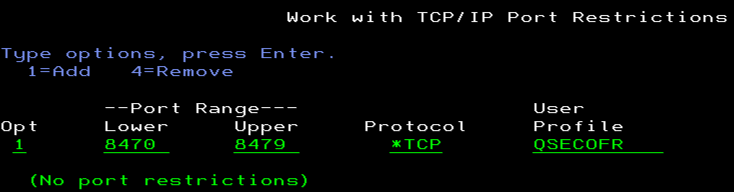
After the port restrictions are added, the host servers must be restarted to stop them from accepting nonsecure connections. The following commands stop and restart the host servers:
ENDHOSTSVR *ALL
STRTCPSVR *ALL
The telnet server is not a host server. It is stopped and restarted with the following commands*:
ENDTCPSVR *TELNET
STRTCPSVR *TELNET
* NOTE: Unlike the host servers, running these commands also ends all active telnet connections. So pick a good time to run the commands and run them from something other than an interactive telnet session. Some alternatives are to run the commands from a CL program in batch, through Run SQL Scripts (CL: ENDTCPSVR *TELNET; CL:STRTCPSVR *TELNET;), or the IBM i Access Client Solutions RMTCMD plug-in.
Related Information
[{"Type":"MASTER","Line of Business":{"code":"LOB68","label":"Power HW"},"Business Unit":{"code":"BU070","label":"IBM Infrastructure"},"Product":{"code":"SWG60","label":"IBM i"},"ARM Category":[{"code":"a8m0z0000000CGmAAM","label":"Host Servers"}],"ARM Case Number":"","Platform":[{"code":"PF012","label":"IBM i"}],"Version":"All Versions"}]
Was this topic helpful?
Document Information
Modified date:
22 December 2025
UID
nas8N1021130