Troubleshooting
Problem
When server ASMI event logs are needed for diagnostics on a server not managed by an HMC, this process will explain how to gather the logs to send to IBM.
Environment
Power Systems
Resolving The Problem
To gather the event logs from Advanced System Management Interface (ASMI), you will need to first configure and connect a PC to the server ports to access ASMI:
| 1. | Follow the links for this activity, depending on the server type: o Power5: http://www.ibm.com/support/knowledgecenter/POWER5/iphby_p5/browser.htm o Power6 and above: http://www.ibm.com/support/knowledgecenter/POWER8/p8eg1/p8egn_access_asmi.htm |
| 2. | Once connected to ASMI, log on as user admin. If the password has not been changed, use the default of admin. |
| 3. | From the menu, expand System Service Aids. |
| 4. | Click Error/Event logs. |
| 5. | Click Select all. |
| 6. | Click Show details: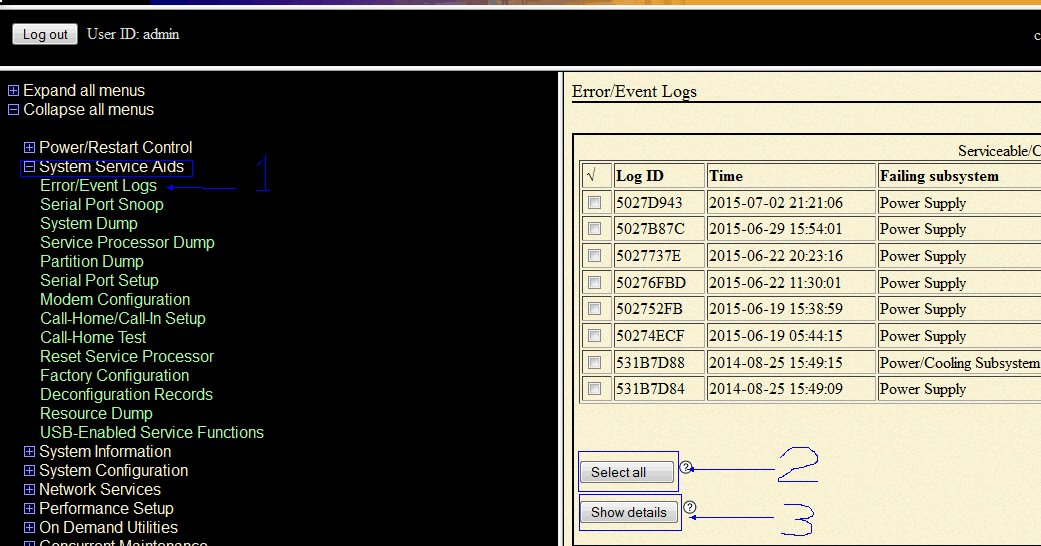 |
| 7. | Right click in the data display, select save page as, and save to your PC. This creates a directory with all the HTML files. |
| 8. | Zip the directory with the saved HTML files, and send to IBM. |
Note: For information on how to send data to IBM, you should refer to document N1019224, MustGather: Instructions for Sending Data to IBM i Support.
[{"Type":"MASTER","Line of Business":{"code":"LOB57","label":"Power"},"Business Unit":{"code":"BU058","label":"IBM Infrastructure w\/TPS"},"Product":{"code":"SWG60","label":"IBM i"},"Platform":[{"code":"PF012","label":"IBM i"}],"Version":"7.1.0"}]
Was this topic helpful?
Document Information
Modified date:
18 December 2019
UID
nas8N1020806