How To
Summary
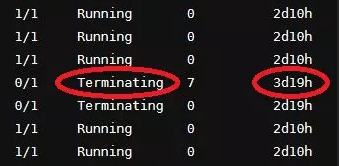
A Red Hat OpenShift Container Platform Pod was deleted from the User Interface, but remains in a status of 'Terminating'. Stagnant terminating status can happen to a pod that is not responding to termination signals.
Objective
In this article, we are providing a process for Red Hat OpenShift Container Platform to delete a Pod that is stuck in a 'Terminating' status.
Environment
Red Hat OpenShift Container Platform (
OCP) 4Steps
- Log in to your Red Hat OpenShift Container Platform Console.
- In Red Hat OpenShift Container Platform Console click the drop-down arrow next to your username, select the option 'Copy login command', then click 'Display Token'.
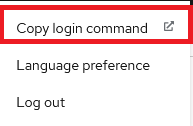

Note: You might need to authenticate again. - Highlight and copy the oc login command. The command looks similar to the following:
oc login –-token=sha256...... - Connect to the Red Hat OpenShift Platform Server with SSH.
- When successfully logged in paste the oc login command, copied in an earlier step.
- Run the following command to retrieve a list of Projects.
oc get projects - Run the following command to retrieve a list of Pods from the Project containing the Pod that is in a 'Terminating' status. Take note of the Pod name that is in a 'Terminating' status.
Note: Replace <Project> with the actual name of the Project.oc get pod -n <Project> - Forcibly remove the Pod from the Project by running the following command.
Note: Replace <Project> with the actual name of the Project. Also, replace <Podname> with the actual name of the Pod.oc delete pod <Podname> -n <Project> --grace-period=0 --force
Results:
Run the following command to confirm the Pod that was stuck in a 'Terminating' status was successfully removed:oc get pod -n <Project>
Document Location
Worldwide
[{"Type":"MASTER","Line of Business":{"code":"LOB24","label":"Security Software"},"Business Unit":{"code":"BU059","label":"IBM Software w\/o TPS"},"Product":{"code":"SSTDPP","label":"IBM Cloud Pak for Security"},"ARM Category":[{"code":"a8m3p0000000rbnAAA","label":"Administration Task"}],"ARM Case Number":"","Platform":[{"code":"PF025","label":"Platform Independent"}],"Version":"All Versions"}]
Was this topic helpful?
Document Information
Modified date:
13 September 2022
UID
ibm16619145