General Page
| RCL Booking Tool Is Moving to IBM Call Home Connect Cloud (CHCC) |
| The Remote Code Load (RCL) booking tool is transitioning to IBM Call Home Connect Cloud, introducing a faster and more intuitive scheduling experience. Users can now select assets directly from their inventory and book RCLs with a single click—eliminating manual entry and simplifying the entire process. Learn what’s changing and how to prepare for the move to CHCC - https://ibm.biz/RCL4IBM |
| Important Notice for DS8900 code upgrades |
|---|
If going to 89.44.25.0, activation might take up to 6 hours, to ensure fix for the following HIPER is applied: https://www.ibm.com/support/pages/node/7267738 |
| Important Notice for DS8A10 code upgrades |
|---|
If the current code level is bellow 10.0.245.0, during a code intercept for DS8A00 RCLs, the machine should not be used for production or host jobs until it is fully upgraded as final step of the installation process. The upgrade is disruptive and hosts might lose access temporarily. |
| Customer "Must-Read" Information for DS8000 Code Updates |
The storage admin should review the following webpage for any prerequisites, messages seen during code update activities, and other recommendations: https://www.ibm.com/support/pages/node/6585326 |
| !!! IMPORTANT !!! |
Once a microcode bundle has been downloaded, no changes are to be made to the DS8000 configuration as it may adversely affect the upgrade process. If changes are made, unpredictable results may occur, such as repeated warmstarts or loss of access to attached Host systems. During a microcode activation, regardless of it being performed by Client, SSR, or via Remote Code Load (RCL), the following should be avoided:
If you wish to make configuration changes after microcode has been downloaded, please contact IBM Support and request to have the preload canceled and rescheduled. |
| Note |
| During a microcode upgrade, access to CSM on the HMC, DSCLI, and the DSGUI will not be available. CSM installed elsewhere will be disconnected from the DS8900F that is being upgraded. All Copy Services functions: Metro Mirror, Global Mirror, etc., will continue to be active during this time. |
Code Recommendations
DS8000 Code Recommendations: https://www.ibm.com/support/pages/ds8000-code-recommendation
System State During the Code Update
DS8K Remote Code Load (RCL) processes are concurrent. Hardware Management Consoles (HMCs) might be rebooted one at a time during engineering change, pre-load, and activation activities. During code update activities, hardware components are updated one at a time and hardware redundancy can be temporarily unavailable.
AOS and Remote Support Notices
The UK-based AOS broker was discontinued at the end of 2021, which might have caused a loss of remote access capability. To read more about the ICS images available to help ensure continued access, or to configure the new broker from the DS8000 WUI, go here: https://ibm.biz/BdfJRz
If using an AOS jump server, you must allow for port 443 traffic between the jump server and the HMCs. See page 21 of the AOS Overview Redbooks for additional information: https://www.redbooks.ibm.com/redpapers/pdfs/redp4889.pdf
For additional information on setting up Remote Support, use the following link and complete the relevant worksheet(s): https://www.ibm.com/support/pages/node/6354259
IBM Fix Central
Port 443 must be enabled to support outbound-initiated connections for seamless communication to the following IBM Fix Central repositories:
Hostname IP address
esupport.ibm.com 192.148.6.11
esupport.ibm.com 170.225.123.67
www-945.ibm.com 192.148.6.11
www-945.ibm.com 170.225.123.67
Notices for Copy Services Manager (CSM)
If CSM is in use and co-located on the HMC:
- It is recommended to update CSM independent of the upgrade by following the steps found at https://ibm.biz/BdqKmg.
- If the CSM code level is below the level included in the microcode bundle, it will be updated.
- CSM will not connect when the code levels are different.
- If the active and the standby servers are operating at different code levels, message IWNR3016E Reason Code 114 can be seen.
- If the active and the standby servers are operating at different code levels, message IWNR3016E Reason Code 114 can be seen.
- The HMCs might be rebooted during pre-load or activation activities, causing CSM to disconnect. A manual reconnect may be required.
If CSM is running on a stand-alone server, these notices do not apply.
Standard ICS images
As part of code update and engineering change procedures, the latest version of the following ICS images may be installed unless otherwise requested:
For DS8A00s:
- PFE_DS8A00_CCL_PreCheck_v1.x –This bundle ICS makes several non-disruptive checks to confirm remote connectivity settings and that the machine is ready for a code update. Installed during engineering changes and pre-loads.
- DS8k_DDM_SSD_UC_Activate_v1.x – Concurrently updates DDM Firmware to levels included in the target microcode bundle. Installed after activation.
- CSE_SyncIO-sw1-check-v1 - checks for potential exposure in codes 10.11.30.0 or 10.11.34.0 to the following: https://www.ibm.com/support/pages/node/7271018.
- CSE_CDA-Wait4IPL_v4 – Required when updating to code level 10.2.35.0. It will allow the CDA process more time to complete the P9 firmware update before timing out. Installed during activation.
For DS8900s:
- PFE_DS8900_CCL_PreCheck_v1.x – This bundle ICS that makes several non-disruptive checks to confirm remote connectivity settings and that the machine is ready for a code update. Installed during engineering changes and pre-loads.
- DS8k_DDM_SSD_UC_Activate_v1.x – Concurrently updates DDM Firmware to levels included in the target microcode bundle. Installed after activation.
- CSE_ESSNI_DB_delete_v1.x - required for boxes going to 89.44.x.x. Needed to restart ESSNI server and rebuild database.
- PFE_FixAOS_Consolidated_v2.x - required for codes lower than 89.43.3.0 and above. Fixing HMCs AOS connection server list.
- eccUpdater_v1.x - This ICS ensures callhome server lists in the HMCs are updated.This ICS is integrated in code levels higher than 89.32.99.0.
- CVE_1Q2022_v1.x- Security ICS including Apache Log4j libraries update. Installed during engineering changes and after activation. This ICS is integrated in code levels higher than 89.21.99.0.
More mandatory ICS images will be installed depending on the code levels and if an HMC transformation is required.
Monitor RCL Progress
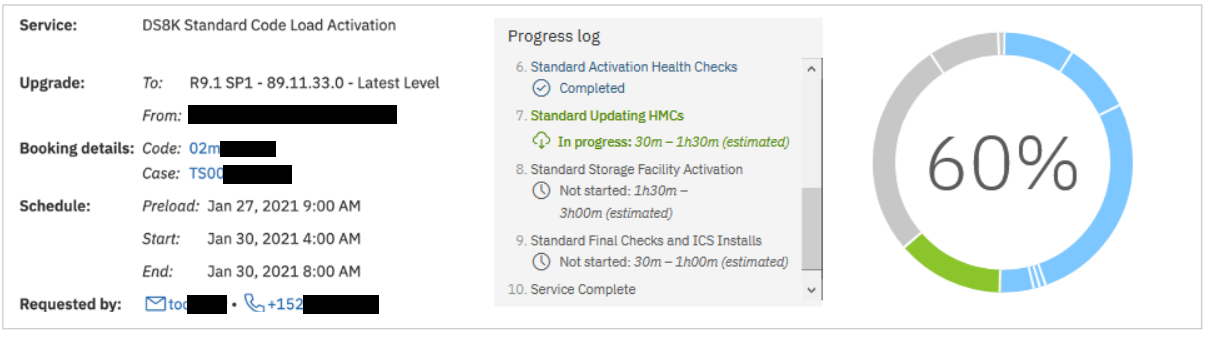
Monitor the real-time progress of all your RCL activities in one window using IBM Call Home Connect Cloud: https://www.ibm.com/support/call-home-connect/cloud/.
When submitting the booking, you can select how would you like to be informed of the progress of the RCL.
- If you select the option "Emails only - every 1 hour", you receive our standard email updates every 1 hour
- If you select the option "Progress Tracker - Live Updates", you are registered in the IBM Call Home Connect portal, and the requested assets are added to your profile. Then, you receive an email with a link where you can monitor the progress of the RCL (as shown in the picture). You will still receive email updates 30 - 60 minutes before we start and another email after we finish with the RCL.
In order to register your products to the IBM Call Home Connect Cloud, you need to follow the steps:
- Log into IBM Call Home Connect Cloud with your IBMid - https://www.ibm.com/support/call-home-connect/cloud/
- Go to "Site Assistance" - https://www.ibm.com/support/call-home-connect/cloud/siteassistance
- Click "How to use IBM Call Home" tab and then click "How to manage your product list in IBM Call Home Connect Cloud"
You are presented with instructions how to register your assets for yourself and for your colleagues.
Once the assets are added to your profile, you can go to the home page in step 1 and see your assets. Next to each of them, you find a small cloud icon under "Tools", which leads you to the dashboard of the RCL progress.
RCL Process
I. Initial request
1) Client (or Technical Account Manager) submits a booking request following the steps in "Instructions"
2) IBM Ticket (CSP case) is automatically created and routed to the RCL support mission right after a booking is submitted. CSP case number is automatically entered into the booking entry.
3) Client receives an automated email confirming that the RCL team has received the booking request. This email is not a confirmation of the service.
4) Booking request is manually reviewed. Once the booking is approved, an RCL agent sends out a confirmation email within 24 hours. The confirmation email contains details of the booking as well as the standard requirements and recommendations for an RCL.
Note! If the requested time slot is not available, client will be offered alternative time slots.
II. Steps during scheduled activities
1) Health check and Pre-load
If a specific time slot was not chosen for the pre-load, the pre-load takes place 2 - 3 days before the scheduled code upgrade. An RCL engineer checks the machine for any errors that need to be fixed before the code upgrade and downloads the files necessary for the code upgrade. Pre-load is non-disruptive and can be done during production time.
The pre-load process is as follows:
DS8880/DS8900/DS8A00 Standard
- Running the health checks and ensuring remote downloads work properly. Estimated time: 15 - 60 minutes.
- Downloading the new code bundle and installing necessary ICS images. Estimated time: 30 - 60 minutes.
- Pre-loading the new code bundle. Estimated time: 90 - 180 minutes.
- Running the health checks and ensuring remote downloads work properly. Estimated time: 15 - 60 minutes.
- Downloading the new code bundle, recovery image, and ICS images. Estimated time: 30 - 60 minutes.
- Installing necessary ICS images and upgrading the HMCs. Estimated time: 90 - 240 minutes.
- Pre-loading the new code bundle. Estimated time: 90 - 240 minutes.
2) Code Activation
At the scheduled date and time for the code upgrade, RCL engineer contacts the client and perform the code upgrade procedure along with health checks before and after it completes.
The code upgrade process is as follows:
Engineering Change
- Running the health checks. Estimated time: 15 - 20 minutes.
- Installing ICS images. Estimated time: 20 - 40 minutes.
DS8880/DS8900/DS8A00 Standard
- Updating the HMCs to the new code bundle. Estimated time: 30 - 90 minutes.
- Activating the code on the LPARs, Storage Enclosures, Host adapters, and IO Bays. Estimated time: 90 - 240 minutes.
- Running the post-update checks and installing ICS images. Estimated time: 60 minutes
DS8880/DS8900 Transformation
- Activating the code on the LPARs, Storage Enclosures, Host adapters, and IO Bays. Estimated time: 90 - 300 minutes.
- Running the post-upgrade checks and installing ICS images. Estimated time: 60 minutes
1) RCL team sends email reminder 30 - 60 minutes before any activity.
2) RCL team sends email updates on every 1 hour during each activity with current progress and next actions, as well as estimated time for each step.
Note! If "Progress Tracker" was selected for the Preferred Communication Method, email updates will not be sent every 1 hour, and client is able to monitor the progress of the upgrade in real time.
3) RCL team sends a final email after each activity is completed.
IV. Collaboration
1) During all phases of the RCL Process, RCL team has a 24 x 7 direct link to the Support and Subject Matter Experts of the product. If any issues, the needed team is engaged and collaborates together with the RCL team for a quick resolution of the issue.
2) If an onsite repair is needed before, during, or after RCL, the RCL engineer will open a hardware ticket. The ticket is routed to the Support team, who dispatches it to the field. SSR has a 24 x 7 quick connection to the Support team by using hot line or PMR updates.
Important! All issues during RCL are considered Severity 1 and are looked at with highest priority.
V. RCL Contacts
The best option to contact the RCL team is by replying to the confirmation email without changing the subject line. This ensures the email gets attached to your booking and IBM ticket and the first available RCL engineer will contact you.
For emergency situations: Direct line: 1-800-IBM-SERV (+1-800-426-7378), follow prompts to enter Direct Access Code (DAC#) 91650
For general questions and concerns: email: ibmrcl@us.ibm.com
To request a callback: 1-800-IBM-SERV, provide the CSP Case # and request a callback. (see the IBM-SERV phone number for your country here - https://www.ibm.com/planetwide/)
Was this topic helpful?
Document Information
Modified date:
23 June 2026
UID
ibm16590739