Question & Answer
Question
What are some common aspects that you need to know about installing and uninstalling QRadar EDR agent for macOS?
Answer
System Requirements for QRadar EDR Agent on macOS
To know more about the system requirements, follow this IBM document.
QRadar EDR Agent system requirements
QRadar EDR Agent system requirements
How to install QRadar EDR Agent on MacOS
- Download the agent distribution package for MacOS from QRadar EDR dashboard:
- Log in to the QRadar EDR Dashboard.
- Click Administration Tab > Update Manager.
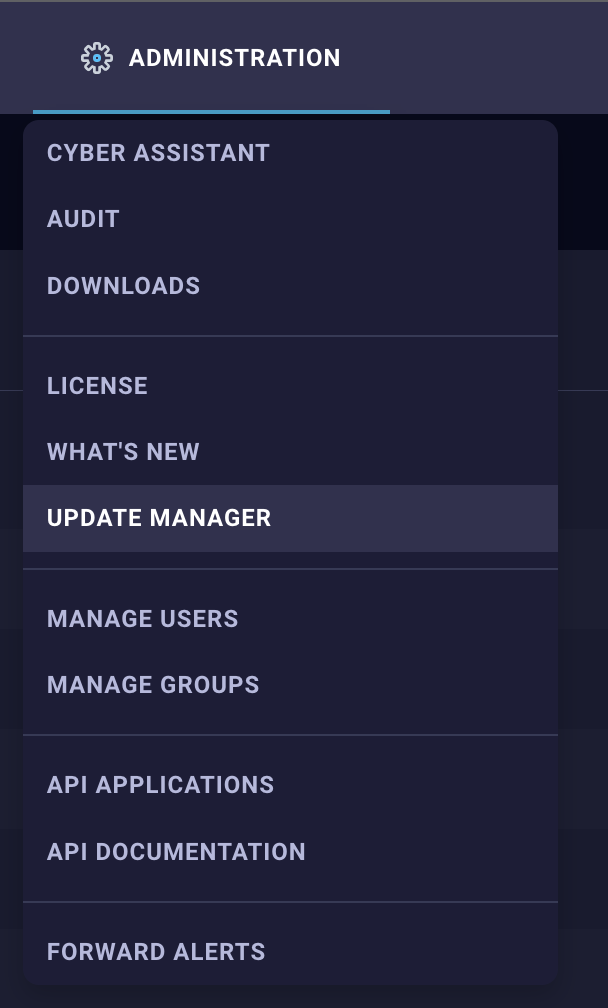
- Click the Hive Package for MacOS, which opens up the Agent Distribution Details pane. Then, click the Installer Download tab.


- Click the Download, which downloads a .pkg file.

- Double-click the .pkg file and click Continue.

- You will see the Software License Agreement. Click Continue.

- Click Agree after you read, understood, and agree on the License Agreement.

- Ensure that you have the necessary space that is required for the installation. Click Install to proceed with the installation.

- You need the user password or TouchID (if applicable) to proceed with the installation.

- You might be prompted to allow the Installer.app to access the Folder where you run the .pkg file from. Click OK to continue.
- After the agent installation is done, you will be prompted to input the backend URL and
gidsto register the agent to the backend server. Click OK after you input the correct parameters.

- You will see the message box that indicates that the system extension is blocked. Click Open System Settings.

- Under Privacy & Security, Security Section, you should see the message that indicates that “IBM Security ReaQta.app” was blocked from loading. Click Allow.

- You need the user password or TouchID (if applicable) to proceed.

- Under Privacy & Security, Full Disk Access Section, ensure that
keeperiand ReaQta-Hive-ES-Extension is enabled. If they are disabled, enable them.

- If
keeperiis not shown on the list, proceed to include it from the path “/Library/IBM Security ReaQta/keeperi”, then enable it. - Go to the package installation window and click Close to complete the installation.
- Log in to the QRadar EDR Dashboard, click the Endpoints tab, verify that the newly installed endpoint is registered and online.

How to uninstall QRadar EDR Agent on MacOS
There are two methods to uninstall the Hive agent. You can select any according to your convenience.
Method 1: Uninstall from QRadar EDR dashboard UI
- In the QRadar EDR Dashboard, go to the Endpoint tab. Click the target endpoint where you want to uninstall the agent.
- Click the View Endpoint at the lower right corner.
- Click uninstall.

- Verify the /Library/IBM Security ReaQta directory is removed. If not, then proceed with steps in method 2.
Note: If the agent is not communicating with the server, uninstall from QRadar EDR dashboard is not successful.
Method 2: Uninstall from Mac
- Open the terminal and run the following command:
sudo /Library/IBM\ Security\ ReaQta/uninstall.sh - Verify the /Library/IBM Security ReaQta directory is removed.
If there is any issues during installation, what information do you need to provide to the support
- Specify the Endpoint name and link to the Dashboard.
- Specify the MacOS version, QRadar EDR dashboard version, and Agent distribution version.
- Provide the install.log to support from following location.
/var/log/install.log - Open console.app and filter by "keeperi" and "ibm" as shown in the following screenshot and send the logs to the support.

[{"Type":"MASTER","Line of Business":{"code":"LOB24","label":"Security Software"},"Business Unit":{"code":"BU059","label":"IBM Software w\/o TPS"},"Product":{"code":"SSVOEH","label":"IBM Security ReaQta"},"ARM Category":[{"code":"a8m3p000000hBSRAA2","label":"Agent-\u003EInstallation-\u003EmacOS"}],"ARM Case Number":"","Platform":[{"code":"PF025","label":"Platform Independent"}],"Version":"All Versions"}]
Product Synonym
ReaQta
Was this topic helpful?
Document Information
Modified date:
24 October 2023
UID
ibm16565683