Troubleshooting
Problem
Saving Upgrade Data task on HMC fails.
Symptom
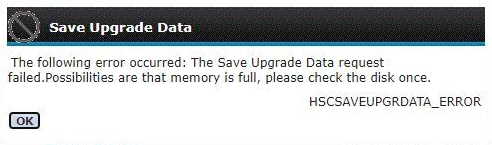
The HMC shows an error message:
The following error occured: The Save Upgrade Data request
failed. Possibilities are that memory is full, please check the disk once.
HSCSAVEUPGRDATA_ERROR
Cause
This error is seen whether a USB flash drive with label upgrade is used. The label upgrade is used already for the internal hidden partition where the save upgrade data are stored on the local hard disk. Using the same label for the USB flash drive prevents successful mount of the local partition on the HMC.
Environment
HMC V9
HMC V10
Diagnosing The Problem
Check the file saveUpgradeFiles.log:
tail /var/hsc/log/saveUpgradeFiles.log
Output is:
   Processing /tmp/saveupgrade.list...

Input parameters are: 0, /tmp/saveupgrade.list, and SaveHSCSystemUpgradeData.tar
Taking dump of postgres data...
postgres data backup has been completed successfully.
mount of /mnt/upgrade failed. RC = 32
The mountpoint, /mnt/upgrade, cannot be mounted.  Error is 32
umount: /mnt/upgrade: not mounted.
Can't unmount the source /mnt/upgrade, rc = 32.
saveUpgradeFiles script exiting, rc = 7.
Check USB flash drive label:
lsmediadev
lsmediadev
Output is:
device=/dev/sdb1,mount_point=/media/sdb1,type=3,description=USB device,label=upgrade,product=USB DISK 3.0
Resolving The Problem
Format the USB flash drive with a label different than upgrade.
Document Location
Worldwide
[{"Type":"MASTER","Line of Business":{"code":"LOB08","label":"Cognitive Systems"},"Business Unit":{"code":"BU054","label":"Systems w\/TPS"},"Product":{"code":"SGGSNP","label":"Hardware Management Console V9"},"ARM Category":[{"code":"a8m0z000000cw1DAAQ","label":"Hardware Management Console-\u003EHMC Upgrade\/Update"}],"ARM Case Number":"","Platform":[{"code":"PF025","label":"Platform Independent"}],"Version":"9.1.91;and future releases"}]
Was this topic helpful?
Document Information
Modified date:
10 February 2022
UID
ibm16555108