Question & Answer
Question
Cause
Answer
| When using | Traces to collect |
|---|---|
IDz Eclipse client |
|
IDz in VS code Z Open Editor |
Optional:
|
| Error | Possible cause | Resolution |
|---|---|---|
| The error can indicate that the client side broke the connection. For example if the server certificate is not trusted by the client and the client side is configured to check it | Add the server certificate to the client key store. On Windows (a) |
| The host closed the connection because no client certificate was provided | Select a client certificate on the RCE connection properties  |
 | When launched from Z Open Editor, the host TN3270 closed the connection because it requires a client certificate but RSEAPI doesn't support it | In rseapi.env, configure a TN3270 port that do not require a client certificate |
| The host closed the connection because the client certificate was not recognized | |
| The client certificate alias was not found the keystore | On Windows, verify in certmgr that your client certificate alias is listed under Personal > Certificate in column Friendly Name |
CommonPropertiesRESTService EXCEPTION : Exception in GET - Get a list of all Common Properties Namespaces with userid USERXYZ com.ibm.rse.rest.exception.RestWAFunctionDisabledException: Common Properties service is not enabled. | Error is printed to the RSEAPI STC joblog if common properties is not enabled in rse.env. The error can be ignored and should not prevent a successful connection with RCE | Set variable RSE_COMMON_PROPERTIES in rseapi.env |
Menu "Launch 3270 emulator in Web browser" is not available in Zower Explorer  |
|

|
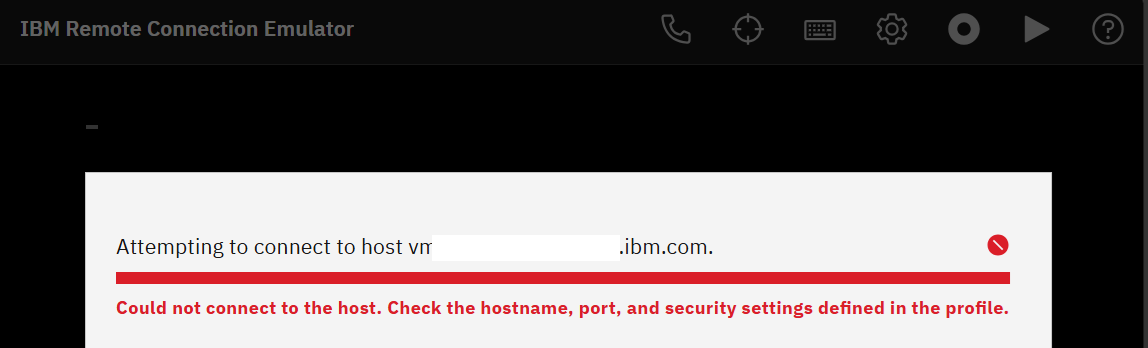 | The Tomcat RCE app on z/OS failed to communicate with the TN3270 server.
| Verify that the RCE_HOST, RCE_PORT, RCE_SECURITY parameters in rseapi.env are correct. If the error "Couldn't open a socket" can be found on the RSEAPI STC joblog then it would mean that RCE app on z/OS failed to communicate with its s3270 spawned process. Verify in your TCPIP configuration that RSEAPI* jobs can open a random port. Error will happen with PORT UNRSV TCP rules excluding RSEAPI from opening an unreserved port. It can be resolved by adding a specific rule for RSEAPI like |
| ABEND SEC6 happens when the RSEAPI RCE app on z/OS detects that a 3270 session already exists and kills the related s3270 process.
| This is working as designed. |
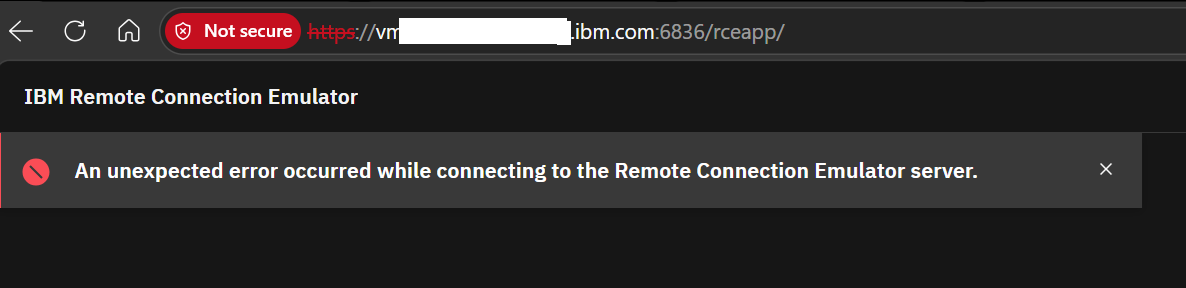 | /rceapp is not a valid URI | Launch RCE from Z Open Editor menu
|
certmgr /s my

- Host certificate has to be trusted

- When using Client certificate


- Enable tracing with menu Window > Preferences > Tracing and set com.ibm.remote.connection.emulator to FINEST

<your workspace>\.metadata\.trace

TTLSConnectionAction  TN3270_conn
{
 HandshakeRole Server
 TTLSCipherParmsRef  TN3270_cipherparms
 TTLSConnectionAdvancedParmsRef TN3270_Conn_adv
 CtraceClearText  Off
 Trace  255
}
- Enable DEBUG level from menu File > Preferences > Settings > Extension > IBM Z Open Editor and set Logger=DEBUG

- Reproduce the problem;
- Open the output view from menu View > Output and send the content for "IBM Z Open Editor"

$OUTPUT_DIR/rseapi_<port>.1/server/localhost_access_log.<date>.txt
- Add the following statement to your rseapi.env:
#trace HTTP requests from rceapp to rseapi in catalina.log
JAVA_OPTS="$JAVA_OPTS -Djdk.httpclient.HttpClient.log=errors,requests,headers"- Restart the RSEAPI started task
- Reproduce the problem
- Collect the catalina log which location depends on the configuration of OUTPUT_DIR in rseapi.env:
$OUTPUT_DIR/rseapi_<port>.1/server/catalina.<date>.log
17-Jun-2025 07:51:53.275 INFO [HttpClient-1-Worker-0] jdk.internal.net.http.Http1Request.logHeaders HEADERS: REQUEST HEADERS:
POST /rseapi/api/v1/auth/login HTTP/1.1
Content-Length: 42
Host: host1.ibm.com:6834
User-Agent: Java-http-client/11.0.23
Accept: application/json
Content-Type: application/json
17-Jun-2025 07:51:53.523 INFO [HttpClient-1-Worker-0] jdk.internal.net.http.Http1Response.lambda$readHeadersAsync$0 HEADERS: RESPONSE HEADERS:
    authorization: Bearer eyJhbGci......
    date: Tue, 17 Jun 2025 11:51:53 GMT
    set-cookie: apimlAuthenticationToken=eyJhbGci.......;Version=1
    strict-transport-security: max-age=0
    token-expiration-time: Tue Jun 17 15:51:53 EDT 2025
    vary: Origin
    x-content-type-options: nosniff
    x-frame-options: DENY
    x-xss-protection: 1; mode=block
- Add the following statement to your rseapi.env:
# enable RCE debug level
RCE_LOG_LEVEL=DEBUG- Restart the RSEAPI started task
- Reproduce the problem
- Collect the rce.log which location depends on the configuration of OUTPUT_DIR in rseapi.env:
$OUTPUT_DIR/rseapi_<port>.1/server/rce.log
2026-09-09 03:19:03.680 [exec-9] INFO  com.ibm.host.connect.s3270.tomcat.LoginRegistry - Inside ConnectToHostAction - get the user session - rceSessionGroupId is: 1788938343339
2026-09-09 03:19:03.684 [exec-9] INFO  com.ibm.host.connect.s3270.tomcat.LoginRegistry - Inside ConnectToHostAction - data from the Web UI: - rceSessionGroupId is: 1788938343339
2026-09-09 03:19:03.684 [exec-9] INFO  com.ibm.host.connect.s3270.tomcat.LoginRegistry - Inside ConnectToHostAction - Successfully extracted the user session - rceSessionGroupId is: 1788938343339
2026-09-09 03:19:03.685 [exec-9] INFO  com.ibm.host.connect.s3270.tomcat.LoginRegistry - Inside ConnectToHostAction - Successfully extracted the connection properties. Invoking screenWrapper.connectToHost - rceSessionGroupId is: 1788938343339
2026-09-09 03:19:03.685 [exec-9] INFO  com.ibm.host.connect.s3270.tomcat.LoginRegistry - ------Attempt to disconnect previous session - rceSessionGroupId is: 1788938343339
2026-09-09 03:19:03.685 [exec-9] INFO  com.ibm.host.connect.s3270.tomcat.LoginRegistry - ------Done attempting to disconnect previous session - rceSessionGroupId is: 1788938343339
2026-09-09 03:19:03.686 [exec-9] INFO  com.ibm.host.connect.s3270.tomcat.LoginRegistry - ----- Starting the s3270 session ----- rceSessionGroupId is: 1788938343339
 Location of executable is: /u/sandbox/usr/rseapi/v12x/tomcat.base/webapps/rceapp/WEB-INF/executable/s3270
2026-09-09 03:19:03.688 [exec-9] INFO  com.ibm.host.connect.s3270.tomcat.LoginRegistry - ---------   Beginning of startProcess ---------- rceSessionGroupId is: 1788938343339
2026-09-09 03:19:03.911 [exec-9] INFO  com.ibm.host.connect.s3270.tomcat.LoginRegistry - rceSessionGroupId is: 1788938343339 ------ Seting session parms:
model=3279-2-E,codepage=037
2026-09-09 03:19:03.911 [exec-9] INFO  com.ibm.host.connect.s3270.tomcat.LoginRegistry - ------Connecting to host after session parms have been set - rceSessionGroupId is: 1788938343339
2026-09-09 03:19:04.318 [exec-9] INFO  com.ibm.host.connect.s3270.tomcat.LoginRegistry - Inside ConnectToHostAction - Successfully got the response from screenWrapper.connectToHost. jsonString is:
{"command":"Connect(C:L:Y:[myTN3270.ibm.com]:992)","processEnded":false,"okReceived":true,"errorReceived":false,"timeout":false,"lockedKeyboard":false,"internalError":false,"connectionState":"","keyboardState":"unlocked","responseStatus":....
Related Information
Product Synonym
IDz;IDz on VS Code;IDz EE
Was this topic helpful?
Document Information
Modified date:
09 September 2026
UID
ibm16514447