Troubleshooting
Problem
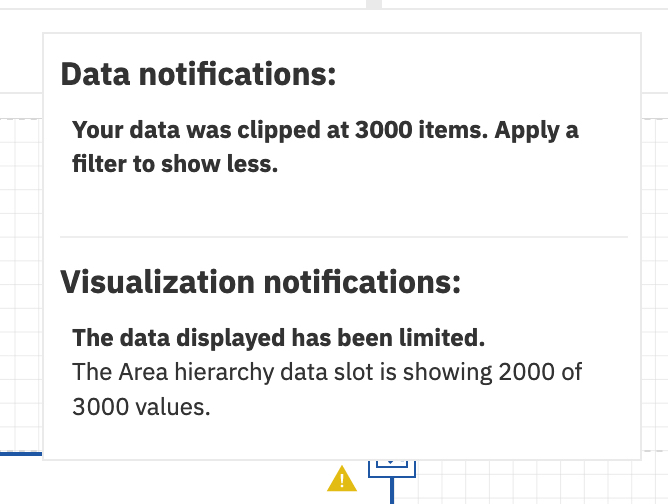
Cognos Analytics dashboard users can encounter data visualizations that display one or both of the following notification messages:
- "Your data was clipped at 3000 items. Apply a filter to show less"
- "The data displayed has been limited"
The following image displays an example of how the notifications appear in Cognos Analytics.
Symptom
A warning symbol (⚠) in the top right corner of the visualization widget. When you select the warning icon, one or both of the notification messages are shown.
Document Location
Worldwide
[{"Type":"MASTER","Line of Business":{"code":"LOB76","label":"Data Platform"},"Business Unit":{"code":"BU048","label":"IBM Software"},"Product":{"code":"SSTSF6","label":"IBM Cognos Analytics"},"ARM Category":[{"code":"a8m0z0000001jleAAA","label":"Dashboards"}],"ARM Case Number":"","Platform":[{"code":"PF025","label":"Platform Independent"}],"Version":"11.0.13;11.1.7;11.2.1"},{"Product":{"code":"SS6G84","label":"IBM Cognos Analytics on Cloud"},"Business Unit":{"code":"BU048","label":"IBM Software"},"Component":" ","Platform":[{"code":"","label":""}],"Version":"","Edition":"","Line of Business":{"code":"LOB76","label":"Data Platform"}},{"Product":{"code":"SSLKT6","label":"IBM Maximo Asset Management"},"Business Unit":{"code":"BU048","label":"IBM Software"},"Component":" ","Platform":[{"code":"","label":""}],"Version":"","Edition":"","Line of Business":{"code":"LOB77","label":"Automation Platform"}}]
Log InLog in to view more of this document
This document has the abstract of a technical article that is available to authorized users once you have logged on. Please use Log in button above to access the full document. After log in, if you do not have the right authorization for this document, there will be instructions on what to do next.
Was this topic helpful?
Document Information
Modified date:
14 January 2026
UID
ibm16445813