How To
Summary
How to renew the DEP Token for MaaS360
Steps
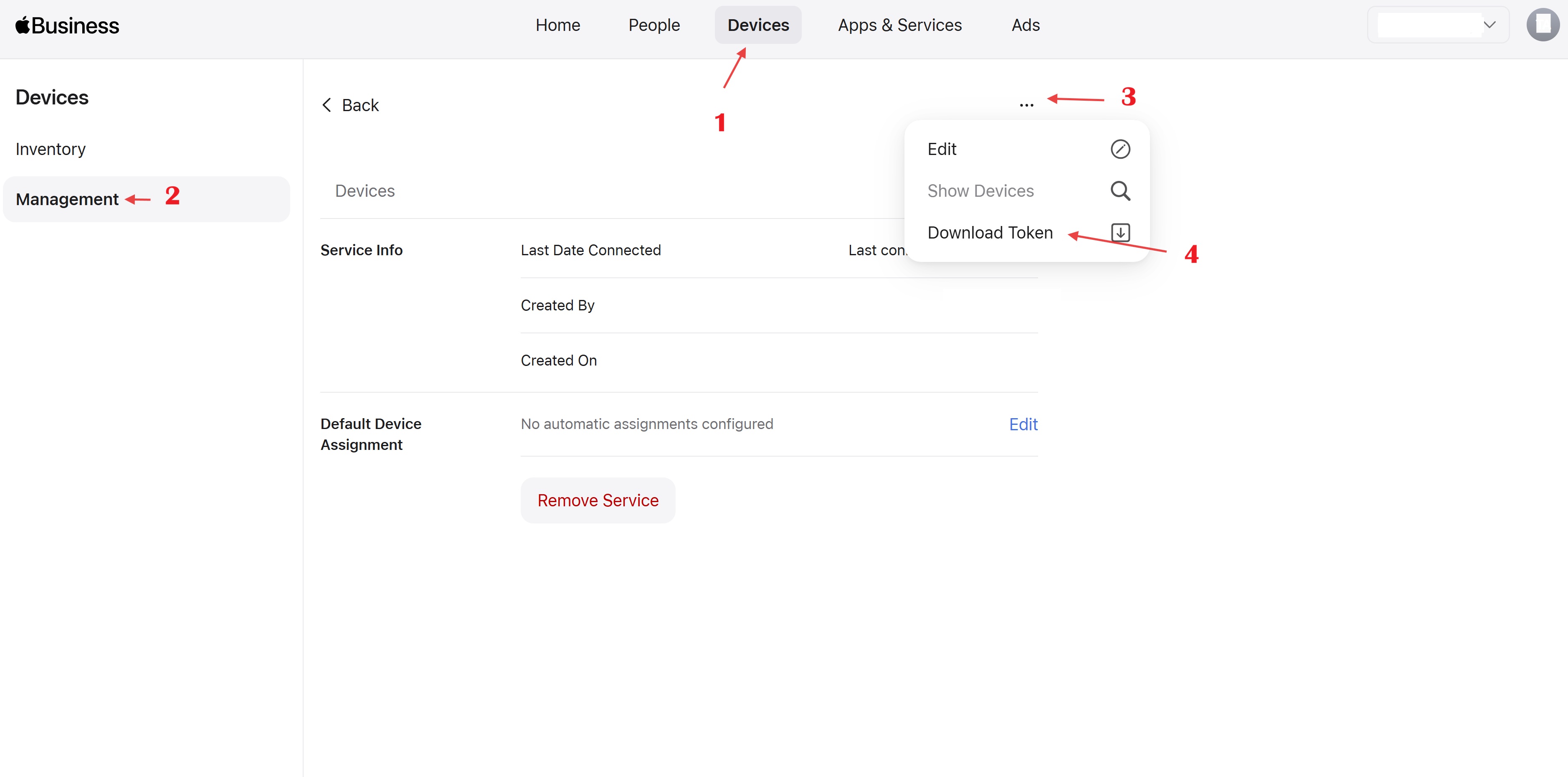
1. Login to the Apple Business/School portal. Click on Devices> Management> Then click on the server name and from the three dots you can find the option “Download Token”
2. Once the token has been downloaded, in the MaaS360 Portal go to Devices (Hover)> Enrollments> Other Enrollment options> Apple> Apple Device Enrollment> Tokens> Tokens and click on “Update” under the token name.

3. Click on Browse and upload the token downloaded from Apple Business Manager, it will show a successful message if the token was uploaded correctly.
Document Location
Worldwide
[{"Type":"SW","Line of Business":{"code":"LOB77","label":"Automation Platform"},"Business Unit":{"code":"BU048","label":"IBM Software"},"Product":{"code":"SSYSXX","label":"IBM MaaS360"},"ARM Category":[{"code":"a8m0z000000070dAAA","label":"ENROLLMENT PROGRAMS"}],"ARM Case Number":"","Platform":[{"code":"PF025","label":"Platform Independent"}],"Version":"All Version(s)"}]
Was this topic helpful?
Document Information
Modified date:
29 May 2026
UID
ibm16442127