Troubleshooting
Problem
This document shows how a user without *ALLOBJ special authority can view a joblog for a user with *ALLOBJ special authority.
Resolving The Problem
A user without *ALLOBJ special authority can view a joblog for a user with *ALLOBJ special authority is available starting with Version 5. Use one of the following options.
Option 1: Starting with V5R3, activate the function with the following command:
Note: SECADM is required to issue the command successfully.
Option 2: From the iSeries Navigator, do the following:
To allow a user without *ALLOBJ special authority to view a user's active job log that has *ALLOBJ special authority, do the following:
Option 1: Starting with V5R3, activate the function with the following command:
Note: SECADM is required to issue the command successfully.
CHGFCNUSG FCNID(QIBM_ACCESS_ALLOBJ_JOBLOG) USER(USRNAME) USAGE(*ALLOWED)
Option 2: From the iSeries Navigator, do the following:
| 1. | The following PTFs are required to enable this function at these releases: V5R1: SI08171 on cumulative tape 3343510 V5R2: SI08172 on cumulative tape 3364520 |
| 2. | The users using this feature must have *JOBCTL special authority. |
To allow a user without *ALLOBJ special authority to view a user's active job log that has *ALLOBJ special authority, do the following:
| 1. | Open iSeries Navigator. |
| 2. | Right-click on the system and choose Application Administration(for V5R2 choose Local settings). |
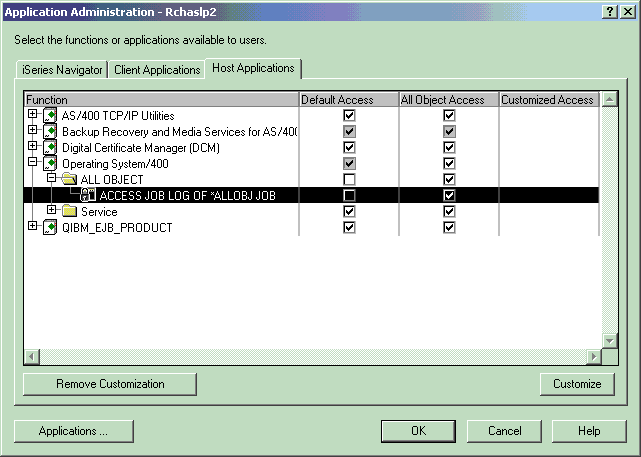
| 3. | This brings up the Application Administration window below. (It may require an update to iSeries Navigator functions before this window comes up.) |
| 4. | Click on the Host Applications tab. |
| 5. | Expand the Operating System/400 Function. |
| 6. | Expand the new All Object folder. |
| 7. | Choose the Default access (all users). |
| 8. | If the ACCESS JOB LOG OF *ALLOBJ JOB function is highlighted, the Customize button on the lower right of this window can be used to customize this function for specific users. |
| 9. | Once the Default Access is checked for the ACCESS JOB LOG OF *ALLOBJ JOB or individual users added with the customize button, *ALLOBJ special authority is no longer required to view another user's active job log if they have *ALLOBJ special authority. |
[{"Type":"MASTER","Line of Business":{"code":"LOB68","label":"Power HW"},"Business Unit":{"code":"BU070","label":"IBM Infrastructure"},"Product":{"code":"SWG60","label":"IBM i"},"ARM Category":[{"code":"a8m0z0000000CHyAAM","label":"Security"}],"ARM Case Number":"","Platform":[{"code":"PF012","label":"IBM i"}],"Version":"All Versions"}]
Historical Number
29762529
Was this topic helpful?
Document Information
Modified date:
07 October 2024
UID
nas8N1016625