Troubleshooting
Problem
This document describes using the IBM i console recovery feature with HMC 5250 console and the benefits of using it instead of shared consoles.
Resolving The Problem
What is Console recovery?
Console recovery and takeover is a special set of functions in IBM i to enhance 5250 console. Recovery is the process of regaining control of the job running on the console after a problem with the console is encountered or the active console is disconnected. The recovery process may be on same console device or a different console device altogether.
The default value is Off. IBM support recommends console recovery be enabled.
A common benefit of console recovery is its use in long running console tasks such as restricted state backups. With recovery enabled, a user can start a backup from one console session, disconnect that console (shut down the PC), relocate, and reconnect later to check the progress. Recovery will keep the console session, along with the running backup, active while the console is disconnected. It allows the user to resume the job later.
Using Console recovery in place of shared consoles
Administrators may wish to use console recovery in place of (or with) HMC shared 5250 consoles. IBM support recommends using it with dedicated consoles. Many users use HMC shared consoles as a limited type of "recovery." They start one shared session on the local HMC to keep the running console job (such as backup) active in case the remote shared console session disconnects. Console recovery provides the same protection as shared consoles with two additional benefits as follows:
1. It works at the IBM i layer
Console recovery and takeover is a special set of functions in IBM i to enhance 5250 console. Recovery is the process of regaining control of the job running on the console after a problem with the console is encountered or the active console is disconnected. The recovery process may be on same console device or a different console device altogether.
The default value is Off. IBM support recommends console recovery be enabled.
A common benefit of console recovery is its use in long running console tasks such as restricted state backups. With recovery enabled, a user can start a backup from one console session, disconnect that console (shut down the PC), relocate, and reconnect later to check the progress. Recovery will keep the console session, along with the running backup, active while the console is disconnected. It allows the user to resume the job later.
Using Console recovery in place of shared consoles
Administrators may wish to use console recovery in place of (or with) HMC shared 5250 consoles. IBM support recommends using it with dedicated consoles. Many users use HMC shared consoles as a limited type of "recovery." They start one shared session on the local HMC to keep the running console job (such as backup) active in case the remote shared console session disconnects. Console recovery provides the same protection as shared consoles with two additional benefits as follows:
1. It works at the IBM i layer
Even if the HMC is rebooted, encounters an error, or is powered off, the recovery feature will still keep the console job running.
2. No need to start local shared consoles
You do not have to open local shared consoles after every HMC reboot. This is especially beneficial for remote or "lights out" data centers where there is no or limited access to the local HMC.
When the function is enabled for a partition with HMC 5250 console type, the HMC 5250 console presents an additional dedicated service tools [DST] logon panel each time the console connects. The user will need a DST log on (with the take-over console privilege) to resume an existing console session.
For additional information on the console recovery feature, refer to: https://www.ibm.com/docs/en/i/7.6.0?topic=console-takeover-recovery-operations-connection
The following sections cover additional topics:
| o | Checking the Takeover Setting - Checking or changing the current recovery settings. |
| o | Console Recovery - Sample screens of the log on and recovery panels. |
| o | Taking over an existing dedicated console - Explains how to take control of or "move" an existing console session to a different PC or workstation. |
| o | Access Dedicated Service Tools (DST) or System Service Tools (SST) |
| o | SST: <skip this step> DST: Select Option "5. Work with DST environment" |
| o | SST: Select Option "8. Work with service tools user IDs and Devices" DST: Select Option "2. System devices" |
| o | SST: Select Option "2. Select console" DST: Select Option "6. Select console" |
| o |
Check the value for console takeover field as shown below. Change the value to "1" to allow recovery and takeover.
"Allow console recovery and console can be taken over by another console . . . . . . . . . . . . . . . . 1 1=Yes, 2=No" |
 |
Console Recovery
When console takeover is enabled, the following takeover screens are shown each time the HMC console connects to the partition. The exceptions are immediately after an IPL or console restart which will go directly to an IBM i OS logon.
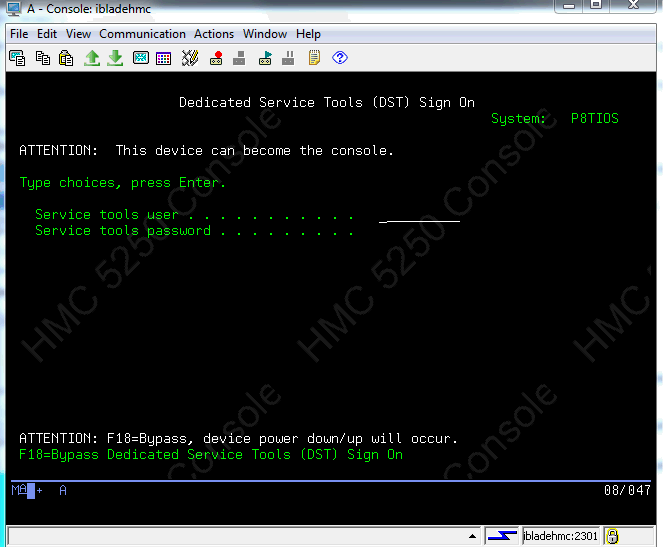
Screen 1 Dedicate Service Tools (DST) Sign on
The "ATTENTION: This device can become the console" message indicates that this is a DST takeover/recovery screen as opposed to a normal DST sign-on.
The user must sign on with a valid DST user profile and password that has the "takeover console" privilege.
Note: If the optional "F18" function is enabled, the user has the option to bypass the console recovery and resume at the IBM i OS login. This option ends any running console job.
Optional Console Information Status panel
Depending on the console configuration settings, IBM i release and PTF level, and last console connection, the console may either immediately resume the active/running session or present an additional console information status panel.
If the console information status panel is displayed, the user must press F10 to "take over" the console:

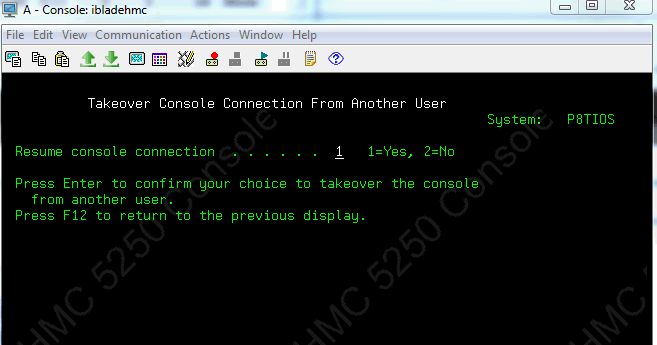
Console Takeover Screen 2
On the Takeover console connection from another user panel, reply 1=Yes and press Enter to resume the active console job/session:
Taking over an existing dedicated console
Taking control of an active console job from another device or user using HMC dedicated consoles is different than with LAN console. For HMC console, you must first disconnect the active user and then use the recovery option to recover the running job.
1. Use Option 3=Show Details to view the active console (status "Connected"):
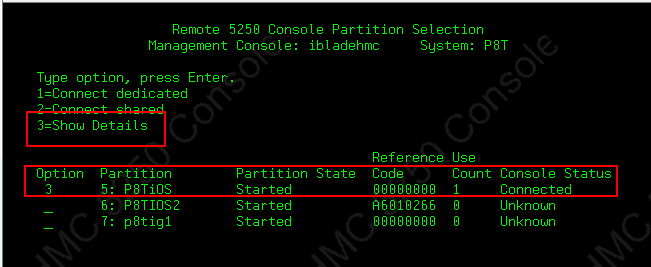
2. Disconnect active user
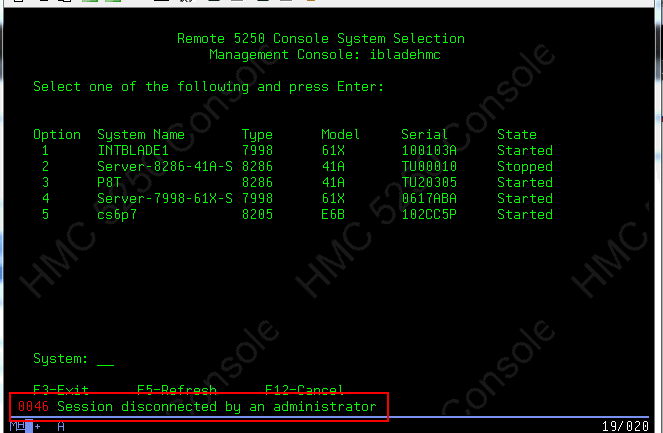
You can see the HMC user ID that has the current console and their IP address. Use Option 1 to disconnect them:

The remote user will receive a 0046 disconnect message informing them that they have been disconnected:
3. Connect dedicated
After the disconnect completes the user that did the disconnect is returned to the partition selection panel. Enter 1 (dedicated) or 2 (shared) under the Option column to connect:
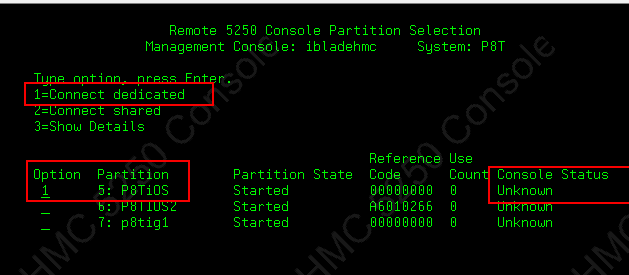
Enter your service tool user/password, and continue with the recovery login described above:

[{"Product":{"code":"SSB6AA","label":"Power System Hardware Management Console Physical Appliance"},"Business Unit":{"code":"BU054","label":"Systems w\/TPS"},"Component":"HMC","Platform":[{"code":"PF012","label":"IBM i"}],"Version":"Version Independent;7.1.0;6.1.1;6.1.0;5.4.5;5.4.0;5.3.5;5.3.0","Edition":"","Line of Business":{"code":"LOB08","label":"Cognitive Systems"}}]
Historical Number
367515335
Was this topic helpful?
Document Information
Modified date:
26 May 2025
UID
nas8N1015706