How To
Summary
The 7063-CR1 Hardware Management Console appliance, ships with the default BMC ADMIN user password of ADMIN. Starting with BMC 3.16, the ADMIN user password must be changed from its default. If the new password is forgotten, this document describes the procedure to use to set a new BMC ADMIN user password.
Objective
Learn how to change the BMC ADMIN user's password if lost or forgotten.
Environment
7063-CR1 HMC at BMC v3.16 or newer.
Steps
This procedure assumes the HMC is powered off.
- Power On the HMC by pressing the Power button
- Once the Petitboot menu is displayed, select the option Exit to Shell
- Enter the following command to change the BMC ADMIN user's password:
ipmitool user set password 2 - You are prompted for the new password, twice.
The new password must conform to the following rules:
- At least 8 characters in length
- At least one lowercase character
- At least one uppercase character
- At least one number
If a non-conforming BMC user password is entered, the following error is returned:
IPMI command failed: Invalid data field in request
Set User Password command failed (user 2)
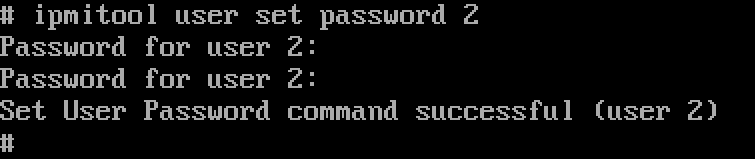
If a conforming BMC user password is provided, the operation succeeds and returns the following message:
Set User Password command successful (user 2)
Example 1: Non-conforming password entered:

Example 2: Conforming password entered:
Document Location
Worldwide
[{"Line of Business":{"code":"LOB57","label":"Power"},"Business Unit":{"code":"BU058","label":"IBM Infrastructure w\/TPS"},"Product":{"code":"7063-CR1","label":"Hardware Management Console (7063-CR1)"},"ARM Category":[{"code":"a8m0z000000GnS5AAK","label":"HMC"}],"ARM Case Number":"","Platform":[{"code":"PF025","label":"Platform Independent"}],"Version":"All Version(s)"}]
Was this topic helpful?
Document Information
Modified date:
29 March 2022
UID
ibm16346599