Fix Readme
Abstract
This document contains V3.2.5 release information for Financial Transaction Manager for Digital Payments (DP) for Multiplatforms.
Content
Financial Transaction Manager for Digital Payments (DP) V3.2.5 Release Information
Contents
Common Across Releases
3.2.5.0 Release
... 3.2.5.0 interim fix 1
... 3.2.5.0 interim fix 2
... 3.2.5.0 interim fix 3
... 3.2.5.0 interim fix 3.1
... 3.2.5.0 interim fix 3.2
... 3.2.5.0 interim fix 4
... 3.2.5.0 interim fix 4.1
... 3.2.5.0 interim fix 5
... 3.2.5.0 interim fix 6
When upgrading a fix pack or interim fix (iFix), in addition to the changes in the level that is being upgraded to, be sure to review the changes in the intermediate fix packs or iFixes.
Examples:
- Currently at level fix pack 1 and upgrading to level fix pack 3, review the changes in fix pack 2 and fix pack 3.
- Currently at fix pack 1 / iFix 1 and upgrading to fix pack 1 / iFix 3, review the changes in fix pack 1 / iFix 2 and fix pack 1 / iFix 3.
| Back to top |
Common Across Releases
|
Known Issues
WebSphere Application Server 9.0.x update issue
Automated Deployment Utility workaround:
The interim fix components to update need to be first uninstalled. The tokens file, for example pfs_deploy.xml, contains those interim ifix components to update. These will appear in the <install> </install> section. You will also need to add these same components in the <uninstall> </uninstall> section.
Before updating the Console WAR modules stop the FrameworkUI_EAR application, then proceed as normal. The Engine modules can be updated as normal.
The minimum EWS version required for FTM V3.2.5 is EWS V4.1.
The following is a list of supported EWS notifications and supported EWS SOAP requests.
Notification Version:
OnTokenStatusChangeNotification 4.0
OnPaymentProfileStatusChangeNotification 2.0
OnNewPaymentNotification 4.0
OnPaymentStatusChangeNotification 4.0
OnNewPaymentRequestNotification 4.0
OnPaymentRequestChangeNotification 2.4
OnCustomerChangeNotification 2.4
OnOrganizationsChangeNotification 4.0
Request Version:
AddPaymentRequest 4.1
ChangePaymentRequestRequest 4.0
ChangePaymentStatusRequest 4.0
DeletePaymentProfileRequest 4.1
GetCustomerEventDetailsRequest 4.0
GetOrganizationsRequest 4.0
GetPaymentRequest 4.0
GetPaymentRequestDetailsRequest 4.0
GetPendingActivityForTokenRequest 3.2
GetTokenHistoryRequest 4.1
GetTokenStatusRequest 4.1
MatchRecipientRequest 4.1
RegisterTokenRequest 4.0
RequestPaymentsRequest 4.0
RemoveTokenRestrictRequest 3.10
RestrictTokenRequest 3.10
UnregisterTokenRequest 4.1
UpdateBusinessPaymentProfileRequest 4.0
UpdatePersonalPaymentProfileRequest 4.0
Feature changes
Fix list and new feature summary
For a list of fixes, see V3.2.5 Fix List for Financial Transaction Manager for Digital Payments (DP).
Data Setup Utility
The following documentation describes the changes for the data setup utility (DSU) and the import and export workbooks:
DSUmigration_v3.2.5.pdf
DSUMigrationBR_v3.2.5.pdf
Refer to Entitled Documentation for the document.
Database migration
For database migration instructions, refer to the migration instructions in {Install location}\shared\vnnn\pfs\Database\db2\{os}\doc
Transaction Server Scheduler XML
The following documentation describes the changes to the scheduler XML for the Transaction Server component:
TransactionServerSchedulerChanges_v3.2.5.pdf
Refer to Entitled Documentation for the document.
Entitled Documentation
Entitled documentation can be downloaded from Fix Central at:
3.2.5-FTM-DP-MP-Documents for Digital Payments(DP).
General Instructions
Installation
- Start IBM Installation Manager.
- Add the location of the repository that contains the installation package:
- Select File > Preferences.
- Click Add Repository.
- Browse to the directory that contains the repository .zip file and select the file. Click Open and then OK.
- Click Test Connections and then OK.
- Click OK.
- Install the FTM product installation files to your installation directory:
- On the main pane, click Update.
- Select IBM Financial Transaction Manager for Digital Payments, IBM Financial Transaction Manager for Check Services, or IBM Financial Transaction Manager for Corporate Payment Services and then click Next.
- Select the fix pack or interim fix and then click Next.
- Follow the rest of the prompts.
- Confirm that the "Update packages" page shows success.
Deployment
- Do the database migration. Refer to the Database migration section in this document.
- Note: The runtime components can’t be running during the database migration.
- Note: Files can continue to be delivered to the Gateway inbound source folder.
- J2SE components: The installation overlays the J2SE applications, so no special migration instructions are needed. Restarting those applications updates them with the fixes.
- WebSphere Application Server (WAS) components: You can use the Automated Deployment Utility (ADU), manually upgrade (refer to the update instructions in each WAS component doc folder), or, in a WAS Network Deployment configuration, use the Deployment Manager.
Note: Refer to "WebSphere Application Server 9.0.x update issue" in "Common Across Releases" > "Known Issues".- All WebSphere servers must be restarted after all the components were updated.
- For an interim fix, refer to the fix list for the modules to deploy. Note: Interim fixes are meant to be deployed on an existing WAS profile deployment. If you are using a new WAS profile and already installed the interim fix onto the prior installation, you must do two deployment passes. The first pass is to do the initial, full product deployment. The second pass is to do those components that are affected by the interim fix.
- Update your Transaction Server Scheduler.xml. Refer to the Transaction Server Scheduler XML section in this document. Note: Updating the scheduler file might not be required for your installation.
- Refer to the release-specific section for any changes that might affect your installation.
- Start your runtime components.
- If you are using the Data Setup Utility (DSU) worksheets capability for managing your data, update your worksheets. For more information, see the Data Setup Utility section in this document.
| Back to top |
3.2.5.0 interim fix 5
|
None
131156
Create Services Framework task for re-syncing of Zelle Payments.
⦁ Manual initiation without a business date. (Uses current date)
⦁ Scheduler Initiation to attempt to resync payments on current date.
com.ibm.paydir.iyb.services.util.tasks.ZelleResyncPaymentsTask
⦁ RTP UI EJB Location – This value is a combination of the hostname and bootstrap port for the server hosting the application. When the application lives in a cluster, separate each server and port number using a comma. Example: machineA:58814,machineB:58815.
⦁ Business Day Date – The date that the Zelle Resync Payments Task should use when querying the Payment Table for Out of Sync Payments. If not populated, the current date will be used. The format for this date is YYMMDD.
None
| Back to top |
3.2.5.0 interim fix 4
|
None
126430
The Zelle notification user exit is not invoked when participants add, update, or delete recipients.
The unique Zelle notification user exit methods are invoked now when participants add, update, or delete recipients.
These user exit methods can be customised to notify their participants that these events have occurred.
None
| Back to top |
3.2.5.0 interim fix 3.2
|
None
None
None
| Back to top |
3.2.5.0 interim fix 3
|
None
121399
Inbound Transaction screen needs to add received time to its default filter
- 'Business Date' equal to current business day
- 'Transmission Received' in the 'past five minutes'
124819
File names for NACHA files are incorrect -- Date, Time / Filename has changed
Use the following file to add the property:
3.2.5.0_ifix3_124819.ddl
Which can be downloaded from Fix Central at 3.2.5-FTM-DP-MP-Documents.
None
| Back to top |
3.2.5.0 interim fix 1
|
None
119574
When EWS notifications are received, the Message Driven Bean (MDB) has been enhanced to log only the message text of the received JMS message when the "finer" level WAS trace is enabled.
This new message will not include the JMS Header information, allowing the full text body of the message to be logged to the WebSphere trace.log for debugging and monitoring purposes.
If the "finest" or "all" trace levels are used, then the existing log message, which includes JMS Header information, and the new message will be logged to the WebSphere trace.log.
Refer to Entitled Documentation to use the WebSphere trace string for production debugging and monitoring use:
3.2.5-FTM-DP-MP-Documents for Digital Payments(DP).
None.
| Back to top |
3.2.5.0 Release
|
Because the development of releases and interim fixes (iFixes) for maintenance are done in parallel, a later release might not contain every interim fix that was created for an earlier release. The following table shows you which releases and interim fix levels can be successfully upgraded to V3.2.5.
In the following table, the "If you're on version" column shows you the releases that can be upgraded successfully. The highest release or interim fix level that can be upgraded for each release is shown in the "To successfully upgrade to V3.2.5, you must be no higher than version" column. If the release that you are upgrading from is at an interim fix level that is higher than the release or fix level that is shown in the right column, you can't upgrade the release without losing some changes. The upgrade needs to occur at the next release.
For more information about the individual changes in a release or interim fix, see the fix list for this version.
| If you’re on version | To successfully upgrade to V3.2.5, you must be no higher than version |
| 3.2.0.0 | 3.2.0.0 iFix 1 |
| 3.2.0.1 | 3.2.0.1 iFix 2 |
| 3.2.1.0 | 3.2.1.0 iFix 4 |
| 3.2.2.0 | 3.2.2.0 iFix 5 |
| 3.2.2.1 | 3.2.2.1 iFix 3 |
| 3.2.3.0 | 3.2.3.0 iFix 3 |
| 3.2.4.0 | 3.2.4.0 iFix 2 |
Known Issues
None.
Feature changes
EWS Optional Mandate - Support for EWS enhanced fields on OnNewPaymentRequestNotification 4.0
The EWS summary of this optional mandate is:
The Network Operator is making an enhancement to the On New Payment Request Notification to provide additional information to Participants about the intended Respondent.
FTM has been updated to process the OnNewPaymentRequestNotification4.0 (from OnNewPaymentRequestNotification 3.0) notification. In the previous notification, the responder was indicated by one of the following:
• Responder - A CustomerType object that contained the EWS participant id and the EWS org that the participant belongs to.
• Token - The token of the responder
• Responder Profile - The customer's payment profile id and the EWS org that the profile belongs to.
In the OnNewPaymentRequestNotification4.0 notification, the responder is indicated by one of the following responder nodes:
• Responder - A CustomerType object that contained the EWS participant id and the EWS org that the participant belongs to.
• ResponderToken - The token of the responder AND a CustomerType object that contains the EWS participant id and the EWS org that the participant belongs to.
• Responder Profile - The customer's payment profile id and the EWS org that the profile belongs to the EWS participant id AND a CustomerType object that contains the EWS participant id and the EWS org that the participant belongs to.
Now that each responder node also includes a CustomerType object, (according to EWS) this will allow the user to choose a different token and or payment profile if they want to respond to the request differently. Potentially using a Small Business or Personal token as needed.
FTM will now store the various information that is provided in the responder information nodes. This information (token, payment profile, and/or customer id) will be available on the CXCPaymentRequest data object.
The FTM customer can choose to use these fields as needed. The Sample Notification user exit has been updated to provide an example to send a notification to the end user that a payment request was received, and that notification will include any/all of the responder details that were provided on the OnNewPaymentRequestNotification4.0 notification.
EWS Optional Mandate - Support for EWS RegisterToken 4.0 API to support Small Business tokens
The EWS summary of this optional mandate is:
The Network Operator is making enhancements to the Register Token API for the Small Business Payments Service.
This was done to eliminate the two-step process to register a Small Business Token/Payment profile (register as a personal token, then update to a small business token).
FTM has been updated to use the RegisterTokenRequest4.0 API (from RegisterTokenRequest3.10). When any token (personal or small business) is registered, FTM will supply the pertinent personal/small business information on the RegisterTokenRequest4.0 request. There will no longer be a follow along UpdateBusinessPaymentProfileRequest when registering a small business token.
Also, following the EWS guidance that the MatchRecipient API should only be used during payment processing workflows, the create/register token workflow has been changed to use the GetTokenStatusRequest4.1 API.
The updated token registration workflow for both personal and small business tokens is shown below.

EWS Optional Mandate: Support Unrestricted Token notifications with OnTokenStatusChange 4.0
The EWS summary of this optional mandate is:
The Network Operator will notify the Participant when a Token is unrestricted if that Participant previously owned the Token when it was originally restricted.
FTM has been updated to process the OnTokenStatusChange4.0 (from OnTokenStatusChange3.10) notification. With the new notification, EWS will now notify the participant that a token restriction has been removed. The notification will indicate that the token is now inactive. There were no changes to handle the new “inactive” notification since FTM already handles this.
The EWS emulator was updated so that when a restriction is removed, then a OnTokenStatusChange4.0 notification is delivered to FTM. This should simulate the same behavior as EWS.
Token change reasons
Previously, the possible token change reasons were:
“U” – user-action
“C” – carrier-disconnect
These reasons did not correctly reflect when the token was restricted and if/when the restriction was subsequently removed. The token change reason values supported have been updated to:
“U” – user-action
“C” – carrier-disconnect
“R” – restricted
“X” – restriction-removed
Required restrict/remove restriction reason
When restricting/unrestricting participants and tokens from the Participant Directory, there is a reason field that can be filled in by the user. Previously, when this field was left blank, FTM would provide a default value. This field has now been changed to be required in the UI. Also, on the restrict dialog, included in the field level help are the EWS “preferred” restriction reasons that can be used by the user.
Required restriction reason with help

Required unrestrict reason

EWS Mandate - 4.0 Input validations
The EWS summary of this mandate is:
The Network Operator is enforcing the requirement that Participants include complete and accurate information for all API service calls.
EWS has specified new required validations within their xsd documentation for 4.0/4.1 (sd-schema4_0.xsd) for many of the fields in their API requests. If the data supplied in these fields does not match the supplied criteria, then the API request will fail.
EWS API Request Upgrades
The following API requests have been upgraded to ensure the correct validations are used:
• AddPaymentRequest3.10 => AddPaymentRequest4.1
• ChangePaymentStatusRequest3.9 => ChangePaymentStatusRequest4.0
• ChangePaymentRequestRequest2.4 => ChangePaymentRequestRequest4.0
• DeletePaymentProfileRequest => DeletePaymentProfileRequest4.1
• GetTokenHistoryRequest3.10 => GetTokenHistoryRequest4.1
• GetCustomerEventDetailsRequest3.0 => GetCustomerEventDetailsRequest4.0
• GetOrganizationsRequest3.9 => GetOrganizationsRequest4.0
• GetPaymentRequest3.9 => GetPaymentRequest4.0
• GetPaymentRequestDetailsRequest3.0 => GetPaymentRequestDetailsRequest4.0
• MatchRecipientRequest3.10 => MatchRecipientRequest4.1
• RegisterTokenRequest3.10 => RegisterTokenRequest4.0
• RequestPaymentsRequest3.10 => RequestPaymentsRequest4.0
• UnregisterTokenRequest3.10 => UnregisterTokenRequest4.1
• UpdateBusinessPaymentProfileRequest3.8 => UpdateBusinessPaymentProfileRequest4.0
• UpdatePersonalPaymentProfileRequest3.0 => UpdatePersonalPaymentProfileRequest4.0
EWS Notification Upgrades
For consistency, the following EWS notifications have been upgraded:
• OnNewPaymentNotification3.9 => OnNewPaymentNotification4.0
• OnNewPaymentRequestNotification3.0 => OnNewPaymentRequestNotification4.0
• OnOrganizationsChangeNotification3.9 => OnOrganizationsChangeNotification4.0
• OnPaymentStatusChangeNotification3.9 => OnPaymentStatusChangeNotification4.0
• OnTokenStatusChangeNotification3.10 => OnTokenStatusChangeNotification4.0
Field validation changes
Each of the following field types are listed with the defined EWS validation. FTM will validate these fields and will return the defined error message if/when the supplied field is deemed to be invalid. This will ensure that the invalid field will not be sent to EWS. There are many fields defined as “Allow space and any type of printable characters except emoji.”.
EWS defines these fields to use a regular expression pattern similar to: [\p{L}\p{P}\p{N}\p{Z}\p{S}]. It was found that this regular expression would in fact allow emoji characters. For these fields, FTM will instead use this regular expression: [\p{L}\p{P}\p{N}\p{Z}\p{Sm}\p{Sc}\p{Sk}]. This pattern will disallow emoji characters. FTM will use the EWS defined regular expression for all other fields.
FTM may enforce more restrictive field validations based on prior behavior (such as database column size restrictions).
Name fields (first, last, business)
EWS Documentation: Allow space and any type of printable characters except emoji. Disallow carriage return, line feed, tab characters.
EWS Maximum length: 50 characters
EWS Allowable Regex pattern: [\p{L}\p{P}\p{N}\p{Z}\p{S}]+
FTM Regex pattern: [\p{L}\p{P}\p{N}\p{Z}\p{Sm}\p{Sc}\p{Sk}]+
Error Message: "100509: '{0}' is not a valid EWS Name field."
Address Lines
EWS Documentation: Allow space and any type of printable characters except emoji. Disallow carriage return, line feed, tab characters.
EWS Maximum length: 50 characters
EWS Allowable Regex pattern: [\p{L}\p{P}\p{N}\p{Z}\p{S}]+
FTM Regex pattern: [\p{L}\p{P}\p{N}\p{Z}\p{Sm}\p{Sc}\p{Sk}]+
Error Message: "100500: '{0}' is not a valid EWS Address Line field."
Address City
EWS Documentation: Allow space and any type of printable characters except emoji. Disallow carriage return, line feed, tab characters.
EWS Maximum length: 25 characters
EWS Allowable Regex pattern: [\p{L}\p{P}\p{N}\p{Z}\p{S}]+
FTM Regex pattern: [\p{L}\p{P}\p{N}\p{Z}\p{Sm}\p{Sc}\p{Sk}]+
Error Message: "100501: '{0}' is not a valid EWS City field."
Address State
EWS Documentation: Required for USA and Canada. Allowed alphanumeric, astrix(*), space.
EWS Minimum length: 2 characters
EWS Maximum length: 3 characters
EWS Allowable Regex pattern: [a-zA-Z0-9\* ]+
Error Message: "100502: '{0}' is not a valid EWS Address State field."
Address Zip
EWS Documentation: Required for USA and Canada. Allowed alphanumeric, hyphen(-), space.
EWS Minimum length:1 characters
EWS Maximum length: 10 characters
EWS Allowable Regex pattern: [a-zA-Z0-9\- ]+
Error Message: "100503: '{0}' is not a valid EWS Address Zip field."
Address Country Code
EWS Documentation: ISO-3166-1 alpha-3 code, uppercased
EWS Maximum length: 3 characters
EWS Allowable Regex pattern: [A-Z]+
Error Message: "100504: '{0}' is not a valid EWS Country Code field."
Token fields
EWS documentation: Allow space and any type of printable characters except emoji. Disallow carriage return, line feed, tab characters.
EWS Maximum length: 255 characters
EWS Allowable Regex pattern: [\p{L}\p{P}\p{N}\p{Z}\p{S}]*
FTM Regex pattern: [\p{L}\p{P}\p{N}\p{Z}\p{Sm}\p{Sc}\p{Sk}]*
Error Message: "100505: '{0}' is not a valid EWS Token field."
Email fields
EWS documentation: Allow space and any type of printable characters except emoji. Disallow carriage return, line feed, tab characters.
EWS Minimum length: 5 characters
EWS Maximum length: 255 characters
Allowable Regex pattern: [\p{L}\p{P}\p{N}\p{S}]+
FTM Regex pattern: [\p{L}\p{P}\p{N}\p{Sm}\p{Sc}\p{Sk}]*
Error Message: "100506: '{0}' is not a valid EWS Email field."
Phone number fields
EWS documentation: Allowed alphanumeric, as well as characters like plus sign “+”, periods “.”, hyphen “-“, commas “,” , parens “()” , forward slash “/”, space “ “ .
EWS Minimum length: 10 characters
EWS Maximum length: 30 characters
Allowable Regex pattern: [a-zA-Z0-9\+\.\-,\(\) /]+
Error Message: "100507: '{0}' is not a valid EWS Phone number field."
Customer ID (EWS participant) fields
EWS documentation: Allow space and any type of printable characters except emoji. Disallow carriage return, line feed, tab characters.
EWS Maximum length: 64 characters
EWS Allowable Regex pattern: [\p{L}\p{P}\p{N}\p{Z}\p{S}]*
FTM Regex pattern: [\p{L}\p{P}\p{N}\p{Z}\p{Sm}\p{Sc}\p{Sk}]*
Error Message: "100508: '{0}' is not a valid EWS customer id field."
Organization Id fields
EWS documentation: Must be exactly three alphanumeric characters.
EWS Length: 3 characters
EWS Allowable Regex pattern: [a-zA-Z0-9]+
Error Message: "100511: '{0}' is not a valid EWS organization id field."
Payment Profile Id fields
EWS Documentation: Allow space and any type of printable characters except emoji. Disallow carriage return, line feed, tab characters.
EWS Maximum length: 128 characters
EWS Allowable Regex pattern: [\p{L}\p{P}\p{N}\p{Z}\p{S}]*
FTM Regex pattern: [\p{L}\p{P}\p{N}\p{Sm}\p{Sc}\p{Sk}]*
Error Message: "100510: '{0}' is not a valid EWS payment profile id field."
EWS Mandate - SenderType support for 4.0 APIs
The EWS summary of this mandate is:
A new transaction attribute, Sender Type, is being added to the Shared Directory and will be required for the Add Payment API.
Additional new attributes, set by Shared Directory, are also being added.
AddPaymentRequest4.1
FTM has been updated to use AddPaymentRequest4.1(from AddPaymentRequest3.10). The AddPaymentRequest4.1 contains a required SenderType field. For FTM, the available values for this field will be either person or small-business.
The SenderType value will be determine by the token type of the token that originated the payment.
OnNewPaymentRequest4.0
FTM has been updated to process OnNewPaymentNotification4.0(from OnNewPaymentNotification3.9). This new notification will contain the sender type field. FTM will process and store this new field.
Transaction Category updates for incoming Zelle payments
When processing OnNewPaymentNotifications prior to 4.0, any incoming Zelle payment would be assigned a transaction category of U2C (Unknown to Consumer) or U2B (Unknown to Business) since there was no sender information provided by the OnNewPaymentNotification.
With the sender type field now available on the OnNewPaymentNotification4.0 notification, the transaction category of incoming payments may change.
When the sender type value is supplied on the OnNewPaymentNotification4.0 notification, the transaction category for the incoming payment will be either:
- B2B (Business to Business)
- B2C (Business to Consumer)
- C2C (Consumer to Consumer)
- C2B (Consumer to Business)
The values will be based on the sender type provided and the configured recipient token (Personal or Small Business).
In some cases, the sender type may not be included on the OnNewPaymentNotification4.0 notification. This could be caused by a different institution using a previous AddPayment request API that did not include sender type.
When the sender type is not available on the OnNewPaymentNotification4.0 notification, then transaction category for the incoming payment will be set as before:
- U2B (Unknown to Business)
- U2C (Unknown to Consumer)
Create participant webservice
Participants can now be added to Participant Directory through a new webservice call. Only some basic information will be supported with this webservice, and it will be deprecated in 4.0 for significantly more robust create participant functionality.
Webservice
The Create Participant webservice will be exposed under the ParticipantDetail services.

Fields
Only the participant id and participant name are required to create a participant. The created participant will be activated immediately and passed through business rules.


Web Services - Response to Request for Payment
The Response to Request for Payment will allow responding the original request for payment(pain.013) messages. As a result, the Immediate Payment will generate the pain.014 messages with response information such as Accept or Reject to the network.
If the response is Reject, the reject reason code is required in the API as a parameter.
Upon response to Request for payment is successfully processed, the new initiate credit transfer (pain.001)which was requested by pain.013 message can be created using the existing Create Initiate Credit Transfer web service. The input for the pain.001 should have a reference of the requesting pain.013. Such reference information can be retrieved using the Read Inbound Transactions web service (paymentInformationId).
All web services API will now use the configurable application name based on the ISO 20022 Message Standard. The ISO 20022 Message standard's FSM Application name needs to have the FTM IP TCH Application if IP is installed.
98935
Recipient UI for Recipients created by Generic Recipients Web Service
Two new participant directory screens have been added for viewing configured recipient information. These screens will only be view only.
Permissions
Two new permissions have been added to control access to these screens.


Recipient Screen
A new screen is located under the Originator > Recipients. This screen will only be visible with the Originator > Recipients view permission.

On this screen, records may only be viewed. The Accounts and Zelle checkmarks allow for quick navigation to the associated screens.
Recipients Form
To display more detailed information about the recipient, the detail form can be opened by clicking the eye icon.


Recipient Account Screen
The recipient account screen allows viewing of all recipient accounts for a given participant. Clicking the details icon will open up the Recipient Form screen shown above.
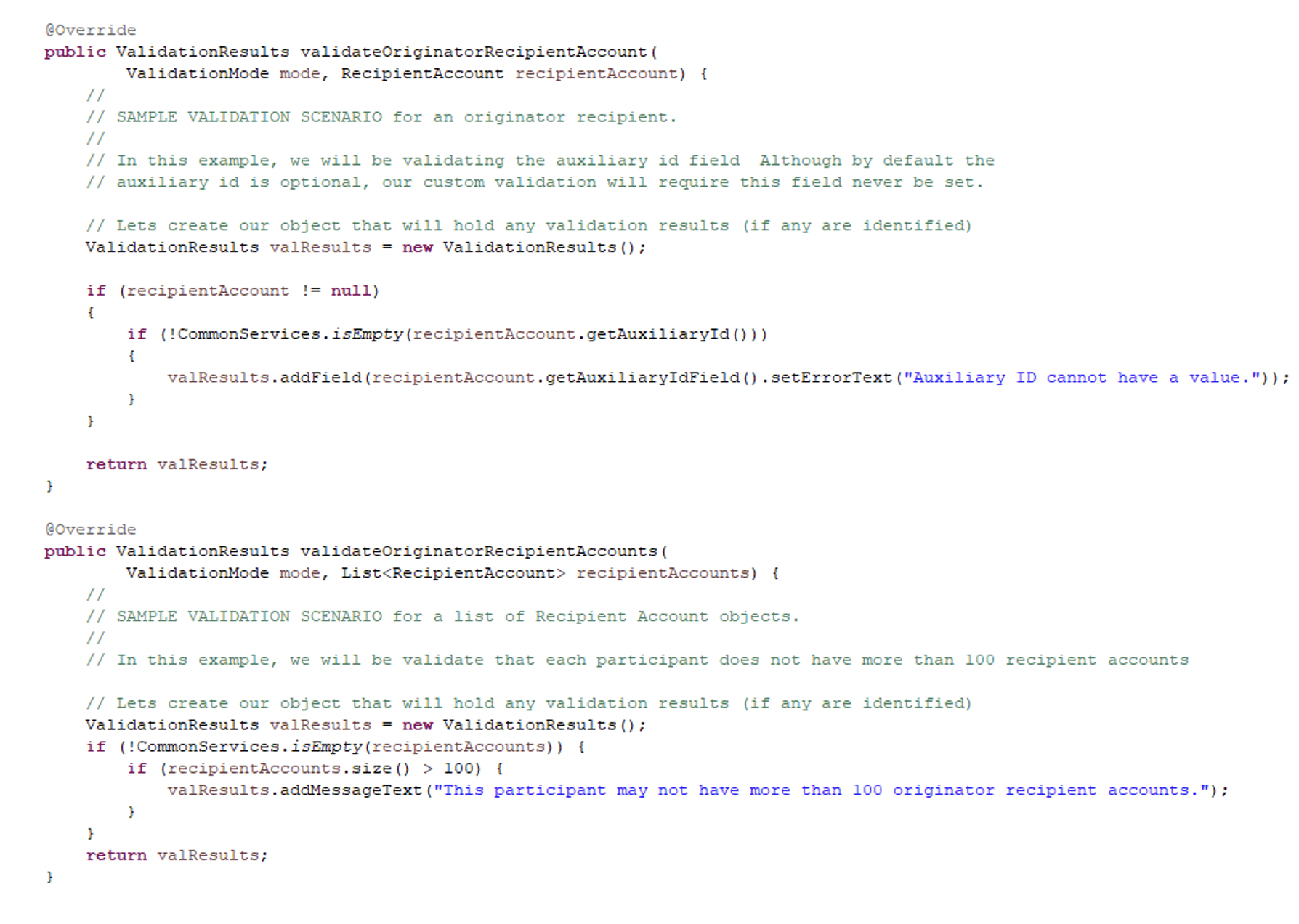
Custom Participant Validation
Four new validation methods have been added for custom validation on the new screens.

Recipient Webservice Updates
Two new fields have been added to the Recipient webservice. Recipient Type allows a recipient to be type business or person. Business Name is a new field that can be used to store names of businesses, without having to misuse the first and last name fields.
Validation has been updated to only require first or last name if the recipient type is person. If the recipient type is business, business name is required.
The READ webservice can now have additional input specified to further narrow down the returned list.
Recipient Account Webservice Updates
The READ webservice input has changed from recipientID to partnerID. This allows reading of a group of recipient accounts instead of a single recipient account at a time. Additional input can now be specified to further narrow down the returned list.
Web Services - Response to a Request for Return of Funds
The Response to Request for Return of Funds will allow responding the original request for Return of funds (camt.056) messages. As a result, the Immediate Payment will generate the camt.029 messages with response information such as Accept or Reject to the network. If the response is Reject, the reject reason code is required in the API as a parameter.
Upon response to Request for Return of Funds are successfully processed, the original payment (pacs.008) which was requested by camt.059 message can be returned using the Create Return Payment API. The input parameter accepts either ftm transaction id (pacs.008) or Request ftm transaction id (camt.056). If the request ftm transaction id is provided as an input parameter, the API will retrieve the corresponding pacs.008 message automatically and processes the return. The API also supports an option to override the debtor's account number, bank code, as well as the participant addresses.
All web services API will now use the configurable application name based on the ISO 20022 Message Standard. The ISO 20022 Message standard's FSM Application name needs to have the FTM IP TCH Application if IP is installed.
Web Services - Add Synchronous logic to APIs
The Create Initiate Credit Transfer and Create Request for Payment web service APIs can support the synchronous mode. For synchronous mode, the client can specify the timeout value as one of input parameters. If the synchronous mode but timeout value is not specified in the input, then API will utilize the default timeout property value and wait for IP response until such timeout value.
All web services API will now use the configurable application name based on the ISO 20022 Message Standard. The ISO 20022 Message standard's FSM Application name needs to have the FTM IP TCH Application if IP is installed.
Following new property is to be added in the gateway to support the approval reject cases for the existing asynchronous process.
#
# Web service API approval reject error code.
#
webServiceAPIApprovalRejectErrorCode=TCH0001RJC
Migration
DSUmigration_v3.2.5.pdf
DSUMigrationBR_v3.2.5.pdf
Which can be downloaded from Fix Central at:
3.2.5-FTM-DP-MP-Documents for Digital Payments(DP).
Was this topic helpful?
Document Information
Modified date:
22 February 2022
UID
ibm16337627