Troubleshooting
Problem
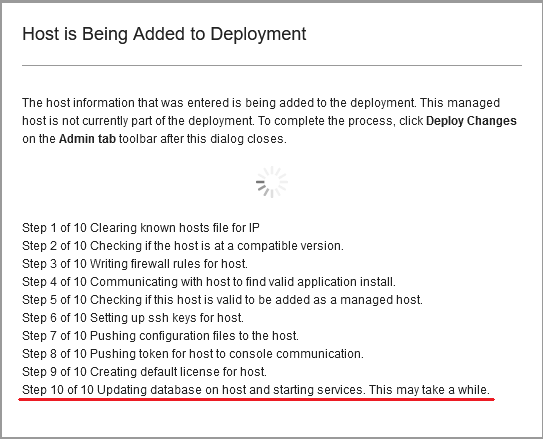
The managed host cannot be added to the deployment after the add host process fails in step 10 with the error:
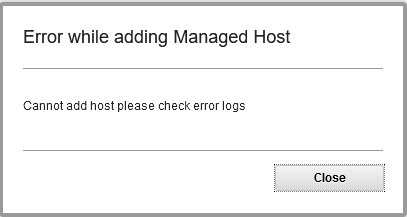
On the Console, the following error appears in /var/log/qradar.log:
[hostcontext.hostcontext] com.q1labs.configservices.capabilities.AddHost: [ERROR] [-/- -]Failed to add host. Output: 'Done Presence Script', data:'Modifying nva.conf [hostcontext.hostcontext] com.q1labs.configservices.capabilities.AddHost: [ERROR][-/- -]Failed to read output from ssh connection on host <managedhost_ip> [hostcontext.hostcontext] com.q1labs.configservices.common.ConfigServicesException: Failed to read output from ssh connection on host <managedhost_ip> [hostcontext.hostcontext] com.q1labs.configservices.common.ConfigServicesException: Failed to add host. Installation problem on the host. Document Location
Worldwide
[{"Line of Business":{"code":"LOB77","label":"Automation Platform"},"Business Unit":{"code":"BU048","label":"IBM Software"},"Product":{"code":"SSBQAC","label":"IBM Security QRadar SIEM"},"ARM Category":[{"code":"a8m0z000000cwtNAAQ","label":"Deployment"}],"ARM Case Number":"TS003975932","Platform":[{"code":"PF016","label":"Linux"}],"Version":"All Version(s)"}]
Log InLog in to view more of this document
This document has the abstract of a technical article that is available to authorized users once you have logged on. Please use Log in button above to access the full document. After log in, if you do not have the right authorization for this document, there will be instructions on what to do next.
Was this topic helpful?
Document Information
Modified date:
29 September 2020
UID
ibm16326949